Forum Discussion

DianneB
Oct 13, 2023Brass Contributor
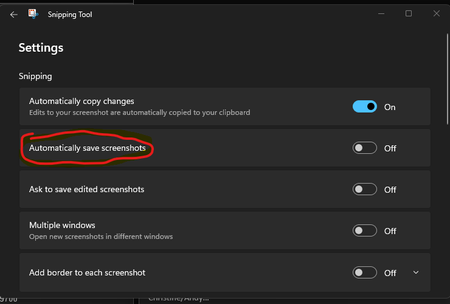
Snipping Tool: Policy to Disable "Automatically save screenshots"
Hello OneDrive Community! We have a use case for the need to push a setting to disable the Windows 11 Snipping Tool to "Automatically save screenshots" to OneDrive. Is there a group policy or a reg...

Anonymous
Oct 23, 2023To disable the Snipping Tool in the Group Policy Editor or the Registry Editor. Here are the steps to disable the Snipping Tool using the Group Policy Editor:
1.Press Windows key + R to open the Run dialog box.
2.Type 'gpedit.msc' and press Enter to open the Local Group Policy Editor.
3.Navigate to User Configuration > Administrative Templates > Windows Components > Tablet PC > Accessories.
4.Select the Enabled option to disable the Snipping Tool.
If I have answered your question, please mark your post as Solved If you like my response, please give it a Like Appreciate your Kudos! Proud to contribute! 🙂 |


DianneB
Oct 25, 2023Brass Contributor
Thank you for these detailed steps, but our goal is not to disable the snipping tool entirely, but rather to disable only the option to automatically save the snip.
- Sorin_CleminteApr 03, 2024Copper Contributor
- DianneBMay 23, 2024Brass ContributorNo not yet
- DianneBApr 26, 2024Brass Contributor
Sorin_Cleminte Thanks for asking, no, we do not have a GP or a reghit yet to disable this.