Forum Discussion

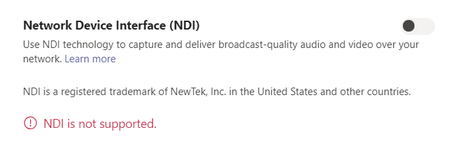
NDI is not supported - error message
 Nov 17, 2020
Thomsch I got mine to work by disabling GPU acceleration in the General settings and then restarting Teams. On my system with an Intel GPU, NDI would be selectable after a reboot but would then turn off with the "NDI is not supported" error as soon as I started a meeting. Interestingly enough, after I disabled GPU and enabled NDI, I was then able to turn GPU acceleration back on and NDI continued to work (at least for now.)
Hopefully this works for other people - we'll see how it goes over the next few events.

ThomschI have put in a service request about this. I'm having exactly the same issue. In terms of what it might be, my best guess is that it isn't supported outside the US, as I saw a comment on https://www.youtube.com/watch?v=Px1eEpd7ovw&ab_channel=NewTek saying:
"https://www.youtube.com/channel/UC9SMJZXNauBjb_RNawU0jFwhttps://www.youtube.com/watch?v=Px1eEpd7ovw&lc=UgwRgu1jWbWnF4mvt9d4AaABAg
