Forum Discussion

Khushi Shaikh
Oct 20, 2020Brass Contributor
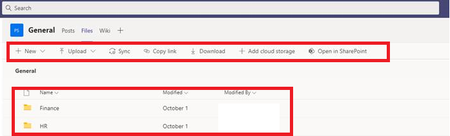
Missing Files Toolbar in Client application
Hello Teams Gurus - A user who is owner of the team is experiencing an issue in the Teams client version. She has no issues in the online version. When she clicks on a channel, and then clicks on th...

Ethan Stern
Oct 21, 2020Iron Contributor
Khushi Shaikh you can delete all of them - they will be recreated once you restart Teams.
If you want to target the folders you can delete the following, but I find it easier just to delete everything.
"%appdata%" and press Enter. Then, Navigate to Microsoft > Teams. Once in the directory, you will need to delete all the files and folders within the following folders:
Application Cache
Blob_storage
Cache
Databases
GPUCache
IndexedDB
Local Storage
tmp

Khushi Shaikh
Nov 10, 2020Brass Contributor
Hello Ethan Stern - It is recurring issue. any idea why is it happening? Clearing Cache does resolve issue but user is not satisfied with this behavior.
Best Regards,