Forum Discussion

Khushi Shaikh
Oct 20, 2020Brass Contributor
Missing Files Toolbar in Client application
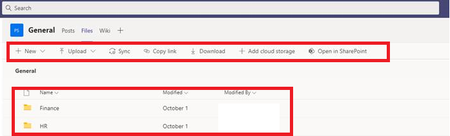
Hello Teams Gurus - A user who is owner of the team is experiencing an issue in the Teams client version. She has no issues in the online version. When she clicks on a channel, and then clicks on th...

Ethan Stern
Oct 21, 2020Iron Contributor
Khushi Shaikh you can delete all of them - they will be recreated once you restart Teams.
If you want to target the folders you can delete the following, but I find it easier just to delete everything.
"%appdata%" and press Enter. Then, Navigate to Microsoft > Teams. Once in the directory, you will need to delete all the files and folders within the following folders:
Application Cache
Blob_storage
Cache
Databases
GPUCache
IndexedDB
Local Storage
tmp

Khushi Shaikh
Oct 23, 2020Brass Contributor
Ethan Stern We tried to remove the cache. User is experiencing files and folder missing randomly. So, it appeared and next day disappeared and then reappeared.
Any specific reason?
- Khushi ShaikhOct 29, 2020Brass ContributorHow to delete this post? This is no longer an issue. It was user's error. The user was not selecting proper channel. I apologize for the post.
Thanks & Regards,