Forum Discussion

Add SharePoint site as a App to the Teams
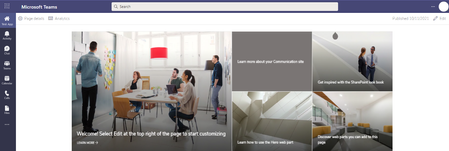

mahendra89 you can create a custom app to do this. Then then Teams admin can a add the app to the left hand nav bar for all users. here is a quick overview of the steps.
Go to the Developer Portal https://dev.teams.microsoft.com/home
+ New App
- Add details
Add Personal App
- In Content URL paste in the Form URL
Publish App too Your org
In Team Admin center - Managae Apps
- make sure app is approved and allowed
In Team Admin – Set up policies
- Add app to Nav bar for all users
This can take several hours to publish app to the nav bar in Teams.
Go to the Developer Portal https://dev.teams.microsoft.com/home
+ New App
- Add details
Add Personal App
- In Content URL paste in the SharePoint site URL
Publish App to Your org
In Team Admin center - Manage Apps
- make sure app is approved and allowed
In Team Admin – Set up policies
- Add app to Nav bar for all users
This can take several hours to publish app to the nav bar in Teams.

 NiezinkJFJul 15, 2022Copper Contributor
Adding the "/?app=portals" to all your navigational elements will fix the issue of not seeing the top bar in the custom Teams SharePoint application.
So the custom app includes the /?app=portals link and every element does not navigate to your SPO site: "https://contoso.sharepoint.com/sites/TestTeam", but to "https://consoto.sharepoint.com/sites/TestTeam/?app=portals".
This will make the top navigational bar visible in your custom teams application of your SPO site.
Hope this helps.
- pharphelJun 25, 2024Copper Contributor
Hello. Has anyone had an issue where links for a PDF do not open when clicked on the intranet site appearing from within MS Teams?