Forum Discussion

Platform SSO for macOS not working
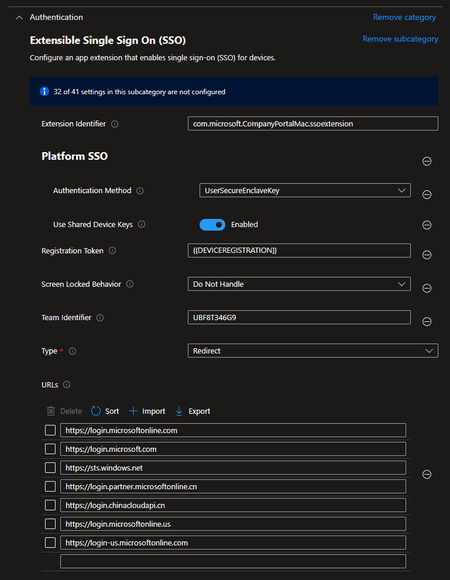

I had this on a fresh setup.
Fix was found after removing the US and CN based URLS from the PSSO configuration profile. After that, the profile successfully deployed without the error 10001.
I shared this on reddit too and another use had the same issue and same resolve with removing those URLs.

Okay i've removed four URLs and afterwards all the config was successful, BUT:
Entra PSSO isn't showing up the pop-up mentioned in the docs:
Do you have an idea? Let me outline all the configs i've made:
- Platform SSO policy
- Deployed via settings catalog to All Users
- Filevault Policy
- deployed via Endpoint protection policy instead of settings catalog, because settings catalog wasn't working as mentioned in my first posting.
- Company Portal App
- deployed via line-of-business app to all devices
So what am i missing?
- Whats missing for platform sso?
- How did you manage to activate filevault without user interaction? The endpoint protection policy asks the user for activation. In the settings catalog there is a policy which should enable filevault before the user logs in, unfortunatelly this wasn't working for me (Screenshot in 1st post).
Thanks in advance :--)
Patrick
- mshrmMay 30, 2024Copper Contributor
Fv not enabled. Doesn't seem to be a pre requisite.
My setup is a little unusual as company portal still thinks it's registered to another mdm, so I've forced bits through to get this working as a PoC. But I do have it working where I can login with any company entra account.
In the mac settings, under users, then network servers (I think, am away rn) there is an option to manually trigger the registration. Search for intuneirl, they've done a deep dive into PSSO and that helped a lot.
 seanlanganOct 08, 2024Copper ContributorThe deepdive fixed my issues in about 10 minutes.