Forum Discussion

Get-IntuneDeviceConfigurationPolicy returns only some of my policies
- Jun 29, 2021
What happens when you run this script? It shows me the stuff the other command didn't showed me
#oauth token
$clientId = "d1ddf0e4-d672-4dae-b554-9d5bdfd93547"
$redirectUri = "urn:ietf:wg:oauth:2.0:oob"
$resourceURI = "https://graph.microsoft.com/"
$authority = "https://login.microsoftonline.com/common"
$AadModule = Import-Module -Name AzureAD -ErrorAction Stop -PassThru
$adal = Join-Path $AadModule.ModuleBase "Microsoft.IdentityModel.Clients.ActiveDirectory.dll"
$adalforms = Join-Path $AadModule.ModuleBase "Microsoft.IdentityModel.Clients.ActiveDirectory.Platform.dll"
[System.Reflection.Assembly]::LoadFrom($adal) | Out-Null
[System.Reflection.Assembly]::LoadFrom($adalforms) | Out-Null
$authContext = New-Object "Microsoft.IdentityModel.Clients.ActiveDirectory.AuthenticationContext" -ArgumentList $authority
$platformParameters = New-Object "Microsoft.IdentityModel.Clients.ActiveDirectory.PlatformParameters" -ArgumentList "Always"
$authResult = $authContext.AcquireTokenAsync($resourceURI, $ClientID, $RedirectUri, $platformParameters)
$accessToken = $authResult.result.AccessToken
$apiUrl = 'https://graph.microsoft.com/beta/deviceManagement/deviceconfigurations'
$Data = Invoke-RestMethod -Headers @{Authorization = "Bearer $($authResult.result.AccessToken)"} -Uri $apiUrl -Method get
$data.valueTHe script I posted is connecting to the beta and shows it all, but the msgraph is connecting to the v1.0
So if you want the get-intunedeviceconfiguraitonpolicy to connect to the beta:
Update-MSGraphEnvironment -SchemaVersion beta
connect-msgraph


JeremyTBradshaw did you ever find a solution to this? I am having the same issue.

jhl_2012 I hadn't tried in some time but just did now to check. I still have the same problem indeed. Strangely, I now get 8 profiles back with this:
[PS]> $devConfigs = New-MSGraphRequest -AccessToken $RT -Request devicemanagement/deviceConfigurations

[PS]> $devConfigs.value.Count
8

[PS]> $devConfigs.value.displayName
Android Enterprise - Work profile
Bitlocker
Broad
DU - Windows 10 Device Restrictions
Essential Settings
Local Administrators (Windows 10 20H2 and newer)
Wi-Fi - Android Enterprise - Work profile
Windows 10 Home > Education
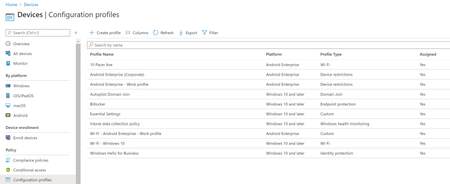
But in reality there are 16 profiles in my Intune tenant, 12 for "Windows 10 and later", 4 for "Android Enterprise". The list of 8 that I get back are a mix from both. In other words, the issue itself is inconsistent, and the results that are given back have no common trait that makes sense of why these 8.
Being that I use MS Graph a lot for other things and never have this kind of issue, I'm thinking the Intune underlying API that MS Graph interfaces directly with is where the problem likely lies. I don't have a support-enabled tenant available where I can get official support for this unfortunately. So I just forget about it and consider Intune broken in this regard. Many things in Intune simply don't work in similar mysterious fashion (**bleep** you Intune!😂).