The number that changes the conversation
Most "run an LLM locally" tutorials start with the model. This one starts with a bill.
Every token a cloud LLM generates is metered. One request is rounding-error cheap. But agents don't make one request — they make thousands, in loops, with retries, across every user, every day, forever. The cost curve of a successful AI feature is not flat; it bends upward with adoption. The thing that makes your product popular is the same thing that makes it expensive to run.
That's the uncomfortable truth behind token economics: in the cloud, the marginal cost of intelligence never reaches zero. You rent it, per token, for as long as the feature lives.
Edge inference flips the equation. Once the model runs on hardware the user already owns, the marginal cost of the next token trends toward zero. You pay a fixed cost once — the silicon — and then you generate as many tokens as you like. For a whole class of workloads — chat assistants, summarizers, classifiers, on-device copilots — that is a structurally different cost model, and it's the reason "where does inference run" has quietly become one of the most important architecture decisions you'll make this year.
To keep this concrete, we'll ground every idea in a real, working repository: kinfey/winml-qwen3-chat — an end-to-end project that builds Qwen3-0.6B for a Windows NPU using Windows ML CLI, benchmarks it against the CPU, and ships a desktop chat app that streams from it token by token.
Why the edge — beyond just the bill
Cost is the headline, but it's not the whole story. Moving inference onto the device buys you four things at once:
- Cost. The marginal token approaches free. No per-request metering, no surprise invoice when a feature goes viral.
- Latency. No network round-trip. The model is a function call away, not an HTTPS request away — and for interactive chat, that's the difference between "snappy" and "spinner."
- Privacy. The prompt never leaves the machine. For regulated data, personal documents, or anything a user wouldn't paste into a public box, "it never left the laptop" is the strongest guarantee you can offer.
- Availability. It works on a plane, in a tunnel, behind a corporate firewall, during an outage. Offline isn't a degraded mode — it's the default.
The catch has always been: CPUs are bad at this. A general-purpose CPU runs a transformer forward pass slowly and, worse, inconsistently — latency jitters as the OS juggles cores. That's where the silicon story begins.
The NPU: purpose-built for the forward pass
A modern AI PC has three compute units, and Windows ML exposes each through its own execution provider:
| Unit | Reference silicon (Snapdragon X Elite) | Execution Provider |
|---|---|---|
| NPU | Qualcomm Hexagon NPU (X1E80100) | QNNExecutionProvider |
| GPU | Qualcomm Adreno X1-85 | DmlExecutionProvider |
| CPU | Snapdragon X 12-core @ 3.40 GHz | CPUExecutionProvider |
The NPU (Neural Processing Unit) is not a faster CPU — it's a different kind of processor, designed for exactly one job: the dense, repetitive matrix multiplication that is model inference. Where a CPU is a brilliant generalist, an NPU is a specialist that does the transformer math at high throughput, low power, and — critically — low variance.
That last property matters more than people expect. For an interactive assistant, predictable latency is often worth more than peak latency. A response that always lands in ~1 second feels better than one that averages 0.8s but occasionally stalls for 5. We'll see this show up hard in the benchmark below: the NPU isn't just faster than the CPU here, it's an order of magnitude more consistent.
NPUs also sip power. Running inference on the Hexagon NPU instead of pinning twelve CPU cores at 100% means the fan stays quiet and the battery survives the afternoon — which, for an always-available on-device copilot, is the whole point.
WinML CLI: from source model to hardware-optimized artifact
Here's the gap the NPU story usually hides: a Hugging Face checkpoint does not run on an NPU as-is. You can't hand model.safetensors to the Hexagon and expect tokens. Between "PyTorch weights" and "running on the NPU" sits a real pipeline — export to ONNX, optimize the graph, quantize to integer precision, and compile to a vendor-specific context binary.
That pipeline is exactly what Windows ML CLI automates. In its own words, it takes you "from a source model — whether from Hugging Face or your own pipeline — to a hardware-optimized artifact in a reproducible workflow," handling conversion, graph optimization, and compilation across AMD, Intel, NVIDIA, and Qualcomm targets. You can drive each stage by hand (export → analyze → optimize → quantize → compile) or let winml build generate the whole config for you. The same commands target every Windows ML execution provider, so you build once and run across hardware.
It's a single CLI, installed as a Python wheel, and it slots cleanly into CI/CD — which is what makes the whole edge-deployment workflow reproducible instead of a one-off science experiment.
Walkthrough: building Qwen3-0.6B for the NPU
This is the heart of the winml-qwen3-chatt repo. Five steps: install, inspect, build, benchmark, run.
0. Prerequisites
The build was validated on a Snapdragon X Elite (ARM64) machine running Windows 11 24H2 (24H2 is required for NPU support), with Python 3.11, the uv package manager, and — for the demo app — the .NET 10 SDK with the WinUI workload.
1. Install the CLI
WinML CLI ships on PyPI. Set up an isolated environment with uv and install:
# Pin the exact Python the project needs
uv python install 3.11

# Create and activate a 3.11 virtual environment
uv venv --python 3.11 winml-env
.\winml-env\Scripts\activate

# Install the CLI from PyPI
uv pip install winml-cli

# Verify
winml --version        # -> winml, version 0.1.0
Then let the CLI introspect your machine — this is your first sanity check that the NPU is even visible:
winml sysOn the reference device this enumerates all three compute units in priority order (NPU → GPU → CPU) and the execution providers behind them (QNNExecutionProvider, DmlExecutionProvider, CPUExecutionProvider). If your NPU doesn't appear here, nothing downstream will use it — winml sys is where you diagnose that.
2. Inspect before you build
💡 Always inspect before build. It catches unsupported architectures in seconds instead of twenty minutes into a failed export.
winml inspect -m Qwen/Qwen3-0.6BFor Qwen3-0.6B this reports the shape of what you're about to build: a text-generation model mapped to the WinML class WinMLModelForCausalLM (composite), architecture Qwen3ForCausalLM with 28 layers, hidden size 1024, vocabulary 151,936, opset 17. Its inputs are input_ids, attention_mask, and position_ids; its output is logits.
One subtlety worth internalizing early: Qwen3 is a composite model — it exports as multiple ONNX components rather than a single graph. That detail comes back to bite you (productively) at quantization time.
3. Build for the NPU
This is the one command that does the heavy lifting — export, optimize, quantize, and compile, all targeting the NPU via the QNN execution provider:
winml build -m Qwen/Qwen3-0.6B -o output\qwen3-0.6b --ep qnn --device npu --compile -v
Under the hood it runs four stages. On the reference device:
| Stage | Time | Output |
|---|---|---|
| Export | 133.2 s | export.onnx (2.9 GB) |
| Optimize | 157.6 s | optimized.onnx (2.9 GB) |
| Quantize | 227.6 s | quantized.onnx (868 MB) — uint8 weight / uint16 activation |
| Compile | 437.8 s | QNN HTP context (compiled_qnn.bin, 913 MB) |
| Total | ~1191.5 s (~20 min) | model.onnx + winml_build_config.json |
The arc of those four rows is the edge-deployment story in miniature: a 2.9 GB float export is quantized down to 868 MB (the integer precision the NPU wants), then compiled into a Qualcomm HTP context binary — a graph the Hexagon NPU can execute directly. The final deployable is output\qwen3-0.6b\model.onnx, a composite entry graph that points at the compiled context. (The ~9 GB of intermediate .onnx.data shards are safe to delete afterward to reclaim disk.)
One honest caveat the repo documents: because text-generation isn't in the CLI's built-in calibration task list, quantization falls back to a RandomDataset for calibration. For a latency benchmark that's expected and harmless — but hold that thought, because it's exactly the seam the demo app has to patch for production quality.
4. Benchmark: NPU vs CPU
Point winml perf at the compiled model and tell it the task:
# NPU (QNN) — runs the compiled context
winml perf -m output\qwen3-0.6b\model.onnx --task text-generation --ep qnn --device npu --iterations 100 --warmup 10

# CPU — the compiled NPU graph can't run on CPU, so benchmark the
# pre-compile quantized.onnx (QDQ) instead
winml perf -m output\qwen3-0.6b\quantized.onnx --task text-generation --ep cpu --device cpu --iterations 50 --warmup 5
The results, for a full prefill forward pass at sequence length 1024:
| Device | EP | Precision | Avg latency | Throughput | Std dev |
|---|---|---|---|---|---|
| NPU | QNN | w16a16 | 960.8 ms | 1.04 samp/s | 3.4 ms |
| CPU | CPU | w8a16 | 5793.3 ms | 0.17 samp/s | 828.3 ms |
Two takeaways, and the second is the one to remember:
- The NPU is ~6× faster than the CPU on this workload.
- The NPU is ~240× more consistent — a 3.4 ms standard deviation versus 828 ms on the CPU. The CPU's latency swings by nearly a full second run to run; the NPU lands in the same spot every time. For an interactive chat experience, that stability is the feature.
This is the token-economics argument made physical: the same model, on hardware the user already owns, delivering cloud-grade interactivity at a marginal token cost approaching zero — and doing it more predictably than the CPU fallback ever could.
5. From artifact to app
A compiled .onnx isn't a product. The repo closes that gap with a complete desktop example that consumes the NPU build above:
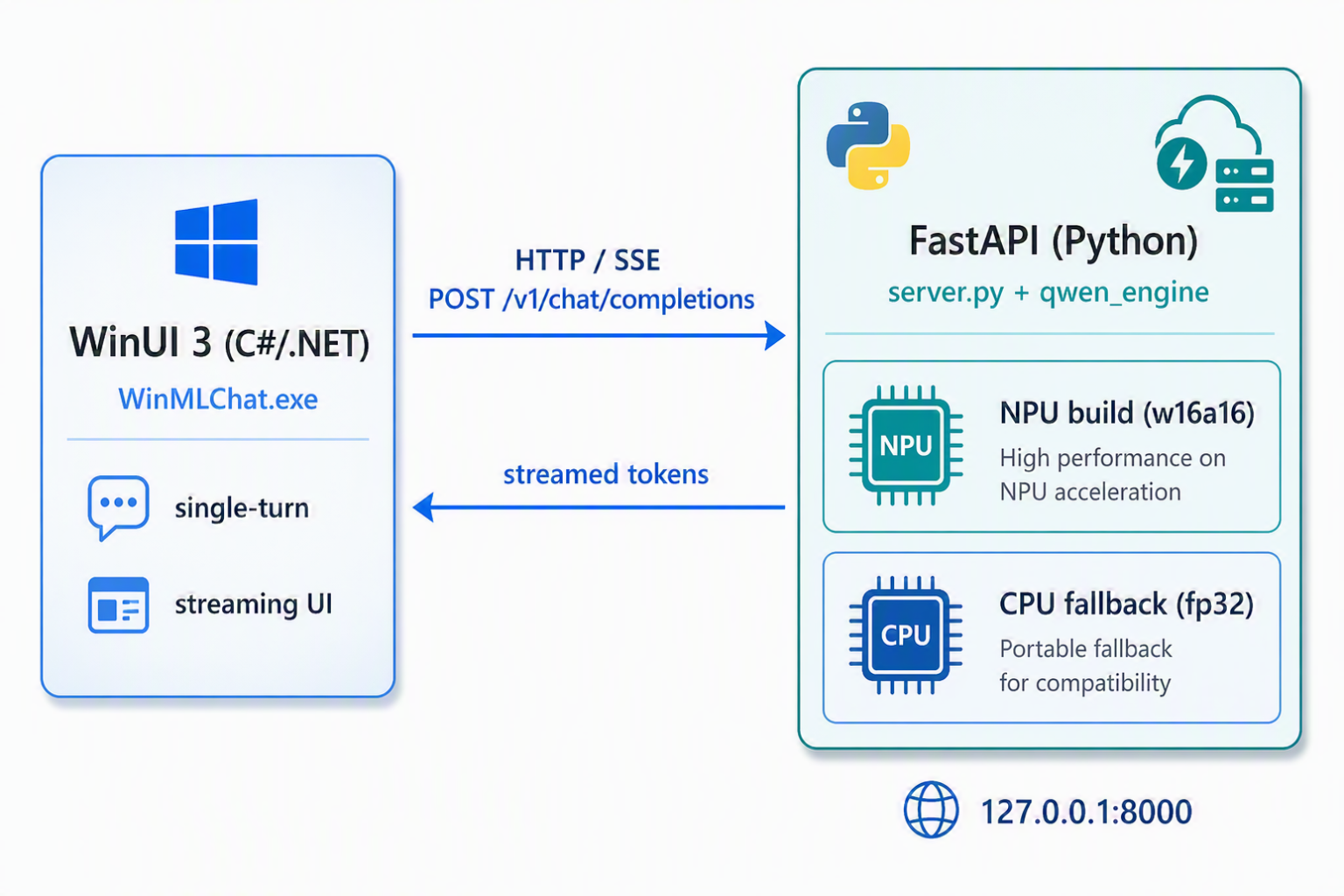
- app/WinMLChat/ — a WinUI 3 chat UI (C# / .NET 10, MVVM) that streams replies token by token, so the NPU's low, steady latency translates directly into a responsive typing-style experience.
- backend/ — a FastAPI server exposing an OpenAI-compatible streaming API, backed by winml.modelkit.WinMLAutoModel.
The most interesting design decision lives in the backend: hybrid NPU/CPU routing. Short prompts go to the quantized NPU build for speed and efficiency; long prompts fall back to an unquantized CPU path. Conceptually, the routing looks like this:
# Illustrative — the backend picks an execution path per request
def choose_backend(prompt_tokens: int):
    if prompt_tokens <= NPU_PREFILL_LIMIT:
        return npu_model   # quantized w16a16, QNN  -> fast, low-power
    return cpu_model       # unquantized fallback   -> handles long context
Because the API speaks the OpenAI streaming dialect, the WinUI front end (and any other OpenAI-compatible client) connects without bespoke glue — the NPU is hidden behind a familiar /chat/completions-style contract.
The production seam: patching quantization for a composite decoder
Remember the RandomDataset calibration warning? That's the honest boundary between a benchmark and a shipping app, and the repo confronts it head-on.
WinML CLI 0.1.0 can't quantize the Qwen3 composite decoder for QNN out of the box — its calibration reader omits position_ids and the 28 layers' past-KV inputs, so the calibration data doesn't match what the model actually consumes at runtime. The example fixes this at the root in backend/winml_npu_patch.py, which:
- supplies real KV-cache calibration feeds (the actual position_ids and per-layer past-key/value tensors the decoder expects), and
- switches to per-channel w16a16 weights with the lm_head excluded from quantization.
That's the difference between a model that benchmarks well and a model that generates well: calibrating against representative inputs — not random noise — and keeping the precision-sensitive output projection in higher precision so token quality holds up.
Where this is still rough
It would be dishonest to end on a victory lap. This is early, and it shows.
- Qwen3-0.6B — and small LLMs in general — aren't enough on their own yet. A 0.6B model is a fine proof point for the pipeline, but it is a modest reasoner. For many real tasks you'll want a larger on-device model, retrieval, or a hybrid edge/cloud design — the silicon is ready before the small-model quality fully is.
- Performance and optimization still have headroom. The build path works end to end, but there are sharp edges: text-generation falls back to a RandomDataset for calibration, the composite decoder needs a hand-written patch to quantize correctly, operator-level profiling (--op-tracing) isn't available in winml-cli 0.1.0, and the throughput numbers here are a starting line, not a ceiling. Expect to tune.
None of this is a reason to wait — it's a reason to get involved. The tooling is open and moving fast, and the fastest way to make it better is to push on it and report what breaks.
Found a bug, hit a wall, or have an idea? File it at github.com/microsoft/winml-cli/issues — feedback from real builds is exactly what sharpens these edges.
Wrap-up
The reason to care about edge AI isn't novelty — it's economics and physics, and they happen to point the same direction.
- Token economics says the cloud's per-token meter never reaches zero, while the edge drives the marginal token toward free after a one-time hardware cost. For high-volume, interactive, privacy-sensitive workloads, that's a structural advantage, not a rounding error.
- The NPU is the silicon that makes it viable: purpose-built for the transformer forward pass, delivering — in this build — roughly 6× the CPU's speed and ~240× its consistency, at a fraction of the power.
- WinML CLI is the bridge that turns a Hugging Face checkpoint into a deployable, hardware-optimized artifact through one reproducible pipeline — inspect → build → perf — that targets every Windows ML execution provider.
- winml-qwen3-chat ties it all together: a real Qwen3-0.6B NPU build, an honest benchmark, a streaming WinUI app, an OpenAI-compatible backend with hybrid routing, and — most instructively — a quantization patch that shows what it actually takes to move from "runs" to "ships."
The headline for builders: inference location is now an architecture decision. When the workload is high-volume, latency-sensitive, or privacy-bound, the right answer increasingly isn't a bigger cloud bill — it's the NPU already sitting in your users' laptops. The tooling to reach it is here today.
Start here:
- Sample Code kinfey/winml-qwen3-chat
- WinML CLI microsoft/winml-cli

 Microsoft