onnx
22 TopicsThe Token Economics of the Edge: Running Qwen3 on a Windows NPU with WinML CLI
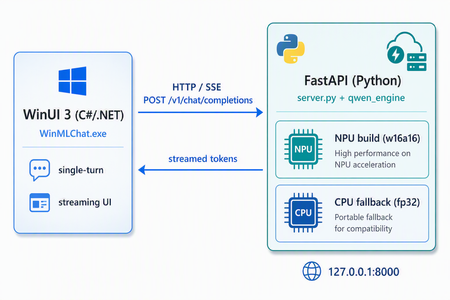
The number that changes the conversation Most "run an LLM locally" tutorials start with the model. This one starts with a bill. Every token a cloud LLM generates is metered. One request is rounding-error cheap. But agents don't make one request — they make thousands, in loops, with retries, across every user, every day, forever. The cost curve of a successful AI feature is not flat; it bends upward with adoption. The thing that makes your product popular is the same thing that makes it expensive to run. That's the uncomfortable truth behind token economics: in the cloud, the marginal cost of intelligence never reaches zero. You rent it, per token, for as long as the feature lives. Edge inference flips the equation. Once the model runs on hardware the user already owns, the marginal cost of the next token trends toward zero. You pay a fixed cost once — the silicon — and then you generate as many tokens as you like. For a whole class of workloads — chat assistants, summarizers, classifiers, on-device copilots — that is a structurally different cost model, and it's the reason "where does inference run" has quietly become one of the most important architecture decisions you'll make this year. To keep this concrete, we'll ground every idea in a real, working repository: kinfey/winml-qwen3-chat — an end-to-end project that builds Qwen3-0.6B for a Windows NPU using Windows ML CLI, benchmarks it against the CPU, and ships a desktop chat app that streams from it token by token. Why the edge — beyond just the bill Cost is the headline, but it's not the whole story. Moving inference onto the device buys you four things at once: Cost. The marginal token approaches free. No per-request metering, no surprise invoice when a feature goes viral. Latency. No network round-trip. The model is a function call away, not an HTTPS request away — and for interactive chat, that's the difference between "snappy" and "spinner." Privacy. The prompt never leaves the machine. For regulated data, personal documents, or anything a user wouldn't paste into a public box, "it never left the laptop" is the strongest guarantee you can offer. Availability. It works on a plane, in a tunnel, behind a corporate firewall, during an outage. Offline isn't a degraded mode — it's the default. The catch has always been: CPUs are bad at this. A general-purpose CPU runs a transformer forward pass slowly and, worse, inconsistently — latency jitters as the OS juggles cores. That's where the silicon story begins. The NPU: purpose-built for the forward pass A modern AI PC has three compute units, and Windows ML exposes each through its own execution provider: Unit Reference silicon (Snapdragon X Elite) Execution Provider NPU Qualcomm Hexagon NPU (X1E80100) QNNExecutionProvider GPU Qualcomm Adreno X1-85 DmlExecutionProvider CPU Snapdragon X 12-core @ 3.40 GHz CPUExecutionProvider The NPU (Neural Processing Unit) is not a faster CPU — it's a different kind of processor, designed for exactly one job: the dense, repetitive matrix multiplication that is model inference. Where a CPU is a brilliant generalist, an NPU is a specialist that does the transformer math at high throughput, low power, and — critically — low variance. That last property matters more than people expect. For an interactive assistant, predictable latency is often worth more than peak latency. A response that always lands in ~1 second feels better than one that averages 0.8s but occasionally stalls for 5. We'll see this show up hard in the benchmark below: the NPU isn't just faster than the CPU here, it's an order of magnitude more consistent. NPUs also sip power. Running inference on the Hexagon NPU instead of pinning twelve CPU cores at 100% means the fan stays quiet and the battery survives the afternoon — which, for an always-available on-device copilot, is the whole point. WinML CLI: from source model to hardware-optimized artifact Here's the gap the NPU story usually hides: a Hugging Face checkpoint does not run on an NPU as-is. You can't hand model.safetensors to the Hexagon and expect tokens. Between "PyTorch weights" and "running on the NPU" sits a real pipeline — export to ONNX, optimize the graph, quantize to integer precision, and compile to a vendor-specific context binary. That pipeline is exactly what Windows ML CLI automates. In its own words, it takes you "from a source model — whether from Hugging Face or your own pipeline — to a hardware-optimized artifact in a reproducible workflow," handling conversion, graph optimization, and compilation across AMD, Intel, NVIDIA, and Qualcomm targets. You can drive each stage by hand (export → analyze → optimize → quantize → compile) or let winml build generate the whole config for you. The same commands target every Windows ML execution provider, so you build once and run across hardware. It's a single CLI, installed as a Python wheel, and it slots cleanly into CI/CD — which is what makes the whole edge-deployment workflow reproducible instead of a one-off science experiment. Walkthrough: building Qwen3-0.6B for the NPU This is the heart of the winml-qwen3-chatt repo. Five steps: install, inspect, build, benchmark, run. 0. Prerequisites The build was validated on a Snapdragon X Elite (ARM64) machine running Windows 11 24H2 (24H2 is required for NPU support), with Python 3.11, the uv package manager, and — for the demo app — the .NET 10 SDK with the WinUI workload. 1. Install the CLI WinML CLI ships on PyPI. Set up an isolated environment with uv and install: # Pin the exact Python the project needs uv python install 3.11 # Create and activate a 3.11 virtual environment uv venv --python 3.11 winml-env .\winml-env\Scripts\activate # Install the CLI from PyPI uv pip install winml-cli # Verify winml --version # -> winml, version 0.1.0 Then let the CLI introspect your machine — this is your first sanity check that the NPU is even visible: winml sys On the reference device this enumerates all three compute units in priority order (NPU → GPU → CPU) and the execution providers behind them (QNNExecutionProvider, DmlExecutionProvider, CPUExecutionProvider). If your NPU doesn't appear here, nothing downstream will use it — winml sys is where you diagnose that. 2. Inspect before you build 💡 Always inspect before build. It catches unsupported architectures in seconds instead of twenty minutes into a failed export. winml inspect -m Qwen/Qwen3-0.6B For Qwen3-0.6B this reports the shape of what you're about to build: a text-generation model mapped to the WinML class WinMLModelForCausalLM (composite), architecture Qwen3ForCausalLM with 28 layers, hidden size 1024, vocabulary 151,936, opset 17. Its inputs are input_ids, attention_mask, and position_ids; its output is logits. One subtlety worth internalizing early: Qwen3 is a composite model — it exports as multiple ONNX components rather than a single graph. That detail comes back to bite you (productively) at quantization time. 3. Build for the NPU This is the one command that does the heavy lifting — export, optimize, quantize, and compile, all targeting the NPU via the QNN execution provider: winml build -m Qwen/Qwen3-0.6B -o output\qwen3-0.6b --ep qnn --device npu --compile -v Under the hood it runs four stages. On the reference device: Stage Time Output Export 133.2 s export.onnx (2.9 GB) Optimize 157.6 s optimized.onnx (2.9 GB) Quantize 227.6 s quantized.onnx (868 MB) — uint8 weight / uint16 activation Compile 437.8 s QNN HTP context (compiled_qnn.bin, 913 MB) Total ~1191.5 s (~20 min) model.onnx + winml_build_config.json The arc of those four rows is the edge-deployment story in miniature: a 2.9 GB float export is quantized down to 868 MB (the integer precision the NPU wants), then compiled into a Qualcomm HTP context binary — a graph the Hexagon NPU can execute directly. The final deployable is output\qwen3-0.6b\model.onnx, a composite entry graph that points at the compiled context. (The ~9 GB of intermediate .onnx.data shards are safe to delete afterward to reclaim disk.) One honest caveat the repo documents: because text-generation isn't in the CLI's built-in calibration task list, quantization falls back to a RandomDataset for calibration. For a latency benchmark that's expected and harmless — but hold that thought, because it's exactly the seam the demo app has to patch for production quality. 4. Benchmark: NPU vs CPU Point winml perf at the compiled model and tell it the task: # NPU (QNN) — runs the compiled context winml perf -m output\qwen3-0.6b\model.onnx --task text-generation --ep qnn --device npu --iterations 100 --warmup 10 # CPU — the compiled NPU graph can't run on CPU, so benchmark the # pre-compile quantized.onnx (QDQ) instead winml perf -m output\qwen3-0.6b\quantized.onnx --task text-generation --ep cpu --device cpu --iterations 50 --warmup 5 The results, for a full prefill forward pass at sequence length 1024: Device EP Precision Avg latency Throughput Std dev NPU QNN w16a16 960.8 ms 1.04 samp/s 3.4 ms CPU CPU w8a16 5793.3 ms 0.17 samp/s 828.3 ms Two takeaways, and the second is the one to remember: The NPU is ~6× faster than the CPU on this workload. The NPU is ~240× more consistent — a 3.4 ms standard deviation versus 828 ms on the CPU. The CPU's latency swings by nearly a full second run to run; the NPU lands in the same spot every time. For an interactive chat experience, that stability is the feature. This is the token-economics argument made physical: the same model, on hardware the user already owns, delivering cloud-grade interactivity at a marginal token cost approaching zero — and doing it more predictably than the CPU fallback ever could. 5. From artifact to app A compiled .onnx isn't a product. The repo closes that gap with a complete desktop example that consumes the NPU build above: app/WinMLChat/ — a WinUI 3 chat UI (C# / .NET 10, MVVM) that streams replies token by token, so the NPU's low, steady latency translates directly into a responsive typing-style experience. backend/ — a FastAPI server exposing an OpenAI-compatible streaming API, backed by winml.modelkit.WinMLAutoModel. The most interesting design decision lives in the backend: hybrid NPU/CPU routing. Short prompts go to the quantized NPU build for speed and efficiency; long prompts fall back to an unquantized CPU path. Conceptually, the routing looks like this: # Illustrative — the backend picks an execution path per request def choose_backend(prompt_tokens: int): if prompt_tokens <= NPU_PREFILL_LIMIT: return npu_model # quantized w16a16, QNN -> fast, low-power return cpu_model # unquantized fallback -> handles long context Because the API speaks the OpenAI streaming dialect, the WinUI front end (and any other OpenAI-compatible client) connects without bespoke glue — the NPU is hidden behind a familiar /chat/completions-style contract. The production seam: patching quantization for a composite decoder Remember the RandomDataset calibration warning? That's the honest boundary between a benchmark and a shipping app, and the repo confronts it head-on. WinML CLI 0.1.0 can't quantize the Qwen3 composite decoder for QNN out of the box — its calibration reader omits position_ids and the 28 layers' past-KV inputs, so the calibration data doesn't match what the model actually consumes at runtime. The example fixes this at the root in backend/winml_npu_patch.py, which: supplies real KV-cache calibration feeds (the actual position_ids and per-layer past-key/value tensors the decoder expects), and switches to per-channel w16a16 weights with the lm_head excluded from quantization. That's the difference between a model that benchmarks well and a model that generates well: calibrating against representative inputs — not random noise — and keeping the precision-sensitive output projection in higher precision so token quality holds up. Where this is still rough It would be dishonest to end on a victory lap. This is early, and it shows. Qwen3-0.6B — and small LLMs in general — aren't enough on their own yet. A 0.6B model is a fine proof point for the pipeline, but it is a modest reasoner. For many real tasks you'll want a larger on-device model, retrieval, or a hybrid edge/cloud design — the silicon is ready before the small-model quality fully is. Performance and optimization still have headroom. The build path works end to end, but there are sharp edges: text-generation falls back to a RandomDataset for calibration, the composite decoder needs a hand-written patch to quantize correctly, operator-level profiling (--op-tracing) isn't available in winml-cli 0.1.0, and the throughput numbers here are a starting line, not a ceiling. Expect to tune. None of this is a reason to wait — it's a reason to get involved. The tooling is open and moving fast, and the fastest way to make it better is to push on it and report what breaks. Found a bug, hit a wall, or have an idea? File it at github.com/microsoft/winml-cli/issues — feedback from real builds is exactly what sharpens these edges. Wrap-up The reason to care about edge AI isn't novelty — it's economics and physics, and they happen to point the same direction. Token economics says the cloud's per-token meter never reaches zero, while the edge drives the marginal token toward free after a one-time hardware cost. For high-volume, interactive, privacy-sensitive workloads, that's a structural advantage, not a rounding error. The NPU is the silicon that makes it viable: purpose-built for the transformer forward pass, delivering — in this build — roughly 6× the CPU's speed and ~240× its consistency, at a fraction of the power. WinML CLI is the bridge that turns a Hugging Face checkpoint into a deployable, hardware-optimized artifact through one reproducible pipeline — inspect → build → perf — that targets every Windows ML execution provider. winml-qwen3-chat ties it all together: a real Qwen3-0.6B NPU build, an honest benchmark, a streaming WinUI app, an OpenAI-compatible backend with hybrid routing, and — most instructively — a quantization patch that shows what it actually takes to move from "runs" to "ships." The headline for builders: inference location is now an architecture decision. When the workload is high-volume, latency-sensitive, or privacy-bound, the right answer increasingly isn't a bigger cloud bill — it's the NPU already sitting in your users' laptops. The tooling to reach it is here today. Start here: Sample Code kinfey/winml-qwen3-chat WinML CLI microsoft/winml-cli634Views2likes0CommentsBuilding an On-Device Voice Assistant with Microsoft Foundry Local
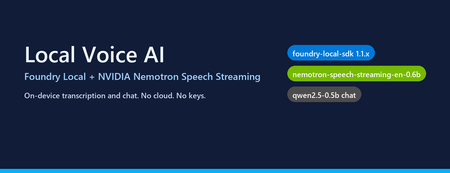
Why on-device voice still matters Most "voice AI" tutorials assume your audio leaves the machine. You ship a WAV to Whisper-API, your transcript to GPT-4, and a synthesized response back over the wire. That works — but it also means three round trips, three per-token bills, and three places your user's voice gets logged. The new wave of small, hardware-optimised models changes the trade-off. NVIDIA's Nemotron Speech Streaming En 0.6B is a 600M-parameter streaming ASR model published into the Microsoft Foundry Local catalog. Paired with a small chat model like qwen2.5-0.5b or phi-4-mini , you can run the entire capture → transcribe → reason → respond loop in-process on a developer laptop, with no API keys and no network egress. This post walks through how the fl-nemotron sample does it, the SDK pitfalls we hit on the way, and the design decisions that made the pipeline reliable. What we're building A browser-hosted assistant served by FastAPI at http://127.0.0.1:8000 . The page captures microphone audio, posts it to /api/transcribe , then streams the chat reply back over Server-Sent Events from /api/chat . All inference runs locally through two Foundry Local models loaded into the same process. The shape of the pipeline: Microphone (browser MediaRecorder) │ WebM/Opus blob ▼ Client-side WAV encoder (16 kHz, mono, PCM-16) │ multipart/form-data ▼ FastAPI /api/transcribe │ ▼ Nemotron Speech Streaming En 0.6B (Foundry Local audio client) │ transcript text ▼ Chat LLM e.g. qwen2.5-0.5b (Foundry Local chat client) │ streamed tokens ▼ FastAPI /api/chat → SSE → browser bubble The version that bit us: foundry-local-sdk >= 1.1.0 Before any code, the single most important fact about this project: The Nemotron Speech Streaming model only appears in the Foundry Local 1.1.x catalog. Older SDKs (0.5.x / 0.6.x) cannot resolve the alias nemotron-speech-streaming-en-0.6b and fail with model not found . The module name also changed in 1.1.0 — it is now foundry_local_sdk (with the underscore- sdk suffix), not foundry_local . The pip wheel for foundry-local-core is bundled, so there is no separate MSI / winget install to worry about. Pin it explicitly: pip install --upgrade "foundry-local-sdk>=1.1.0,<2" And verify before anything else: python -c "import importlib.metadata as m; print('sdk', m.version('foundry-local-sdk'))" # expect: sdk 1.1.0 Loading both models from one manager The 1.1.x SDK exposes a single FoundryLocalManager that owns the runtime. Each loaded model gives you back a per-model OpenAI-compatible client — get_chat_client() for text models and get_audio_client() for ASR. There is no need to bring your own openai Python package; the SDK ships its own thin client. The wrapper used in the repo ( src/foundry_client.py ) does this: from foundry_local_sdk import Configuration, FoundryLocalManager FoundryLocalManager.initialize(Configuration(app_name="fl-nemotron")) manager = FoundryLocalManager.instance chat_model = manager.load_model("qwen2.5-0.5b") stt_model = manager.load_model("nemotron-speech-streaming-en-0.6b") chat_client = chat_model.get_chat_client() audio_client = stt_model.get_audio_client() Both models are downloaded on first use into the Foundry Local cache and stay resident for the lifetime of the process. On a laptop with 16 GB RAM, the combined working set sits comfortably under 4 GB. The transcription surprise The first naive approach was the obvious one: with open(wav_path, "rb") as f: result = audio_client.transcribe(file=f, model="nemotron-speech-streaming-en-0.6b") That call fails on Nemotron. The bundled ONNX Runtime GenAI in foundry-local-core does not register the nemotron_speech multi-modal model type that the standard AudioClient.transcribe() path tries to instantiate. The error surfaces as a cryptic model-type registration failure deep inside the native runtime. The fix is to use the streaming session API instead — a different native entry point ( core_interop.start_audio_stream ) that the streaming model does support. The repo isolates this in src/_nemotron_live.py : def transcribe_wav_live(audio_client, wav_path, *, language="en"): with wave.open(str(wav_path), "rb") as w: sample_rate = w.getframerate() channels = w.getnchannels() sample_width = w.getsampwidth() pcm = w.readframes(w.getnframes()) session = audio_client.create_live_transcription_session() session.settings.sample_rate = sample_rate session.settings.channels = channels session.settings.bits_per_sample = sample_width * 8 session.settings.language = language session.start() # Feed PCM in ~100 ms chunks from a worker thread, then stop. bytes_per_sec = sample_rate * channels * sample_width chunk_bytes = max(bytes_per_sec // 10, 1024) def _pusher(): try: for offset in range(0, len(pcm), chunk_bytes): session.append(pcm[offset:offset + chunk_bytes]) finally: session.stop() threading.Thread(target=_pusher, daemon=True).start() parts = [] for resp in session.get_stream(): for cp in getattr(resp, "content", []) or []: text = getattr(cp, "text", "") or getattr(cp, "transcript", "") or "" if text: parts.append(text) return " ".join(p.strip() for p in parts if p.strip()).strip() Two things to notice: Push from a thread, read from the main coroutine. session.append() is a blocking write into the native stream and session.get_stream() is a blocking generator. Run one in a worker thread so the other can drain in parallel — otherwise you deadlock the session. Chunk to ~100 ms. Smaller chunks (e.g. 10 ms) spend more time crossing the FFI boundary than transcribing; larger chunks (e.g. 1 s) hold back partial results and hurt perceived latency. Always session.stop() . Without it the generator never terminates and the request hangs. The other transcription surprise: browsers don't send WAV Inside the browser, MediaRecorder defaults to audio/webm; codecs=opus . That's great for size but bad for our STT model, which expects a 16-bit mono PCM WAV at a known sample rate. Decoding WebM/Opus server-side would require ffmpeg as a runtime dependency — which is exactly the kind of friction this project exists to remove. The cleaner solution is to encode WAV on the client. AudioContext.decodeAudioData already understands WebM/Opus, so the page can decode the recording, resample to 16 kHz, mix to mono, and emit a PCM-16 WAV blob in 30 lines of JavaScript: // Inside src/static/index.html async function webmToWav(blob) { const ctx = new (window.AudioContext || window.webkitAudioContext)({ sampleRate: 16000 }); const buf = await ctx.decodeAudioData(await blob.arrayBuffer()); // Mix to mono const ch = buf.numberOfChannels; const mono = new Float32Array(buf.length); for (let c = 0; c < ch; c++) { const data = buf.getChannelData(c); for (let i = 0; i < data.length; i++) mono[i] += data[i] / ch; } return encodeWav(mono, 16000); } function encodeWav(samples, sampleRate) { const buffer = new ArrayBuffer(44 + samples.length * 2); const view = new DataView(buffer); // RIFF header writeStr(view, 0, "RIFF"); view.setUint32(4, 36 + samples.length * 2, true); writeStr(view, 8, "WAVE"); // fmt chunk writeStr(view, 12, "fmt "); view.setUint32(16, 16, true); // PCM chunk size view.setUint16(20, 1, true); // PCM format view.setUint16(22, 1, true); // mono view.setUint32(24, sampleRate, true); view.setUint32(28, sampleRate * 2, true); // byte rate view.setUint16(32, 2, true); // block align view.setUint16(34, 16, true); // bits per sample // data chunk writeStr(view, 36, "data"); view.setUint32(40, samples.length * 2, true); // PCM-16 samples let o = 44; for (let i = 0; i < samples.length; i++, o += 2) { const s = Math.max(-1, Math.min(1, samples[i])); view.setInt16(o, s < 0 ? s * 0x8000 : s * 0x7FFF, true); } return new Blob([view], { type: "audio/wav" }); } Now the server's /api/transcribe endpoint just writes the bytes to a temp file and hands them to transcribe_wav_live() — no audio decoding libraries on the Python side. Wiring it into FastAPI The server ( src/app.py ) is deliberately small. The notable detail is that the same process holds both Foundry Local model handles for its entire lifetime, so there is no warm-up cost per request: @app.post("/api/transcribe") async def transcribe(audio: UploadFile = File(...)): data = await audio.read() with tempfile.NamedTemporaryFile(suffix=".wav", delete=False) as f: f.write(data); path = f.name text = _ai_client.transcribe(path) return {"text": text} @app.post("/api/chat") async def chat(req: ChatRequest): if req.stream: return StreamingResponse( _sse(_ai_client.stream_completion(req.messages)), media_type="text/event-stream", ) return {"text": _ai_client.chat_completion(req.messages)} Streaming uses Server-Sent Events because they are trivially supported in both fetch() and the FastAPI runtime, and they don't require a WebSocket upgrade through any proxy a developer might have in front of localhost . What it looks like The repo includes screenshots of the running UI: a welcome screen with both models loaded, a streamed haiku reply, an inline code block with copy-to-clipboard, and the recording state for the microphone. Performance, honestly This is a small-model, CPU-friendly stack. On an Arm64 Surface running the x64 SDK under emulation: First model load (cold cache): tens of seconds — downloads ~600 MB for Nemotron and ~400 MB for qwen2.5-0.5b . Subsequent loads (warm cache): a few seconds per model. End-to-end transcription of a 5-second utterance: well under a second after warm-up. First chat token from qwen2.5-0.5b : typically 200–500 ms; full short reply within 1–2 s. On x64 silicon with a recent CPU the numbers improve substantially, and the SDK will pick the best execution provider it finds (CPU / DirectML / CUDA) for each model. Trade-offs to know about Model quality. qwen2.5-0.5b is a 500M-parameter model. It is fast and small enough to ship on a laptop, but it is not GPT-4. Swap in phi-4-mini or mistral-nemo-12b-instruct if you have the RAM and want better reasoning — the wrapper accepts any chat alias in the Foundry Local catalog. STT is English-only here. The current Nemotron streaming model in the catalog is ...-en-0.6b . Multilingual variants are likely to follow. Browser microphone needs a real browser. Headless / automated browsers (Playwright, Puppeteer) deny getUserMedia by default. Open the page in Edge / Chrome / Firefox to grant the permission and capture audio for real. No agent framework yet. This sample is deliberately a single-turn loop over a chat client — there is no tool calling, planning, or multi-agent orchestration. Adding the Microsoft Agent Framework on top would be a natural next step for richer behaviour. Responsible AI considerations Running locally removes the cloud-egress class of privacy concerns, but it does not remove responsibility: Disclose recording. The browser prompts for mic permission; your UI should make it obvious when capture is active. The sample shows a red ⏹ button and a "Recording…" banner for that reason. Don't log raw audio. The sample writes audio to a per-request NamedTemporaryFile and deletes it after transcription. Treat the WAV as sensitive data even when it never leaves the device. Small models hallucinate. A 0.5B chat model is great for snappy local replies, but unsuitable for high-stakes answers. Pair it with retrieval, ground it on your own data, or escalate to a larger model when accuracy matters. Try it Clone github.com/leestott/fl-nemotron. ./setup.ps1 (or ./setup.sh ) to create a virtualenv and install the pinned SDK. python scripts/prefetch.py nemotron-speech-streaming-en-0.6b qwen2.5-0.5b to download both models. .venv\Scripts\uvicorn.exe app:app --app-dir src --port 8000 Open http://127.0.0.1:8000 in a real browser and click the 🎤 button. Where to go next Foundry Local documentation — official docs for the runtime, catalog, and SDK. microsoft/Foundry-Local — upstream samples and issue tracker. NVIDIA Nemotron model family — background on the speech and language models being published into the catalog. leestott/fl-nemotron — the full source for this post. Key takeaways Pin foundry-local-sdk >= 1.1.0 . Earlier SDKs cannot see the Nemotron Speech Streaming model. Use the LiveAudioTranscriptionSession API for Nemotron, not AudioClient.transcribe() . Encode WAV in the browser. It eliminates a heavy server-side ffmpeg dependency for a few lines of JS. Push audio chunks on a worker thread and drain the response generator on the main one to avoid deadlocks. A small Foundry Local chat model plus Nemotron STT gives you a credible local voice loop in a single Python process — no cloud, no keys, no data egress.oBeaver — A Beaver That Runs LLMs on Your Machine 🦫
Hi there! I'm the creator of oBeaver. This project started from a pretty simple desire: I wanted to run large language models on my own computer. No data sent to the cloud. No API keys. No per-call charges. I'm guessing you've had the same thought. There are already great tools out there — Ollama being the most prominent. But in my day-to-day work, I spend a lot of time in the ONNX ecosystem — the cross-platform reach of ONNX Runtime, its native NPU support, the turnkey experience of Microsoft Foundry Local. It kept nagging at me: the ONNX ecosystem deserves a more complete local inference toolkit. That's how oBeaver was born. Here are the links if you want to jump straight in: GitHub: https://github.com/microsoft/obeaver Docs: https://microsoft.github.io/obeaver Up and Running in Three Minutes Getting started with oBeaver is dead simple. You need Python 3.12+, then it's clone, install, chat: git clone https://github.com/microsoft/obeaver.git cd obeaver pip install -e . # Initialize the model directory (auto-creates ort/, foundrylocal/, cache_dir/ sub-folders) obeaver init # Make sure everything looks good obeaver check If you're on macOS or Windows, install Foundry Local and you're one command away from chatting with a model: obeaver run phi-4-mini The first run downloads the model automatically — give it a minute. After that, it's instant. On Linux, or if you want to use models from Hugging Face, the ORT engine has you covered: # Convert Qwen3-0.6B from Hugging Face to ONNX format obeaver convert Qwen/Qwen3-0.6B # Run it with the ORT engine obeaver run --engine ort ./models/ort/Qwen3-0.6B_ONNX_INT4_CPU Want to turn your model into an HTTP service? One line: obeaver serve Phi-4-mini Then point any OpenAI-compatible client at it — just change one base_url and your existing code works as-is: from openai import OpenAI client = OpenAI(base_url="http://127.0.0.1:18000/v1", api_key="unused") response = client.chat.completions.create( model="Phi-4-mini", messages=[{"role": "user", "content": "What is the capital of France?"}], stream=True, ) for chunk in response: print(chunk.choices[0].delta.content or "", end="", flush=True) LangChain, LlamaIndex, Microsoft Agent Framework, CrewAI — anything that speaks the OpenAI protocol plugs right in. This was a non-negotiable design principle from day one: local inference shouldn't be an island; it should fit seamlessly into your existing dev workflow. "Why Not Just Use Ollama?" I get this question a lot, and it deserves a straight answer. Ollama is a fantastic project. It pioneered the "one command to run a model" experience and made local LLM inference accessible to everyone. If all you need is a quick way to chat with a model locally, Ollama is still a wonderful choice. oBeaver itself draws heavy inspiration from it. But Ollama and oBeaver take different technical paths. Ollama is built on llama.cpp and uses the GGUF model format. oBeaver is built on ONNX Runtime and uses the ONNX model format. Behind these two formats are two very different philosophies. GGUF: Grab and Go GGUF's strength is ultimate portability. One file bundles everything — weights, tokenizer, metadata. Hugging Face is packed with pre-quantized GGUF models ready to download and run. Quantization options are rich (Q2_K through Q8_0), and the community is incredibly active. For individual developers, this "grab and go" experience is hard to beat. ONNX: Convert Once, Accelerate Everywhere ONNX shines in a different dimension. As a cross-platform industrial standard, ONNX Runtime has something called Execution Providers — the same ONNX model, without any changes, can run on CPU, GPU, and even NPU. This matters more than it might seem at first glance. With chips like Intel Core Ultra, Qualcomm Snapdragon X, and Apple Neural Engine becoming mainstream, NPUs are quickly becoming standard hardware in AI PCs. ONNX Runtime already supports NPU acceleration natively, while the GGUF ecosystem doesn't have this capability yet. This means ONNX naturally adapts to a far wider range of devices — from servers to laptops, from desktops to edge devices, even phones and IoT endpoints. The ONNX model you run on CPU today can be accelerated on an NPU-equipped machine tomorrow — no re-conversion, no code changes, just switch the Execution Provider. ONNX does have a higher barrier to entry — models need to be converted first. But oBeaver's built-in obeaver convert command, powered by Microsoft's Olive toolkit, reduces that to a single line. Another project worth mentioning is oMLX, which also explores local inference in the ONNX ecosystem, but focuses specifically on Apple Silicon. oBeaver aims to be more comprehensive — spanning macOS, Windows, and Linux, covering text chat, embeddings, and vision-language scenarios. Here's a quick comparison of all three: Ollama oMLX oBeaver Model format GGUF ONNX ONNX Inference backend llama.cpp ONNX Runtime Foundry Local + ORT GenAI Platforms macOS/Linux/Windows macOS macOS/Windows/Linux NPU acceleration ❌ ❌ ✅ Embedding models ✅ ✅ ✅ VL models ✅ ✅ ✅ Function Calling ✅ ✅ ✅ Docker deployment ✅ ✅ ✅ I'm not saying oBeaver is better than Ollama. They serve different needs. But if your work involves the ONNX ecosystem, NPU acceleration, or a combination of embedding and multimodal capabilities, oBeaver offers a path that Ollama doesn't currently cover. Why a "Dual Engine"? This is oBeaver's most distinctive design decision, and the one I spent the most time thinking about. oBeaver has two inference engines under the hood: Foundry Local and ONNX Runtime GenAI (ORT). Why not just pick one? Because reality is messier than ideals. Foundry Local is Microsoft's local inference runtime, and the experience is lovely — pass a catalog alias like Phi-4-mini, and it auto-downloads, loads, and runs the model with smart hardware scheduling (NPU > GPU > CPU). But it has two clear limitations: first, the model catalog is still small, mostly centered around Microsoft's Phi family; second, it only supports macOS and Windows — Linux users are left out. ONNX Runtime GenAI fills exactly those gaps. It supports macOS, Windows, and Linux — all three platforms. And with obeaver convert, you can transform almost any model on Hugging Face into ONNX format, giving you a much wider model selection. Right now, oBeaver can already run models from Phi, Qwen, Gemma, GLM, and other SLM families through the ORT engine. On top of that, the ORT engine powers capabilities that Foundry Local simply can't do: Embedding models — The ORT engine includes a dedicated embedding engine supporting Qwen3-Embedding and EmbeddingGemma, perfect for local RAG pipelines: # Start the embedding service obeaver serve-embed ./models/Qwen3-Embedding-0.6B from openai import OpenAI client = OpenAI(base_url="http://127.0.0.1:18001/v1", api_key="unused") response = client.embeddings.create( model="Qwen3-Embedding-0.6B", input=["Hello, world!", "Embeddings are useful."], ) for item in response.data: print(f"index={item.index} dim={len(item.embedding)}") Vision-Language models (VL) — When the ORT engine detects vision.onnx in a model directory, it automatically switches to VL mode. Currently supported: Qwen-2.5-VL-3B and Qwen-3-VL-2B. You can send images alongside text for multimodal understanding: obeaver serve ./models/Qwen3-VL-2B-Instruct_VL_ONNX_INT4_CPU Converting a VL model is just one command too: obeaver convert Qwen/Qwen2.5-VL-3B-Instruct --type vl So the dual engine isn't redundancy — it's the optimal choice given reality: Foundry Local covers only macOS/Windows; ORT GenAI covers all platforms. Foundry Local has fewer models but zero friction; ORT GenAI has more models and more flexibility. oBeaver automatically picks the right engine for your platform and task — Foundry Local by default on macOS/Windows, ORT on Linux, auto-switching to ORT for embedding or VL workloads. You can always override with --engine ort. In short: Foundry Local handles the "just works" path, ORT handles the "I need more" path. Together, they give oBeaver an answer for every platform and every scenario. Cloud-Native? Of Course oBeaver isn't just a local toy. Deployment was baked into the design from the start. The architecture is cleanly layered: CLI (Typer) → FastAPI Server → pluggable inference engines. We ship a Docker image supporting both linux/amd64 and linux/arm64 (Apple Silicon included): # Build the image docker buildx build --platform=linux/amd64 \ -f docker/Dockerfile.cpu -t obeaver-cpu . # Start the API server docker run -d --rm -p 18000:18000 \ -v /path/to/models:/models \ obeaver-cpu serve -m /models -E ort --host 0.0.0.0 --port 18000 Local dev, CI/CD pipelines, headless servers, Kubernetes clusters — it all works. Combined with the OpenAI-compatible API, you can develop against oBeaver locally and switch to a cloud endpoint in production by changing a single URL. Not a single line of application code needs to change. Not Just a CLI — There's a Dashboard Too So far everything I've shown has been terminal commands. But sometimes you just want a visual interface — especially when you're evaluating models, comparing performance, or showing a demo. oBeaver ships with a built-in web dashboard. One command to launch: obeaver dashboard # Foundry Local engine (macOS/Windows) obeaver dashboard -e ort # ORT engine (scans local ONNX models) Open http://127.0.0.1:1573/ and you'll see something like this: It's a real-time monitoring and chat interface rolled into one. Here's what you get: Model Selector — Switch between your cached models on the fly. If a model supports NPU acceleration, it's marked with a ⚡ badge. With Foundry Local, you'll see the models from your local catalog: With the ORT engine, it scans your model directory for all available ONNX models: Chat + Live Benchmarking — Send messages and get streaming responses, with real-time performance stats right in the interface — TTFT (Time to First Token), tokens per second, total token count. This makes it incredibly easy to benchmark different models side by side: System Monitoring — Real-time memory gauges for CPU, GPU, NPU, and process memory. A system info bar shows the current model, engine type, platform, and health status at a glance. Inference Parameters — Adjust temperature, top-p, top-k, and max tokens with built-in presets, all without restarting the server. VL Mode — When you load a Vision-Language model in the ORT dashboard, the interface automatically switches to a dedicated VL mode where you can provide an image URL alongside your text prompt: And more — Conversation history with save/load, system prompt configuration, live server logs showing every request with method/path/status/timing, and export to JSON or Markdown. The dashboard isn't a separate product — it's just obeaver dashboard. Everything runs locally, nothing phones home. It's particularly useful when you want to quickly evaluate how a model performs on your hardware before committing to it in your application. Being Honest: CPU Only for Now oBeaver is currently in Tech Preview, and I want to be upfront about this — it only supports CPU inference right now. This is a deliberate, stage-by-stage choice. We wanted to make sure the entire toolchain — model conversion, inference, API serving, Docker deployment — is rock solid on CPU first. Almost every machine has a CPU; it's the best baseline for validating the complete workflow. But GPU and NPU support are coming soon. They're at the very top of the roadmap. ONNX Runtime already ships mature CUDA (GPU) and QNN/OpenVINO (NPU) Execution Providers. Foundry Local already has NPU > GPU > CPU auto-scheduling built in. What oBeaver needs to do is integrate these into its engine selection logic and model conversion pipeline — and that work is actively underway. Ultimately, one of the key reasons oBeaver chose the ONNX path is the NPU future. The AI PC era is arriving, and when NPUs become standard hardware, ONNX will be the ecosystem most ready for it. Acknowledgements oBeaver is inspired by and builds upon the ideas from the following excellent projects: Project Description Ollama Run large language models locally with a simple CLI OMLX Run large language models on Apple Silicon, ONNX-based vLLM High-throughput and memory-efficient inference engine for LLMs Foundry Local Microsoft's local model inference runtime with NPU/GPU/CPU acceleration ONNX Runtime GenAI Generative AI extensions for ONNX Runtime Olive Microsoft's model optimization toolkit for ONNX Runtime I Need Your Feedback That's the tour. But oBeaver is still in its early days, and there's so much room to improve. As the creator of this project, what I fear most isn't criticism — it's silence. So I genuinely hope you'll give it a try and let me know what you think: Which models do you most want to run? How urgent is GPU / NPU acceleration for your use case? What do you think of the dual-engine design — does it add value, or does it add complexity? In your real-world projects, what's the biggest pain point with local inference? What else does the Docker story need? Helm Charts? Compose files? GitHub Issues, PRs, or just reaching out on social media — any form of feedback is deeply appreciated. The name oBeaver comes from the beaver — nature's most remarkable engineer. Beavers build dams stick by stick, creating the environment they need to thrive. I hope oBeaver can help you do the same: build your local AI infrastructure, one piece at a time, on your own hardware. Build local. Dam the cloud. 🦫 GitHub: https://github.com/microsoft/obeaver Docs: https://microsoft.github.io/obeaver If you find oBeaver useful, a ⭐ on GitHub means the world to us!Building an Offline AI Interview Coach with Foundry Local, RAG, and SQLite
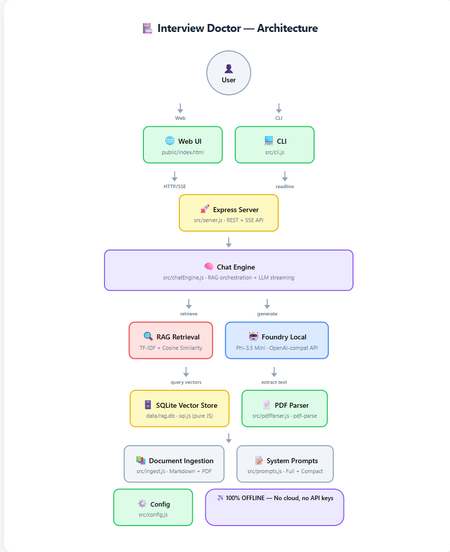
How to build a 100% offline, AI-powered interview preparation tool using Microsoft Foundry Local, Retrieval-Augmented Generation, and nothing but JavaScript. Foundry Local 100% Offline RAG + TF-IDF JavaScript / Node.js Contents Introduction What is RAG and Why Offline? Architecture Overview Setting Up Foundry Local Building the RAG Pipeline The Chat Engine Dual Interfaces: Web & CLI Testing Adapting for Your Own Use Case What I Learned Getting Started Introduction Imagine preparing for a job interview with an AI assistant that knows your CV inside and out, understands the job you're applying for, and generates tailored questions, all without ever sending your data to the cloud. That's exactly what Interview Doctor does. Interview Doctor's web UI, a polished, dark-themed interface running entirely on your local machine. In this post, I'll walk you through how I built an interview prep tool as a fully offline JavaScript application using: Foundry Local — Microsoft's on-device AI runtime SQLite — for storing document chunks and TF-IDF vectors RAG (Retrieval-Augmented Generation) — to ground the AI in your actual documents Express.js — for the web server Node.js built-in test runner — for testing with zero extra dependencies No cloud. No API keys. No internet required. Everything runs on your machine. What is RAG and Why Does It Matter? Retrieval-Augmented Generation (RAG) is a pattern that makes AI models dramatically more useful for domain-specific tasks. Instead of relying solely on what a model learned during training (which can be outdated or generic), RAG: Retrieves relevant chunks from your own documents Augments the model's prompt with those chunks as context Generates a response grounded in your actual data For Interview Doctor, this means the AI doesn't just ask generic interview questions, it asks questions specific to your CV, your experience, and the specific job you're applying for. Why Offline RAG? Privacy is the obvious benefit, your CV and job applications never leave your device. But there's more: No API costs — run as many queries as you want No rate limits — iterate rapidly during your prep Works anywhere — on a plane, in a café with bad Wi-Fi, anywhere Consistent performance — no cold starts, no API latency Architecture Overview Complete architecture showing all components and data flow. The application has two interfaces (CLI and Web) that share the same core engine: Document Ingestion — PDFs and markdown files are chunked and indexed Vector Store — SQLite stores chunks with TF-IDF vectors Retrieval — queries are matched against stored chunks using cosine similarity Generation — relevant chunks are injected into the prompt sent to the local LLM Step 1: Setting Up Foundry Local First, install Foundry Local: # Windows winget install Microsoft.FoundryLocal # macOS brew install microsoft/foundrylocal/foundrylocal The JavaScript SDK handles everything else — starting the service, downloading the model, and connecting: import { FoundryLocalManager } from "foundry-local-sdk"; import { OpenAI } from "openai"; const manager = new FoundryLocalManager(); const modelInfo = await manager.init("phi-3.5-mini"); // Foundry Local exposes an OpenAI-compatible API const openai = new OpenAI({ baseURL: manager.endpoint, // Dynamic port, discovered by SDK apiKey: manager.apiKey, }); ⚠️ Key Insight Foundry Local uses a dynamic port never hardcode localhost:5272 . Always use manager.endpoint which is discovered by the SDK at runtime. Step 2: Building the RAG Pipeline Document Chunking Documents are split into overlapping chunks of ~200 tokens. The overlap ensures important context isn't lost at chunk boundaries: export function chunkText(text, maxTokens = 200, overlapTokens = 25) { const words = text.split(/\s+/).filter(Boolean); if (words.length <= maxTokens) return [text.trim()]; const chunks = []; let start = 0; while (start < words.length) { const end = Math.min(start + maxTokens, words.length); chunks.push(words.slice(start, end).join(" ")); if (end >= words.length) break; start = end - overlapTokens; } return chunks; } Why 200 tokens with 25-token overlap? Small chunks keep retrieved context compact for the model's limited context window. Overlap prevents information loss at boundaries. And it's all pure string operations, no dependencies needed. TF-IDF Vectors Instead of using a separate embedding model (which would consume precious memory alongside the LLM), we use TF-IDF, a classic information retrieval technique: export function termFrequency(text) { const tf = new Map(); const tokens = text .toLowerCase() .replace(/[^a-z0-9\-']/g, " ") .split(/\s+/) .filter((t) => t.length > 1); for (const t of tokens) { tf.set(t, (tf.get(t) || 0) + 1); } return tf; } export function cosineSimilarity(a, b) { let dot = 0, normA = 0, normB = 0; for (const [term, freq] of a) { normA += freq * freq; if (b.has(term)) dot += freq * b.get(term); } for (const [, freq] of b) normB += freq * freq; if (normA === 0 || normB === 0) return 0; return dot / (Math.sqrt(normA) * Math.sqrt(normB)); } Each document chunk becomes a sparse vector of word frequencies. At query time, we compute cosine similarity between the query vector and all stored chunk vectors to find the most relevant matches. SQLite as a Vector Store Chunks and their TF-IDF vectors are stored in SQLite using sql.js (pure JavaScript — no native compilation needed): export class VectorStore { // Created via: const store = await VectorStore.create(dbPath) insert(docId, title, category, chunkIndex, content) { const tf = termFrequency(content); const tfJson = JSON.stringify([...tf]); this.db.run( "INSERT INTO chunks (...) VALUES (?, ?, ?, ?, ?, ?)", [docId, title, category, chunkIndex, content, tfJson] ); this.save(); } search(query, topK = 5) { const queryTf = termFrequency(query); // Score each chunk by cosine similarity, return top-K } } 💡 Why SQLite for Vectors? For a CV plus a few job descriptions (dozens of chunks), brute-force cosine similarity over SQLite rows is near-instant (~1ms). No need for Pinecone, Qdrant, or Chroma — just a single .db file on disk. Step 3: The RAG Chat Engine The chat engine ties retrieval and generation together: async *queryStream(userMessage, history = []) { // 1. Retrieve relevant CV/JD chunks const chunks = this.retrieve(userMessage); const context = this._buildContext(chunks); // 2. Build the prompt with retrieved context const messages = [ { role: "system", content: SYSTEM_PROMPT }, { role: "system", content: `Retrieved context:\n\n${context}` }, ...history, { role: "user", content: userMessage }, ]; // 3. Stream from the local model const stream = await this.openai.chat.completions.create({ model: this.modelId, messages, temperature: 0.3, stream: true, }); // 4. Yield chunks as they arrive for await (const chunk of stream) { const content = chunk.choices[0]?.delta?.content; if (content) yield { type: "text", data: content }; } } The flow is straightforward: vectorize the query, retrieve with cosine similarity, build a prompt with context, and stream from the local LLM. The temperature: 0.3 keeps responses focused — important for interview preparation where consistency matters. Step 4: Dual Interfaces — Web & CLI Web UI The web frontend is a single HTML file with inline CSS and JavaScript — no build step, no framework, no React or Vue. It communicates with the Express backend via REST and SSE: File upload via multipart/form-data Streaming chat via Server-Sent Events (SSE) Quick-action buttons for common follow-up queries (coaching tips, gap analysis, mock interview) The setup form with job title, seniority level, and a pasted job description — ready to generate tailored interview questions. CLI The CLI provides the same experience in the terminal with ANSI-coloured output: npm run cli It walks you through uploading your CV, entering the job details, and then generates streaming questions. Follow-up questions work interactively. Both interfaces share the same ChatEngine class, they're thin layers over identical logic. Edge Mode For constrained devices, toggle Edge mode to use a compact system prompt that fits within smaller context windows: Edge mode activated, uses a minimal prompt for devices with limited resources. Step 5: Testing Tests use the Node.js built-in test runner, no Jest, no Mocha, no extra dependencies: import { describe, it } from "node:test"; import assert from "node:assert/strict"; describe("chunkText", () => { it("returns single chunk for short text", () => { const chunks = chunkText("short text", 200, 25); assert.equal(chunks.length, 1); }); it("maintains overlap between chunks", () => { // Verifies overlapping tokens between consecutive chunks }); }); npm test Tests cover the chunker, vector store, config, prompts, and server API contract, all without needing Foundry Local running. Adapting for Your Own Use Case Interview Doctor is a pattern, not just a product. You can adapt it for any domain: What to Change How Domain documents Replace files in docs/ with your content System prompt Edit src/prompts.js Chunk sizes Adjust config.chunkSize and config.chunkOverlap Model Change config.model — run foundry model list UI Modify public/index.html — it's a single file Ideas for Adaptation Customer support bot — ingest your product docs and FAQs Code review assistant — ingest coding standards and best practices Study guide — ingest textbooks and lecture notes Compliance checker — ingest regulatory documents Onboarding assistant — ingest company handbooks and processes What I Learned Offline AI is production-ready. Foundry Local + small models like Phi-3.5 Mini are genuinely useful for focused tasks. You don't need vector databases for small collections. SQLite + TF-IDF is fast, simple, and has zero infrastructure overhead. RAG quality depends on chunking. Getting chunk sizes right for your use case is more impactful than the retrieval algorithm. The OpenAI-compatible API is a game-changer. Switching from cloud to local was mostly just changing the baseURL . Dual interfaces are easy when you share the engine. The CLI and Web UI are thin layers over the same ChatEngine class. ⚡ Performance Notes On a typical laptop (no GPU): ingestion takes under 1 second for ~20 documents, retrieval is ~1ms, and the first LLM token arrives in 2-5 seconds. Foundry Local automatically selects the best model variant for your hardware (CUDA GPU, NPU, or CPU). Getting Started git clone https://github.com/leestott/interview-doctor-js.git cd interview-doctor-js npm install npm run ingest npm start # Web UI at http://127.0.0.1:3000 # or npm run cli # Interactive terminal The full source code is on GitHub. Star it, fork it, adapt it — and good luck with your interviews! Resources Foundry Local — Microsoft's on-device AI runtime Foundry Local SDK (npm) — JavaScript SDK Foundry Local GitHub — Source, samples, and documentation Local RAG Reference — Reference RAG implementation Interview Doctor (JavaScript) — This project's source codeBuilding real-world AI automation with Foundry Local and the Microsoft Agent Framework
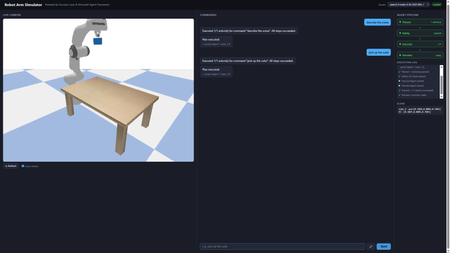
A hands-on guide to building real-world AI automation with Foundry Local, the Microsoft Agent Framework, and PyBullet. No cloud subscription, no API keys, no internet required. Why Developers Should Care About Offline AI Imagine telling a robot arm to "pick up the cube" and watching it execute the command in a physics simulator, all powered by a language model running on your laptop. No API calls leave your machine. No token costs accumulate. No internet connection is needed. That is what this project delivers, and every piece of it is open source and ready for you to fork, extend, and experiment with. Most AI demos today lean on cloud endpoints. That works for prototypes, but it introduces latency, ongoing costs, and data privacy concerns. For robotics and industrial automation, those trade-offs are unacceptable. You need inference that runs where the hardware is: on the factory floor, in the lab, or on your development machine. Foundry Local gives you an OpenAI-compatible endpoint running entirely on-device. Pair it with a multi-agent orchestration framework and a physics engine, and you have a complete pipeline that translates natural language into validated, safe robot actions. This post walks through how we built it, why the architecture works, and how you can start experimenting with your own offline AI simulators today. Architecture The system uses four specialised agents orchestrated by the Microsoft Agent Framework: Agent What It Does Speed PlannerAgent Sends user command to Foundry Local LLM → JSON action plan 4–45 s SafetyAgent Validates against workspace bounds + schema < 1 ms ExecutorAgent Dispatches actions to PyBullet (IK, gripper) < 2 s NarratorAgent Template summary (LLM opt-in via env var) < 1 ms User (text / voice) │ ▼ ┌──────────────┐ │ Orchestrator │ └──────┬───────┘ │ ┌────┴────┐ ▼ ▼ Planner Narrator │ ▼ Safety │ ▼ Executor │ ▼ PyBullet Setting Up Foundry Local from foundry_local import FoundryLocalManager import openai manager = FoundryLocalManager("qwen2.5-coder-0.5b") client = openai.OpenAI( base_url=manager.endpoint, api_key=manager.api_key, ) resp = client.chat.completions.create( model=manager.get_model_info("qwen2.5-coder-0.5b").id, messages=[{"role": "user", "content": "pick up the cube"}], max_tokens=128, stream=True, ) from foundry_local import FoundryLocalManager import openai manager = FoundryLocalManager("qwen2.5-coder-0.5b") client = openai.OpenAI( base_url=manager.endpoint, api_key=manager.api_key, ) resp = client.chat.completions.create( model=manager.get_model_info("qwen2.5-coder-0.5b").id, messages=[{"role": "user", "content": "pick up the cube"}], max_tokens=128, stream=True, ) The SDK auto-selects the best hardware backend (CUDA GPU → QNN NPU → CPU). No configuration needed. How the LLM Drives the Simulator Understanding the interaction between the language model and the physics simulator is central to the project. The two never communicate directly. Instead, a structured JSON contract forms the bridge between natural language and physical motion. From Words to JSON When a user says “pick up the cube”, the PlannerAgent sends the command to the Foundry Local LLM alongside a compact system prompt. The prompt lists every permitted tool and shows the expected JSON format. The LLM responds with a structured plan: { "type": "plan", "actions": [ {"tool": "describe_scene", "args": {}}, {"tool": "pick", "args": {"object": "cube_1"}} ] } The planner parses this response, validates it against the action schema, and retries once if the JSON is malformed. This constrained output format is what makes small models (0.5B parameters) viable: the response space is narrow enough that even a compact model can produce correct JSON reliably. From JSON to Motion Once the SafetyAgent approves the plan, the ExecutorAgent maps each action to concrete PyBullet calls: move_ee(target_xyz) : The target position in Cartesian coordinates is passed to PyBullet's inverse kinematics solver, which computes the seven joint angles needed to place the end-effector at that position. The robot then interpolates smoothly from its current joint state to the target, stepping the physics simulation at each increment. pick(object) : This triggers a multi-step grasp sequence. The controller looks up the object's position in the scene, moves the end-effector above the object, descends to grasp height, closes the gripper fingers with a configurable force, and lifts. At every step, PyBullet resolves contact forces and friction so that the object behaves realistically. place(target_xyz) : The reverse of a pick. The robot carries the grasped object to the target coordinates and opens the gripper, allowing the physics engine to drop the object naturally. describe_scene() : Rather than moving the robot, this action queries the simulation state and returns the position, orientation, and name of every object on the table, along with the current end-effector pose. The Abstraction Boundary The critical design choice is that the LLM knows nothing about joint angles, inverse kinematics, or physics. It operates purely at the level of high-level tool calls ( pick , move_ee ). The ActionExecutor translates those tool calls into the low-level API that PyBullet provides. This separation means the LLM prompt stays simple, the safety layer can validate plans without understanding kinematics, and the executor can be swapped out without retraining or re-prompting the model. Voice Input Pipeline Voice commands follow three stages: Browser capture: MediaRecorder captures audio, client-side resamples to 16 kHz mono WAV Server transcription: Foundry Local Whisper (ONNX, cached after first load) with automatic 30 s chunking Command execution: transcribed text goes through the same Planner → Safety → Executor pipeline The mic button (🎤) only appears when a Whisper model is cached or loaded. Whisper models are filtered out of the LLM dropdown. Web UI in Action Pick command Describe command Move command Reset command Performance: Model Choice Matters Model Params Inference Pipeline Total qwen2.5-coder-0.5b 0.5 B ~4 s ~5 s phi-4-mini 3.6 B ~35 s ~36 s qwen2.5-coder-7b 7 B ~45 s ~46 s For interactive robot control, qwen2.5-coder-0.5b is the clear winner: valid JSON for a 7-tool schema in under 5 seconds. The Simulator in Action Here is the Panda robot arm performing a pick-and-place sequence in PyBullet. Each frame is rendered by the simulator's built-in camera and streamed to the web UI in real time. Overview Reaching Above the cube Gripper detail Front interaction Side layout Get Running in Five Minutes You do not need a GPU, a cloud account, or any prior robotics experience. The entire stack runs on a standard development machine. # 1. Install Foundry Local winget install Microsoft.FoundryLocal # Windows brew install foundrylocal # macOS # 2. Download models (one-time, cached locally) foundry model run qwen2.5-coder-0.5b # Chat brain (~4 s inference) foundry model run whisper-base # Voice input (194 MB) # 3. Clone and set up the project git clone https://github.com/leestott/robot-simulator-foundrylocal cd robot-simulator-foundrylocal .\setup.ps1 # or ./setup.sh on macOS/Linux # 4. Launch the web UI python -m src.app --web --no-gui # → http://localhost:8080 Once the server starts, open your browser and try these commands in the chat box: "pick up the cube": the robot grasps the blue cube and lifts it "describe the scene": returns every object's name and position "move to 0.3 0.2 0.5": sends the end-effector to specific coordinates "reset": returns the arm to its neutral pose If you have a microphone connected, hold the mic button and speak your command instead of typing. Voice input uses a local Whisper model, so your audio never leaves the machine. Experiment and Build Your Own The project is deliberately simple so that you can modify it quickly. Here are some ideas to get started. Add a new robot action The robot currently understands seven tools. Adding an eighth takes four steps: Define the schema in TOOL_SCHEMAS ( src/brain/action_schema.py ). Write a _do_<tool> handler in src/executor/action_executor.py . Register it in ActionExecutor._dispatch . Add a test in tests/test_executor.py . For example, you could add a rotate_ee tool that spins the end-effector to a given roll/pitch/yaw without changing position. Add a new agent Every agent follows the same pattern: an async run(context) method that reads from and writes to a shared dictionary. Create a new file in src/agents/ , register it in orchestrator.py , and the pipeline will call it in sequence. Ideas for new agents: VisionAgent: analyse a camera frame to detect objects and update the scene state before planning. CostEstimatorAgent: predict how many simulation steps an action plan will take and warn the user if it is expensive. ExplanationAgent: generate a step-by-step natural language walkthrough of the plan before execution, allowing the user to approve or reject it. Swap the LLM python -m src.app --web --model phi-4-mini Or use the model dropdown in the web UI; no restart is needed. Try different models and compare accuracy against inference speed. Smaller models are faster but may produce malformed JSON more often. Larger models are more accurate but slower. The retry logic in the planner compensates for occasional failures, so even a small model works well in practice. Swap the simulator PyBullet is one option, but the architecture does not depend on it. You could replace the simulation layer with: MuJoCo: a high-fidelity physics engine popular in reinforcement learning research. Isaac Sim: NVIDIA's GPU-accelerated robotics simulator with photorealistic rendering. Gazebo: the standard ROS simulator, useful if you plan to move to real hardware through ROS 2. The only requirement is that your replacement implements the same interface as PandaRobot and GraspController . Build something completely different The pattern at the heart of this project (LLM produces structured JSON, safety layer validates, executor dispatches to a domain-specific engine) is not limited to robotics. You could apply the same architecture to: Home automation: "turn off the kitchen lights and set the thermostat to 19 degrees" translated into MQTT or Zigbee commands. Game AI: natural language control of characters in a game engine, with the safety agent preventing invalid moves. CAD automation: voice-driven 3D modelling where the LLM generates geometry commands for OpenSCAD or FreeCAD. Lab instrumentation: controlling scientific equipment (pumps, stages, spectrometers) via natural language, with the safety agent enforcing hardware limits. From Simulator to Real Robot One of the most common questions about projects like this is whether it could control a real robot. The answer is yes, and the architecture is designed to make that transition straightforward. What Stays the Same The entire upper half of the pipeline is hardware-agnostic: The LLM planner generates the same JSON action plans regardless of whether the target is simulated or physical. It has no knowledge of the underlying hardware. The safety agent validates workspace bounds and tool schemas. For a real robot, you would tighten the bounds to match the physical workspace and add checks for obstacle clearance using sensor data. The orchestrator coordinates agents in the same sequence. No changes are needed. The narrator reports what happened. It works with any result data the executor returns. What Changes The only component that must be replaced is the executor layer, specifically the PandaRobot class and the GraspController . In simulation, these call PyBullet's inverse kinematics solver and step the physics engine. On a real robot, they would instead call the hardware driver. For a Franka Emika Panda (the same robot modelled in the simulation), the replacement options include: libfranka: Franka's C++ real-time control library, which accepts joint position or torque commands at 1 kHz. ROS 2 with MoveIt: A robotics middleware stack that provides motion planning, collision avoidance, and hardware abstraction. The move_ee action would become a MoveIt goal, and the framework would handle trajectory planning and execution. Franka ROS 2 driver: Combines libfranka with ROS 2 for a drop-in replacement of the simulation controller. The ActionExecutor._dispatch method maps tool names to handler functions. Replacing _do_move_ee , _do_pick , and _do_place with calls to a real robot driver is the only code change required. Key Considerations for Real Hardware Safety: A simulated robot cannot cause physical harm; a real robot can. The safety agent would need to incorporate real-time collision checking against sensor data (point clouds from depth cameras, for example) rather than relying solely on static workspace bounds. Perception: In simulation, object positions are known exactly. On a real robot, you would need a perception system (cameras with object detection or fiducial markers) to locate objects before grasping. Calibration: The simulated robot's coordinate frame matches the URDF model perfectly. A real robot requires hand-eye calibration to align camera coordinates with the robot's base frame. Latency: Real actuators have physical response times. The executor would need to wait for motion completion signals from the hardware rather than stepping a simulation loop. Gripper feedback: In PyBullet, grasp success is determined by contact forces. A real gripper would provide force or torque feedback to confirm whether an object has been securely grasped. The Simulation as a Development Tool This is precisely why simulation-first development is valuable. You can iterate on the LLM prompts, agent logic, and command pipeline without risk to hardware. Once the pipeline reliably produces correct action plans in simulation, moving to a real robot is a matter of swapping the lowest layer of the stack. Key Takeaways for Developers On-device AI is production-ready. Foundry Local serves models through a standard OpenAI-compatible API. If your code already uses the OpenAI SDK, switching to local inference is a one-line change to base_url . Small models are surprisingly capable. A 0.5B parameter model produces valid JSON action plans in under 5 seconds. For constrained output schemas, you do not need a 70B model. Multi-agent pipelines are more reliable than monolithic prompts. Splitting planning, validation, execution, and narration across four agents makes each one simpler to test, debug, and replace. Simulation is the safest way to iterate. You can refine LLM prompts, agent logic, and tool schemas without risking real hardware. When the pipeline is reliable, swapping the executor for a real robot driver is the only change needed. The pattern generalises beyond robotics. Structured JSON output from an LLM, validated by a safety layer, dispatched to a domain-specific engine: that pattern works for home automation, game AI, CAD, lab equipment, and any other domain where you need safe, structured control. You can start building today. The entire project runs on a standard laptop with no GPU, no cloud account, and no API keys. Clone the repository, run the setup script, and you will have a working voice-controlled robot simulator in under five minutes. Ready to start building? Clone the repository, try the commands, and then start experimenting. Fork it, add your own agents, swap in a different simulator, or apply the pattern to an entirely different domain. The best way to learn how local AI can solve real-world problems is to build something yourself. Source code: github.com/leestott/robot-simulator-foundrylocal Built with Foundry Local, Microsoft Agent Framework, PyBullet, and FastAPI.From Cloud to Chip: Building Smarter AI at the Edge with Windows AI PCs
As AI engineers, we’ve spent years optimizing models for the cloud, scaling inference, wrangling latency, and chasing compute across clusters. But the frontier is shifting. With the rise of Windows AI PCs and powerful local accelerators, the edge is no longer a constraint it’s now a canvas. Whether you're deploying vision models to industrial cameras, optimizing speech interfaces for offline assistants, or building privacy-preserving apps for healthcare, Edge AI is where real-world intelligence meets real-time performance. Why Edge AI, Why Now? Edge AI isn’t just about running models locally, it’s about rethinking the entire lifecycle: - Latency: Decisions in milliseconds, not round-trips to the cloud. - Privacy: Sensitive data stays on-device, enabling HIPAA/GDPR compliance. - Resilience: Offline-first apps that don’t break when the network does. - Cost: Reduced cloud compute and bandwidth overhead. With Windows AI PCs powered by Intel and Qualcomm NPUs and tools like ONNX Runtime, DirectML, and Olive, developers can now optimize and deploy models with unprecedented efficiency. What You’ll Learn in Edge AI for Beginners The Edge AI for Beginners curriculum is a hands-on, open-source guide designed for engineers ready to move from theory to deployment. Multi-Language Support This content is available in over 48 languages, so you can read and study in your native language. What You'll Master This course takes you from fundamental concepts to production-ready implementations, covering: Small Language Models (SLMs) optimized for edge deployment Hardware-aware optimization across diverse platforms Real-time inference with privacy-preserving capabilities Production deployment strategies for enterprise applications Why EdgeAI Matters Edge AI represents a paradigm shift that addresses critical modern challenges: Privacy & Security: Process sensitive data locally without cloud exposure Real-time Performance: Eliminate network latency for time-critical applications Cost Efficiency: Reduce bandwidth and cloud computing expenses Resilient Operations: Maintain functionality during network outages Regulatory Compliance: Meet data sovereignty requirements Edge AI Edge AI refers to running AI algorithms and language models locally on hardware, close to where data is generated without relying on cloud resources for inference. It reduces latency, enhances privacy, and enables real-time decision-making. Core Principles: On-device inference: AI models run on edge devices (phones, routers, microcontrollers, industrial PCs) Offline capability: Functions without persistent internet connectivity Low latency: Immediate responses suited for real-time systems Data sovereignty: Keeps sensitive data local, improving security and compliance Small Language Models (SLMs) SLMs like Phi-4, Mistral-7B, Qwen and Gemma are optimized versions of larger LLMs, trained or distilled for: Reduced memory footprint: Efficient use of limited edge device memory Lower compute demand: Optimized for CPU and edge GPU performance Faster startup times: Quick initialization for responsive applications They unlock powerful NLP capabilities while meeting the constraints of: Embedded systems: IoT devices and industrial controllers Mobile devices: Smartphones and tablets with offline capabilities IoT Devices: Sensors and smart devices with limited resources Edge servers: Local processing units with limited GPU resources Personal Computers: Desktop and laptop deployment scenarios Course Modules & Navigation Course duration. 10 hours of content Module Topic Focus Area Key Content Level Duration 📖 00 Introduction to EdgeAI Foundation & Context EdgeAI Overview • Industry Applications • SLM Introduction • Learning Objectives Beginner 1-2 hrs 📚 01 EdgeAI Fundamentals Cloud vs Edge AI comparison EdgeAI Fundamentals • Real World Case Studies • Implementation Guide • Edge Deployment Beginner 3-4 hrs 🧠 02 SLM Model Foundations Model families & architecture Phi Family • Qwen Family • Gemma Family • BitNET • μModel • Phi-Silica Beginner 4-5 hrs 🚀 03 SLM Deployment Practice Local & cloud deployment Advanced Learning • Local Environment • Cloud Deployment Intermediate 4-5 hrs ⚙️ 04 Model Optimization Toolkit Cross-platform optimization Introduction • Llama.cpp • Microsoft Olive • OpenVINO • Apple MLX • Workflow Synthesis Intermediate 5-6 hrs 🔧 05 SLMOps Production Production operations SLMOps Introduction • Model Distillation • Fine-tuning • Production Deployment Advanced 5-6 hrs 🤖 06 AI Agents & Function Calling Agent frameworks & MCP Agent Introduction • Function Calling • Model Context Protocol Advanced 4-5 hrs 💻 07 Platform Implementation Cross-platform samples AI Toolkit • Foundry Local • Windows Development Advanced 3-4 hrs 🏭 08 Foundry Local Toolkit Production-ready samples Sample applications (see details below) Expert 8-10 hrs Each module includes Jupyter notebooks, code samples, and deployment walkthroughs, perfect for engineers who learn by doing. Developer Highlights - 🔧 Olive: Microsoft's optimization toolchain for quantization, pruning, and acceleration. - 🧩 ONNX Runtime: Cross-platform inference engine with support for CPU, GPU, and NPU. - 🎮 DirectML: GPU-accelerated ML API for Windows, ideal for gaming and real-time apps. - 🖥️ Windows AI PCs: Devices with built-in NPUs for low-power, high-performance inference. Local AI: Beyond the Edge Local AI isn’t just about inference, it’s about autonomy. Imagine agents that: - Learn from local context - Adapt to user behavior - Respect privacy by design With tools like Agent Framework, Azure AI Foundry and Windows Copilot Studio, and Foundry Local developers can orchestrate local agents that blend LLMs, sensors, and user preferences, all without cloud dependency. Try It Yourself Ready to get started? Clone the Edge AI for Beginners GitHub repo, run the notebooks, and deploy your first model to a Windows AI PC or IoT devices Whether you're building smart kiosks, offline assistants, or industrial monitors, this curriculum gives you the scaffolding to go from prototype to production.On‑Device AI with Windows AI Foundry and Foundry Local
From “waiting” to “instant”- without sending data away AI is everywhere, but speed, privacy, and reliability are critical. Users expect instant answers without compromise. On-device AI makes that possible: fast, private and available, even when the network isn’t - empowering apps to deliver seamless experiences. Imagine an intelligent assistant that works in seconds, without sending a text to the cloud. This approach brings speed and data control to the places that need it most; while still letting you tap into cloud power when it makes sense. Windows AI Foundry: A Local Home for Models Windows AI Foundry is a developer toolkit that makes it simple to run AI models directly on Windows devices. It uses ONNX Runtime under the hood and can leverage CPU, GPU (via DirectML), or NPU acceleration, without requiring you to manage those details. The principle is straightforward: Keep the model and the data on the same device. Inference becomes faster, and data stays local by default unless you explicitly choose to use the cloud. Foundry Local Foundry Local is the engine that powers this experience. Think of it as local AI runtime - fast, private, and easy to integrate into an app. Why Adopt On‑Device AI? Faster, more responsive apps: Local inference often reduces perceived latency and improves user experience. Privacy‑first by design: Keep sensitive data on the device; avoid cloud round trips unless the user opts in. Offline capability: An app can provide AI features even without a network connection. Cost control: Reduce cloud compute and data costs for common, high‑volume tasks. This approach is especially useful in regulated industries, field‑work tools, and any app where users expect quick, on‑device responses. Hybrid Pattern for Real Apps On-device AI doesn’t replace the cloud, it complements it. Here’s how: Standalone On‑Device: Quick, private actions like document summarization, local search, and offline assistants. Cloud‑Enhanced (Optional): Large-context models, up-to-date knowledge, or heavy multimodal workloads. Design an app to keep data local by default and surface cloud options transparently with user consent and clear disclosures. Windows AI Foundry supports hybrid workflows: Use Foundry Local for real-time inference. Sync with Azure AI services for model updates, telemetry, and advanced analytics. Implement fallback strategies for resource-intensive scenarios. Application Workflow Code Example using Foundry Local: 1. Only On-Device: Tries Foundry Local first, falls back to ONNX if foundry_runtime.check_foundry_available(): # Use on-device Foundry Local models try: answer = foundry_runtime.run_inference(question, context) return answer, source="Foundry Local (On-Device)" except Exception as e: logger.warning(f"Foundry failed: {e}, trying ONNX...") if onnx_model.is_loaded(): # Fallback to local BERT ONNX model try: answer = bert_model.get_answer(question, context) return answer, source="BERT ONNX (On-Device)" except Exception as e: logger.warning(f"ONNX failed: {e}") return "Error: No local AI available" 2. Hybrid approach: On-device first, cloud as last resort def get_answer(question, context): """ Priority order: 1. Foundry Local (best: advanced + private) 2. ONNX Runtime (good: fast + private) 3. Cloud API (fallback: requires internet, less private) # in case of Hybrid approach, based on real-time scenario """ if foundry_runtime.check_foundry_available(): # Use on-device Foundry Local models try: answer = foundry_runtime.run_inference(question, context) return answer, source="Foundry Local (On-Device)" except Exception as e: logger.warning(f"Foundry failed: {e}, trying ONNX...") if onnx_model.is_loaded(): # Fallback to local BERT ONNX model try: answer = bert_model.get_answer(question, context) return answer, source="BERT ONNX (On-Device)" except Exception as e: logger.warning(f"ONNX failed: {e}, trying cloud...") # Last resort: Cloud API (requires internet) if network_available(): try: import requests response = requests.post( '{BASE_URL_AI_CHAT_COMPLETION}', headers={'Authorization': f'Bearer {API_KEY}'}, json={ 'model': '{MODEL_NAME}', 'messages': [{ 'role': 'user', 'content': f'Context: {context}\n\nQuestion: {question}' }] }, timeout=10 ) answer = response.json()['choices'][0]['message']['content'] return answer, source="Cloud API (Online)" except Exception as e: return "Error: No AI runtime available", source="Failed" else: return "Error: No internet and no local AI available", source="Offline" Demo Project Output: Foundry Local answering context-based questions offline : The Foundry Local engine ran the Phi-4-mini model offline and retrieved context-based data. : The Foundry Local engine ran the Phi-4-mini model offline and mentioned that there is no answer. Practical Use Cases Privacy-First Reading Assistant: Summarize documents locally without sending text to the cloud. Healthcare Apps: Analyze medical data on-device for compliance. Financial Tools: Risk scoring without exposing sensitive financial data. IoT & Edge Devices: Real-time anomaly detection without network dependency. Conclusion On-device AI isn’t just a trend - it’s a shift toward smarter, faster, and more secure applications. With Windows AI Foundry and Foundry Local, developers can deliver experiences that respect user specific data, reduce latency, and work even when connectivity fails. By combining local inference with optional cloud enhancements, you get the best of both worlds: instant performance and scalable intelligence. Whether you’re creating document summarizers, offline assistants, or compliance-ready solutions, this approach ensures your apps stay responsive, reliable, and user-centric. References Get started with Foundry Local - Foundry Local | Microsoft Learn What is Windows AI Foundry? | Microsoft Learn https://devblogs.microsoft.com/foundry/unlock-instant-on-device-ai-with-foundry-local/Transform Your AI Applications with Local LLM Deployment
Introduction Are you tired of watching your AI application costs spiral out of control every time your user base grows? As AI Engineers and Developers, we've all felt the pain of cloud-dependent LLM deployments. Every API call adds up, latency becomes a bottleneck in real-time applications, and sensitive data must leave your infrastructure to get processed. Meanwhile, your users demand faster responses, better privacy, and more reliable service. What if there was a way to run powerful language models directly on your users' devices or your local infrastructure? Enter the world of Edge AI deployment with Microsoft's Foundry Local a game-changing approach that brings enterprise-grade LLM capabilities to local hardware while maintaining full OpenAI API compatibility. The Edge AI for Beginners https://aka.ms/edgeai-for-beginners curriculum provides AI Engineers and Developers with comprehensive, hands-on training to master local LLM deployment. This isn't just another theoretical course, it's a practical guide that will transform how you think about AI infrastructure, combining cutting-edge local deployment techniques with production-ready implementation patterns. In this post, we'll explore why Edge AI deployment represents the future of AI applications, dive deep into Foundry Local's capabilities across multiple frameworks, and show you exactly how to implement local LLM solutions that deliver both technical excellence and significant business value. Why Edge AI Deployment Changes Everything for Developers The shift from cloud-dependent to edge-deployed AI represents more than just a technical evolution, it's a fundamental reimagining of how we build intelligent applications. As AI Engineers, we're witnessing a transformation that addresses the most pressing challenges in modern AI deployment while opening up entirely new possibilities for innovation. Consider the current state of cloud-based LLM deployment. Every user interaction requires a round-trip to external servers, introducing latency that can kill user experience in real-time applications. Costs scale linearly (or worse) with usage, making successful applications expensive to operate. Sensitive data must traverse networks and live temporarily in external systems, creating compliance nightmares for enterprise applications. Edge AI deployment fundamentally changes this equation. By running models locally, we achieve several critical advantages: Data Sovereignty and Privacy Protection: Your sensitive data never leaves your infrastructure. For healthcare applications processing patient records, financial services handling transactions, or enterprise tools managing proprietary information, this represents a quantum leap in security posture. You maintain complete control over data flow, meeting even the strictest compliance requirements without architectural compromises. Real-Time Performance at Scale: Local inference eliminates network latency entirely. Instead of 200-500ms round-trips to cloud APIs, you get sub-10ms response times. This enables entirely new categories of applications—real-time code completion, interactive AI tutoring systems, voice assistants that respond instantly, and IoT devices that make intelligent decisions without connectivity. Predictable Cost Structure: Transform variable API costs into fixed infrastructure investments. Instead of paying per-token for potentially unlimited usage, you invest in local hardware that serves unlimited requests. This makes ROI calculations straightforward and removes the fear of viral success destroying your margins. Offline Capabilities and Resilience: Local deployment means your AI features work even when connectivity fails. Mobile applications can provide intelligent features in areas with poor network coverage. Critical systems maintain AI capabilities during network outages. Edge devices in remote locations operate autonomously. The technical implications extend beyond these obvious benefits. Local deployment enables new architectural patterns: AI-powered applications that work entirely client-side, edge computing nodes that make intelligent routing decisions, and distributed systems where intelligence lives close to data sources. Foundry Local: Multi-Framework Edge AI Deployment Made Simple Microsoft's Foundry Local https://www.foundrylocal.ai represents a breakthrough in local AI deployment, designed specifically for developers who need production-ready edge AI solutions. Unlike single-framework tools, Foundry Local provides a unified platform that works seamlessly across multiple programming languages and deployment scenarios while maintaining full compatibility with existing OpenAI-based workflows. The platform's approach to multi-framework support means you're not locked into a single technology stack. Whether you're building TypeScript applications, Python ML pipelines, Rust systems programming projects, or .NET enterprise applications, Foundry Local provides native SDKs and consistent APIs that integrate naturally with your existing codebase. Enterprise-Grade Model Catalog: Foundry Local comes with a curated selection of production-ready models optimized for edge deployment. The `phi-3.5-mini` model delivers impressive performance in a compact footprint, perfect for resource-constrained environments. For applications requiring more sophisticated reasoning, `qwen2.5-0.5b` provides enhanced capabilities while maintaining efficiency. When you need maximum capability and have sufficient hardware resources, `gpt-oss-20b` offers state-of-the-art performance with full local control. Intelligent Hardware Optimization: One of Foundry Local's most powerful features is its automatic hardware detection and optimization. The platform automatically identifies your available compute resources, NVIDIA CUDA GPUs, AMD GPUs, Intel NPUs, Qualcomm Snapdragon NPUs, or CPU-only environments and downloads the most appropriate model variant. This means the same application code delivers optimal performance across diverse hardware configurations without manual intervention. ONNX Runtime Acceleration: Under the hood, Foundry Local leverages Microsoft's ONNX Runtime for maximum performance. This provides significant advantages over generic inference engines, delivering optimized execution paths for different hardware architectures while maintaining model accuracy and compatibility. OpenAI SDK Compatibility: Perhaps most importantly for developers, Foundry Local maintains complete API compatibility with the OpenAI SDK. This means existing applications can migrate to local inference by changing only the endpoint configuration—no rewriting of application logic, no learning new APIs, no disruption to existing workflows. The platform handles the complex aspects of local AI deployment automatically: model downloading, hardware-specific optimization, memory management, and inference scheduling. This allows developers to focus on building intelligent applications rather than managing AI infrastructure. Framework-Agnostic Benefits: Foundry Local's multi-framework approach delivers consistent benefits regardless of your technology choices. Whether you're working in a Node.js microservices architecture, a Python data science environment, a Rust embedded system, or a C# enterprise application, you get the same advantages: reduced latency, eliminated API costs, enhanced privacy, and offline capabilities. This universal compatibility means teams can adopt edge AI deployment incrementally, starting with pilot projects in their preferred language and expanding across their technology stack as they see results. The learning curve is minimal because the API patterns remain familiar while the underlying infrastructure transforms to local deployment. Implementing Edge AI: From Code to Production Moving from cloud APIs to local AI deployment requires understanding the implementation patterns that make edge AI both powerful and practical. Let's explore how Foundry Local's SDKs enable seamless integration across different development environments, with real-world code examples that you can adapt for your production systems. Python Implementation for Data Science and ML Pipelines Python developers will find Foundry Local's integration particularly natural, especially in data science and machine learning contexts where local processing is often preferred for security and performance reasons. import openai from foundry_local import FoundryLocalManager # Initialize with automatic hardware optimization alias = "phi-3.5-mini" manager = FoundryLocalManager(alias) This simple initialization handles a remarkable amount of complexity automatically. The `FoundryLocalManager` detects your hardware configuration, downloads the most appropriate model variant for your system, and starts the local inference service. Behind the scenes, it's making intelligent decisions about memory allocation, selecting optimal execution providers, and preparing the model for efficient inference. # Configure OpenAI client for local deployment client = openai.OpenAI( base_url=manager.endpoint, api_key=manager.api_key # Not required for local, but maintains API compatibility ) # Production-ready inference with streaming def analyze_document(content: str): stream = client.chat.completions.create( model=manager.get_model_info(alias).id, messages=[{ "role": "system", "content": "You are an expert document analyzer. Provide structured analysis." }, { "role": "user", "content": f"Analyze this document: {content}" }], stream=True, temperature=0.7 ) result = "" for chunk in stream: if chunk.choices[0].delta.content: content_piece = chunk.choices[0].delta.content result += content_piece yield content_piece # Enable real-time UI updates return result Key implementation benefits here: • Automatic model management: The `FoundryLocalManager` handles model lifecycle, memory optimization, and hardware-specific acceleration without manual configuration. • Streaming interface compatibility: Maintains the familiar OpenAI streaming API while processing locally, enabling real-time user interfaces with zero latency overhead. • Production error handling: The manager includes built-in retry logic, graceful degradation, and resource management for reliable production deployment. JavaScript/TypeScript Implementation for Web Applications JavaScript and TypeScript developers can integrate local AI capabilities directly into web applications, enabling entirely new categories of client-side intelligent features. import { OpenAI } from "openai"; import { FoundryLocalManager } from "foundry-local-sdk"; class LocalAIService { constructor() { this.foundryManager = null; this.openaiClient = null; this.isInitialized = false; } async initialize(modelAlias = "phi-3.5-mini") { this.foundryManager = new FoundryLocalManager(); const modelInfo = await this.foundryManager.init(modelAlias); this.openaiClient = new OpenAI({ baseURL: this.foundryManager.endpoint, apiKey: this.foundryManager.apiKey, }); this.isInitialized = true; return modelInfo; } The initialization pattern establishes local AI capabilities with full error handling and resource management. This enables web applications to provide AI features without external API dependencies. async generateCodeCompletion(codeContext, userPrompt) { if (!this.isInitialized) { throw new Error("LocalAI service not initialized"); } try { const completion = await this.openaiClient.chat.completions.create({ model: this.foundryManager.getModelInfo().id, messages: [ { role: "system", content: "You are a code completion assistant. Provide accurate, efficient code suggestions." }, { role: "user", content: `Context: ${codeContext}\n\nComplete: ${userPrompt}` } ], max_tokens: 150, temperature: 0.2 }); return completion.choices[0].message.content; } catch (error) { console.error("Local AI completion failed:", error); throw new Error("Code completion unavailable"); } } } Implementation advantages for web applications • Zero-dependency AI features: Applications work entirely offline once models are downloaded, enabling AI capabilities in disconnected environments. • Instant response times: Eliminate network latency for real-time features like code completion, content generation, or intelligent search. • Client-side privacy: Sensitive code or content never leaves the user's device, meeting strict security requirements for enterprise development tools. Cross-Platform Production Deployment Patterns Both Python and JavaScript implementations share common production deployment patterns that make Foundry Local particularly suitable for enterprise applications: Automatic Hardware Optimization: The platform automatically detects and utilizes available acceleration hardware. On systems with NVIDIA GPUs, it leverages CUDA acceleration. On newer Intel systems, it uses NPU acceleration. On ARM-based systems like Apple Silicon or Qualcomm Snapdragon, it optimizes for those architectures. This means the same application code delivers optimal performance across diverse deployment environments. Graceful Resource Management: Foundry Local includes sophisticated memory management and resource allocation. Models are loaded efficiently, memory is recycled properly, and concurrent requests are handled intelligently to maintain system stability under load. Production Monitoring Integration: The platform provides comprehensive metrics and logging that integrate naturally with existing monitoring systems, enabling production observability for AI workloads running at the edge. These implementation patterns demonstrate how Foundry Local transforms edge AI from an experimental concept into a practical, production-ready deployment strategy that works consistently across different technology stacks and hardware environments. Measuring Success: Technical Performance and Business Impact The transition to edge AI deployment delivers measurable improvements across both technical and business metrics. Understanding these impacts helps justify the architectural shift and demonstrates the concrete value of local LLM deployment in production environments. Technical Performance Gains Latency Elimination: The most immediately visible benefit is the dramatic reduction in response times. Cloud API calls typically require 200-800ms round-trips, depending on geographic location and network conditions. Local inference with Foundry Local reduces this to sub-10ms response times—a 95-99% improvement that fundamentally changes user experience possibilities. Consider a code completion feature: cloud-based completion feels sluggish and interrupts developer flow, while local completion provides instant suggestions that enhance productivity. The same applies to real-time chat applications, interactive AI tutoring systems, and any application where response latency directly impacts usability. Automatic Hardware Utilization: Foundry Local's intelligent hardware detection and optimization delivers significant performance improvements without manual configuration. On systems with NVIDIA RTX 4000 series GPUs, inference speeds can be 10-50x faster than CPU-only processing. On newer Intel systems with NPUs, the platform automatically leverages neural processing units for efficient AI workloads. Apple Silicon systems benefit from Metal Performance Shaders optimization, delivering excellent performance per watt. ONNX Runtime Optimization: Microsoft's ONNX Runtime provides substantial performance advantages over generic inference engines. In benchmark testing, ONNX Runtime consistently delivers 2-5x performance improvements compared to standard PyTorch or TensorFlow inference, while maintaining full model accuracy and compatibility. Scalability Characteristics: Local deployment transforms scaling economics entirely. Instead of linear cost scaling with usage, you get horizontal scaling through hardware deployment. A single modern GPU can handle hundreds of concurrent inference requests, making per-request costs approach zero for high-volume applications. Business Impact Analysis Cost Structure Transformation: The financial implications of local deployment are profound. Consider an application processing 1 million tokens daily through OpenAI's API—this represents $20-60 in daily costs depending on the model. Over a year, this becomes $7,300-21,900 in recurring expenses. A comparable local deployment might require a $2,000-5,000 hardware investment with no ongoing API costs. For high-volume applications, the savings become dramatic. Applications processing 100 million tokens monthly face $60,000-180,000 annual API costs. Local deployment with appropriate hardware infrastructure could reduce this to electricity and maintenance costs—typically under $10,000 annually for equivalent processing capacity. Enhanced Privacy and Compliance: Local deployment eliminates data sovereignty concerns entirely. Healthcare applications processing patient records, financial services handling transaction data, and enterprise tools managing proprietary information can deploy AI capabilities without data leaving their infrastructure. This simplifies compliance with GDPR, HIPAA, SOX, and other regulatory frameworks while reducing legal and security risks. Operational Resilience: Local deployment provides significant business continuity advantages. Applications continue functioning during network outages, API service disruptions, or third-party provider issues. For mission-critical systems, this resilience can prevent costly downtime and maintain user productivity during external service failures. Development Velocity: Local deployment accelerates development cycles by eliminating API rate limits, usage quotas, and external dependencies during development and testing. Developers can iterate freely, run comprehensive test suites, and experiment with AI features without cost concerns or rate limiting delays. Enterprise Adoption Metrics Real-world enterprise deployments demonstrate measurable business value: Local Usage: Foundry Local for internal AI-powered tools, reporting 60-80% reduction in AI-related operational costs while improving developer productivity through instant AI responses in development environments. Manufacturing Applications: Industrial IoT deployments using edge AI for predictive maintenance show 40-60% reduction in unplanned downtime while eliminating cloud connectivity requirements in remote facilities. Financial Services: Trading firms deploying local LLMs for market analysis report sub-millisecond decision latencies while maintaining complete data isolation for competitive advantage and regulatory compliance. ROI Calculation Framework For AI Engineers evaluating edge deployment, consider these quantifiable factors: Direct Cost Savings: Compare monthly API costs against hardware amortization over 24-36 months. Most applications with >$1,000 monthly API costs achieve positive ROI within 12-18 months. Performance Value: Quantify the business impact of reduced latency. For customer-facing applications, each 100ms of latency reduction typically correlates with 1-3% conversion improvement. Risk Mitigation: Calculate the cost of downtime or compliance violations prevented by local deployment. For many enterprise applications, avoiding a single significant outage justifies the infrastructure investment. Development Efficiency: Measure developer productivity improvements from unlimited local AI access during development. Teams report 20-40% faster iteration cycles when AI features can be tested without external dependencies. These metrics demonstrate that edge AI deployment with Foundry Local delivers both immediate technical improvements and substantial long-term business value, making it a strategic investment in AI infrastructure that pays dividends across multiple dimensions. Your Edge AI Journey Starts Here The shift to edge AI represents more than just a technical evolution, it's an opportunity to fundamentally improve your applications while building valuable expertise in an emerging field. Whether you're looking to reduce costs, improve performance, or enhance privacy, the path forward involves both learning new concepts and connecting with a community of practitioners solving similar challenges. Master Edge AI with Comprehensive Training The Edge AI for Beginners https://aka.ms/edgeai-for-beginners curriculum provides the complete foundation you need to become proficient in local AI deployment. This isn't a superficial overview, it's a comprehensive, hands-on program designed specifically for developers who want to build production-ready edge AI applications. The curriculum takes you through hours of structured learning, progressing from fundamental concepts to advanced deployment scenarios. You'll start by understanding the principles of edge AI and local inference, then dive deep into practical implementation with Foundry Local across multiple programming languages. The program includes working examples and comprehensive sample applications that demonstrate real-world use cases. What sets this curriculum apart is its practical focus. Instead of theoretical discussions, you'll build actual applications: document analysis systems that work offline, real-time code completion tools, intelligent chatbots that protect user privacy, and IoT applications that make decisions locally. Each project teaches both the technical implementation and the architectural thinking needed for successful edge AI deployment. The curriculum covers multi-framework deployment patterns extensively, ensuring you can apply edge AI principles regardless of your preferred development stack. Whether you're working in Python data science environments, JavaScript web applications, C# enterprise systems, or Rust embedded projects, you'll learn the patterns and practices that make edge AI successful. Join a Community of AI Engineers Learning edge AI doesn't happen in isolation, it requires connection with other developers who are solving similar challenges and discovering new possibilities. The Foundry Local Discord community https://aka.ms/foundry-local-discord provides exactly this environment, connecting AI Engineers and Developers from around the world who are implementing local AI solutions. This community serves multiple crucial functions for your development as an edge AI practitioner. You'll find experienced developers sharing implementation patterns they've discovered, debugging complex deployment issues collaboratively, and discussing the architectural decisions that make edge AI successful in production environments. The Discord community includes dedicated channels for different programming languages, specific deployment scenarios, and technical discussions about optimization and performance. Whether you're implementing your first local AI feature or optimizing a complex multi-model deployment, you'll find peers and experts ready to help problem-solve and share insights. Beyond technical support, the community provides valuable career and business insights. Members share their experiences with edge AI adoption in different industries, discuss the business cases that have proven most successful, and collaborate on open-source projects that advance the entire ecosystem. Share Your Experience and Build Expertise One of the most effective ways to solidify your edge AI expertise is by sharing your implementation experiences with the community. As you build applications with Foundry Local and deploy edge AI solutions, documenting your process and sharing your learnings provides value both to others and to your own professional development. Consider sharing your deployment stories, whether they're successes or challenges you've overcome. The community benefits from real-world case studies that show how edge AI performs in different environments and use cases. Your experience implementing local AI in a healthcare application, financial services system, or manufacturing environment provides valuable insights that others can build upon. Technical contributions are equally valuable, whether it's sharing configuration patterns you've discovered, performance optimizations you've implemented, or integration approaches you've developed for specific frameworks or libraries. The edge AI field is evolving rapidly, and practical contributions from working developers drive much of the innovation. Sharing your work also builds your professional reputation as an edge AI expert. As organizations increasingly adopt local AI deployment strategies, developers with proven experience in this area become valuable resources for their teams and the broader industry. The combination of structured learning through the Edge AI curriculum, active participation in the community, and sharing your practical experiences creates a comprehensive path to edge AI expertise that serves both your immediate project needs and your long-term career development as AI deployment patterns continue evolving. Key Takeaways Local LLM deployment transforms application economics: Replace variable API costs with fixed infrastructure investments that scale to unlimited usage, typically achieving ROI within 12-18 months for applications with significant AI workloads. Foundry Local enables multi-framework edge AI: Consistent deployment patterns across Python, JavaScript, C#, and Rust environments with automatic hardware optimization and OpenAI API compatibility. Performance improvements are dramatic and measurable: Sub-10ms response times replace 200-800ms cloud API latency, while automatic hardware acceleration delivers 2-50x performance improvements depending on available compute resources. Privacy and compliance become architectural advantages: Local deployment eliminates data sovereignty concerns, simplifies regulatory compliance, and provides complete control over sensitive information processing. Edge AI expertise is a strategic career investment: As organizations increasingly adopt local AI deployment, developers with hands-on edge AI experience become valuable technical resources with unique skills in an emerging field. Conclusion Edge AI deployment represents the next evolution in intelligent application development, transforming both the technical possibilities and economic models of AI-powered systems. With Foundry Local and the comprehensive Edge AI for Beginners curriculum, you have access to production-ready tools and expert guidance to make this transition successfully. The path forward is clear: start with the Edge AI for Beginners curriculum to build solid foundations, connect with the Foundry Local Discord community to learn from practicing developers, and begin implementing local AI solutions in your projects. Each step builds valuable expertise while delivering immediate improvements to your applications. As cloud costs continue rising and privacy requirements become more stringent, organizations will increasingly rely on developers who can implement local AI solutions effectively. Your early adoption of edge AI deployment patterns positions you at the forefront of this technological shift, with skills that will become increasingly valuable as the industry evolves. The future of AI deployment is local, private, and performance-optimized. Start building that future today. Resources Edge AI for Beginners Curriculum: Comprehensive training with 36-45 hours of hands-on content examples, and production-ready deployment patterns https://aka.ms/edgeai-for-beginners Foundry Local GitHub Repository: Official documentation, samples, and community contributions for local AI deployment https://github.com/microsoft/foundry_local Foundry Local Discord Community: Connect with AI Engineers and Developers implementing edge AI solutions worldwide https://aka.ms/foundry/discord Foundry Local Documentation: Complete technical documentation and API references Foundry Local documentation | Microsoft Learn Foundry Local Model Catalog: Browse available models and deployment options for different hardware configurations Foundry Local Models - Browse AI ModelsIntroducing Azure AI Travel Agents: A Flagship MCP-Powered Sample for AI Travel Solutions
We are excited to introduce AI Travel Agents, a sample application with enterprise functionality that demonstrates how developers can coordinate multiple AI agents (written in multiple languages) to explore travel planning scenarios. It's built with LlamaIndex.TS for agent orchestration, Model Context Protocol (MCP) for structured tool interactions, and Azure Container Apps for scalable deployment. TL;DR: Experience the power of MCP and Azure Container Apps with The AI Travel Agents! Try out live demo locally on your computer for free to see real-time agent collaboration in action. Share your feedback on our community forum. We’re already planning enhancements, like new MCP-integrated agents, enabling secure communication between the AI agents and MCP servers and more. NOTE: This example uses mock data and is intended for demonstration purposes rather than production use. The Challenge: Scaling Personalized Travel Planning Travel agencies grapple with complex tasks: analyzing diverse customer needs, recommending destinations, and crafting itineraries, all while integrating real-time data like trending spots or logistics. Traditional systems falter with latency, scalability, and coordination, leading to delays and frustrated clients. The AI Travel Agents tackles these issues with a technical trifecta: LlamaIndex.TS orchestrates six AI agents for efficient task handling. MCP equips agents with travel-specific data and tools. Azure Container Apps ensures scalable, serverless deployment. This architecture delivers operational efficiency and personalized service at scale, transforming chaos into opportunity. LlamaIndex.TS: Orchestrating AI Agents The heart of The AI Travel Agents is LlamaIndex.TS, a powerful agentic framework that orchestrates multiple AI agents to handle travel planning tasks. Built on a Node.js backend, LlamaIndex.TS manages agent interactions in a seamless and intelligent manner: Task Delegation: The Triage Agent analyzes queries and routes them to specialized agents, like the Itinerary Planning Agent, ensuring efficient workflows. Agent Coordination: LlamaIndex.TS maintains context across interactions, enabling coherent responses for complex queries, such as multi-city trip plans. LLM Integration: Connects to Azure OpenAI, GitHub Models or any local LLM using Foundy Local for advanced AI capabilities. LlamaIndex.TS’s modular design supports extensibility, allowing new agents to be added with ease. LlamaIndex.TS is the conductor, ensuring agents work in sync to deliver accurate, timely results. Its lightweight orchestration minimizes latency, making it ideal for real-time applications. MCP: Fueling Agents with Data and Tools The Model Context Protocol (MCP) empowers AI agents by providing travel-specific data and tools, enhancing their functionality. MCP acts as a data and tool hub: Real-Time Data: Supplies up-to-date travel information, such as trending destinations or seasonal events, via the Web Search Agent using Bing Search. Tool Access: Connects agents to external tools, like the .NET-based customer queries analyzer for sentiment analysis, the Python-based itinerary planning for trip schedules or destination recommendation tools written in Java. For example, when the Destination Recommendation Agent needs current travel trends, MCP delivers via the Web Search Agent. This modularity allows new tools to be integrated seamlessly, future-proofing the platform. MCP’s role is to enrich agent capabilities, leaving orchestration to LlamaIndex.TS. Azure Container Apps: Scalability and Resilience Azure Container Apps powers The AI Travel Agents sample application with a serverless, scalable platform for deploying microservices. It ensures the application handles varying workloads with ease: Dynamic Scaling: Automatically adjusts container instances based on demand, managing booking surges without downtime. Polyglot Microservices: Supports .NET (Customer Query), Python (Itinerary Planning), Java (Destination Recommandation) and Node.js services in isolated containers. Observability: Integrates tracing, metrics, and logging enabling real-time monitoring. Serverless Efficiency: Abstracts infrastructure, reducing costs and accelerating deployment. Azure Container Apps' global infrastructure delivers low-latency performance, critical for travel agencies serving clients worldwide. The AI Agents: A Quick Look While MCP and Azure Container Apps are the stars, they support a team of multiple AI agents that drive the application’s functionality. Built and orchestrated with Llamaindex.TS via MCP, these agents collaborate to handle travel planning tasks: Triage Agent: Directs queries to the right agent, leveraging MCP for task delegation. Customer Query Agent: Analyzes customer needs (emotions, intents), using .NET tools. Destination Recommendation Agent: Suggests tailored destinations, using Java. Itinerary Planning Agent: Crafts efficient itineraries, powered by Python. Web Search Agent: Fetches real-time data via Bing Search. These agents rely on MCP’s real-time communication and Azure Container Apps’ scalability to deliver responsive, accurate results. It's worth noting though this sample application uses mock data for demonstration purpose. In real worl scenario, the application would communicate with an MCP server that is plugged in a real production travel API. Key Features and Benefits The AI Travel Agents offers features that showcase the power of MCP and Azure Container Apps: Real-Time Chat: A responsive Angular UI streams agent responses via MCP’s SSE, ensuring fluid interactions. Modular Tools: MCP enables tools like analyze_customer_query to integrate seamlessly, supporting future additions. Scalable Performance: Azure Container Apps ensures the UI, backend and the MCP servers handle high traffic effortlessly. Transparent Debugging: An accordion UI displays agent reasoning providing backend insights. Benefits: Efficiency: LlamaIndex.TS streamlines operations. Personalization: MCP’s data drives tailored recommendations. Scalability: Azure ensures reliability at scale. Thank You to Our Contributors! The AI Travel Agents wouldn’t exist without the incredible work of our contributors. Their expertise in MCP development, Azure deployment, and AI orchestration brought this project to life. A special shoutout to: Pamela Fox – Leading the developement of the Python MCP server. Aaron Powell and Justin Yoo – Leading the developement of the .NET MCP server. Rory Preddy – Leading the developement of the Java MCP server. Lee Stott and Kinfey Lo – Leading the developement of the Local AI Foundry Anthony Chu and Vyom Nagrani – Leading Azure Container Apps roadmap Matt Soucoup and Julien Dubois – Leading the ACA DevRel strategy Wassim Chegham – Architected MCP and backend orchestration. And many more! See the GitHub repository for all contributors. Thank you for your dedication to pushing the boundaries of AI and cloud technology! Try It Out Experience the power of MCP and Azure Container Apps with The AI Travel Agents! Try out live demo locally on your computer for free to see real-time agent collaboration in action. Conclusion Developers can explore today the open-source project on GitHub, with setup and deployment instructions. Share your feedback on our community forum. We’re already planning enhancements, like new MCP-integrated agents, enabling secure communication between the AI agents and MCP servers and more. This is still a work in progress and we also welcome all kind of contributions. Please fork and star the repo to stay tuned for updates! ◾️We would love your feedback and continue the discussion in the Azure AI Foundry Discord aka.ms/foundry/discord On behalf of Microsoft DevRel Team.Make Phi-4-mini-reasoning more powerful with industry reasoning on edge devices
In situations with limited computing, Phi-4-mini-reasoning will is an excellent model choice. We can use Microsoft Olive or Apple MLX Framework to quantize Phi-4-mini-reasoning and deploy it on edge terminals such as IoT, Laotop and mobile devices. Quantization In order to solve the problem that the model is difficult to deploy directly to specific hardware, we need to reduce the complexity of the model through model quantization. Undertaking the quantization process will inevitably cause precision loss. Quantize Phi-4-mini-reasoning using Microsoft Olive Microsoft Olive is an AI model optimization toolkit for ONNX Runtime. Given a model and target hardware, Olive (short for Onnx LIVE) will combine the most appropriate optimization techniques to output the most efficient ONNX model for inference in the cloud or on the edge. We can combine Microsoft Olive and Phi-4-mini-reasoning on Azure AI Foundry's Model Catalog to quantize Phi-4-mini-reasoning to an ONNX format model. Create your Notebook on Azure ML Install Microsoft Olive pip install git+https://github.com/Microsoft/Olive.git Quantize using Microsoft Olive olive auto-opt --model_name_or_path {Azure Model Catalog path ,such as azureml://registries/azureml/models/Phi-4-mini-reasoning/versions/1 }--device cpu --provider CPUExecutionProvider --use_model_builder --precision int4 --output_path ./phi-4-14b-reasoninig-onnx --log_level 1 Register your quantized Model ! python -m mlx_lm.generate --model ./phi-4-mini-reasoning --adapter-path ./adapters --max-token 4096 --prompt "A 54-year-old construction worker with a long history of smoking presents with swelling in his upper extremity and face, along with dilated veins in this region. After conducting a CT scan and venogram of the neck, what is the most likely diagnosis for the cause of these symptoms?" --extra-eos-token "<|end|>" Download to local and run Download the onnx model to local device ml_client.models.download("phi-4-mini-onnx-int4-cpu", 1) Running onnx model with onnxruntime-genai Install onnxruntime-genai (This is CPU version) pip install onnxruntime-genai Run it import onnxruntime_genai as og model_folder = "Your ONNX Model Path" model = og.Model(model_folder) tokenizer = og.Tokenizer(model) tokenizer_stream = tokenizer.create_stream() search_options = {} search_options['max_length'] = 32768 chat_template = "<|user|>{input}<|end|><|assistant|>" text = 'A school arranges dormitories for students. If each dormitory accommodates 5 people, 4 people cannot live there; if each dormitory accommodates 6 people, one dormitory only has 4 people, and two dormitories are empty. Find the number of students in this grade and the number of dormitories.' prompt = f'{chat_template.format(input=text)}' input_tokens = tokenizer.encode(prompt) params = og.GeneratorParams(model) params.set_search_options(**search_options) generator = og.Generator(model, params) generator.append_tokens(input_tokens) while not generator.is_done(): generator.generate_next_token() new_token = generator.get_next_tokens()[0] print(tokenizer_stream.decode(new_token), end='', flush=True) Get Notebook from Phi Cookbook : https://aka.ms/phicookbook Quantize Phi-4-mini-reasoning model using Apple MLX Install Apple MLX Framework pip install -U mlx-lm Convert Phi-4-mini-reasoning model through Apple MLX quantization python -m mlx_lm.convert --hf-path {Phi-4-mini-reasoning Hugging face id} -q Run Phi-4-mini-reasoning with Apple MLX in terminal python -m mlx_lm.generate --model ./mlx_model --max-token 2048 --prompt "A school arranges dormitories for students. If each dormitory accommodates 5 people, 4 people cannot live there; if each dormitory accommodates 6 people, one dormitory only has 4 people, and two dormitories are empty. Find the number of students in this grade and the number of dormitories." --extra-eos-token "<|end|>" --temp 0.0 Fine-tuning We can fine-tune the CoT data of different scenarios to enable Phi-4-mini-reasoning to have reasoning capabilities for different scenarios. Here we use the Medical CoT data from a public Huggingface datasets as our example (this is just an example. If you need rigorous medical reasoning, please seek more professional data support) We can fine-tune our CoT data in Azure ML Fine-tune Phi-4-mini-reasoning using Microsoft Olive in Azure ML Note- Please use Standard_NC24ads_A100_v4 to run this sample Get Data from Hugging face datasets pip install datasets run this script to get train data from datasets import load_dataset def formatting_prompts_func(examples): inputs = examples["Question"] cots = examples["Complex_CoT"] outputs = examples["Response"] texts = [] for input, cot, output in zip(inputs, cots, outputs): text = prompt_template.format(input, cot, output) + "<|end|>" # text = prompt_template.format(input, cot, output) + "<|endoftext|>" texts.append(text) return { "text": texts, } # Create the English dataset dataset = load_dataset("FreedomIntelligence/medical-o1-reasoning-SFT","en", split = "train",trust_remote_code=True) dataset = dataset.map(formatting_prompts_func, batched = True,remove_columns=["Question", "Complex_CoT", "Response"]) dataset.to_json("en_dataset.jsonl") Fine-tuning with Microsoft Olive olive finetune \ --method lora \ --model_name_or_path {Azure Model Catalog path , azureml://registries/azureml/models/Phi-4-mini-reasoning/versions/1} \ --trust_remote_code \ --data_name json \ --data_files ./en_dataset.jsonl \ --train_split "train[:16000]" \ --eval_split "train[16000:19700]" \ --text_field "text" \ --max_steps 100 \ --logging_steps 10 \ --output_path {Your fine-tuning save path} \ --log_level 1 Convert the model to ONNX with Microsoft Olive olive capture-onnx-graph \ --model_name_or_path {Azure Model Catalog path , azureml://registries/azureml/models/Phi-4-mini-reasoning/versions/1} \ --adapter_path {Your fine-tuning adapter path} \ --use_model_builder \ --output_path {Your save onnx path} \ --log_level 1 olive generate-adapter \ --model_name_or_path {Your save onnx path} \ --output_path {Your save onnx adapter path} \ --log_level 1 Run the model with onnxruntime-genai-cuda Install onnxruntime-genai-cuda SDK import onnxruntime_genai as og import numpy as np import os model_folder = "./models/phi-4-mini-reasoning/adapter-onnx/model/" model = og.Model(model_folder) adapters = og.Adapters(model) adapters.load('./models/phi-4-mini-reasoning/adapter-onnx/model/adapter_weights.onnx_adapter', "en_medical_reasoning") tokenizer = og.Tokenizer(model) tokenizer_stream = tokenizer.create_stream() search_options = {} search_options['max_length'] = 200 search_options['past_present_share_buffer'] = False search_options['temperature'] = 1 search_options['top_k'] = 1 prompt_template = """<|user|>{}<|end|><|assistant|><think>""" question = """ A 33-year-old woman is brought to the emergency department 15 minutes after being stabbed in the chest with a screwdriver. Given her vital signs of pulse 110\/min, respirations 22\/min, and blood pressure 90\/65 mm Hg, along with the presence of a 5-cm deep stab wound at the upper border of the 8th rib in the left midaxillary line, which anatomical structure in her chest is most likely to be injured? """ prompt = prompt_template.format(question, "") input_tokens = tokenizer.encode(prompt) params = og.GeneratorParams(model) params.set_search_options(**search_options) generator = og.Generator(model, params) generator.set_active_adapter(adapters, "en_medical_reasoning") generator.append_tokens(input_tokens) while not generator.is_done(): generator.generate_next_token() new_token = generator.get_next_tokens()[0] print(tokenizer_stream.decode(new_token), end='', flush=True) inference model with onnxruntime-genai cuda olive finetune \ --method lora \ --model_name_or_path {Azure Model Catalog path , azureml://registries/azureml/models/Phi-4-mini-reasoning/versions/1} \ --trust_remote_code \ --data_name json \ --data_files ./en_dataset.jsonl \ --train_split "train[:16000]" \ --eval_split "train[16000:19700]" \ --text_field "text" \ --max_steps 100 \ --logging_steps 10 \ --output_path {Your fine-tuning save path} \ --log_level 1 Fine-tune Phi-4-mini-reasoning using Apple MLX locally on MacOS Note- we recommend that you use devices with a minimum of 64GB Memory and Apple Silicon devices Get the DataSet from Hugging face datasets pip install datasets run this script to get train and valid data from datasets import load_dataset prompt_template = """<|user|>{}<|end|><|assistant|><think>{}</think>{}<|end|>""" def formatting_prompts_func(examples): inputs = examples["Question"] cots = examples["Complex_CoT"] outputs = examples["Response"] texts = [] for input, cot, output in zip(inputs, cots, outputs): # text = prompt_template.format(input, cot, output) + "<|end|>" text = prompt_template.format(input, cot, output) + "<|endoftext|>" texts.append(text) return { "text": texts, } dataset = load_dataset("FreedomIntelligence/medical-o1-reasoning-SFT","en", trust_remote_code=True) split_dataset = dataset["train"].train_test_split(test_size=0.2, seed=200) train_dataset = split_dataset['train'] validation_dataset = split_dataset['test'] train_dataset = train_dataset.map(formatting_prompts_func, batched = True,remove_columns=["Question", "Complex_CoT", "Response"]) train_dataset.to_json("./data/train.jsonl") validation_dataset = validation_dataset.map(formatting_prompts_func, batched = True,remove_columns=["Question", "Complex_CoT", "Response"]) validation_dataset.to_json("./data/valid.jsonl") Fine-tuning with Apple MLX python -m mlx_lm.lora --model ./phi-4-mini-reasoning --train --data ./data --iters 100 Running the model ! python -m mlx_lm.generate --model ./phi-4-mini-reasoning --adapter-path ./adapters --max-token 4096 --prompt "A 54-year-old construction worker with a long history of smoking presents with swelling in his upper extremity and face, along with dilated veins in this region. After conducting a CT scan and venogram of the neck, what is the most likely diagnosis for the cause of these symptoms?" --extra-eos-token "<|end|>" Get Notebook from Phi Cookbook : https://aka.ms/phicookbook We hope this sample has inspired you to use Phi-4-mini-reasoning and Phi-4-reasoning to complete industry reasoning for our own scenarios. Related resources Phi4-mini-reasoning Tech Report https://aka.ms/phi4-mini-reasoning/techreport Phi-4-Mini-Reasoning technical Report· microsoft/Phi-4-mini-reasoning Phi-4-mini-reasoning on Azure AI Foundry https://aka.ms/phi4-mini-reasoning/azure Phi-4 Reasoning Blog https://aka.ms/phi4-mini-reasoning/blog Phi Cookbook https://aka.ms/phicookbook Showcasing Phi-4-Reasoning: A Game-Changer for AI Developers | Microsoft Community Hub Models Phi-4 Reasoning https://huggingface.co/microsoft/Phi-4-reasoning Phi-4 Reasoning Plus https://huggingface.co/microsoft/Phi-4-reasoning-plus Phi-4-mini-reasoning Hugging Face https://aka.ms/phi4-mini-reasoning/hf Phi-4-mini-reasoning on Azure AI Foundry https://aka.ms/phi4-mini-reasoning/azure Microsoft (Microsoft) Models on Hugging Face Phi-4 Reasoning Models Azure AI Foundry Models Access Phi-4-reasoning models Phi Models at Azure AI Foundry Models Phi Models on Hugging Face Phi Models on GitHub Marketplace Models