excel
43743 Topics
Counting non identical columns
Could anyone explain how to count how many, or remove non-identical entries there are in a set of columns? e.g. In this table, in lines 1- 4 column A and B are identical, but lines 5 - 9, column A is the same in each but column B has a different value in line 9 than in lines 6-8. I want to find a way to count lines 1-5 as one entry and lines 5 - 9 as two entries (i.e. same code in all five lines but different date in one of them.) so the number of unique entries is 3. Line A B 1 G123456 01/01/2026 2 G123456 01/01/2026 3 G123456 01/01/2026 4 G123456 01/01/2026 5 H123456 03/01/2026 6 H123456 03/01/2026 7 H123456 03/01/2026 8 H123456 03/01/2026 9 H123456 05/01/202648Views1like2Comments
[DataFormat.Error] We received a malformed web response and credentials issue
Hi team :) Happy Friday !! There is an excel spreadsheet being connected with data sources and shared with users. Upon, hitting data refreshes it asks every user to edit credentials every time they hit data refresh or shows dataformat.error with malformed web response. There is no data format error though. Can anyone please assist here or know how to solve this issue ?? Thanks Happy22Views0likes0CommentsConditional formatting for a whole column, based on same-row-cells, but in one single rule
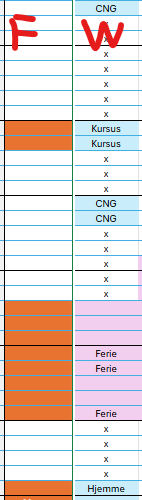
I need conditional formatting, where the color of the cell in column F is changed based on the value in the cell in column W in the same row: I have done it like this: The cell F119 changes colour to orange if this is true: =OG($W$119<>"x";$W$119<>"CNG") This works fine. But I have not been able to find a way to make one rule do this for the entire column. So I have set an individual rule for each cell in column F and I have 376 rows so far. When I need to change the rule, or troubleshoot the rule, this is not operable. Also a lot of the cells have been edited with copy-paste, and now the conditional formatting is all over the place 😒 I would prefer one single rule, that checks the cell in column W in each row, and changes the colour in cell F in the same row, if the conditions are true.Solved44Views0likes1CommentExcel changes multiple series colors at once
I have a simple X-Y chart with five series of markers, no lines. When I change the color of the markers on Series 5, Series 1 also changes to the same color, and when I change Series 1 back to the color it was, Series 5 also changes. It's like they've been linked somehow. Has anyone else seen this issue?27KViews0likes11CommentsMO 365 Excel - Difficulty Changing a Date format
I am using MO 365 - apps for Business, currently received an Excel Spreadsheet and am attempting to change date format in Excel and have tried all the usual methods however the dates remain unchanged. I need to change the date from month /day/year as 1/31/2025 to Year/Month/Day 2025/1/31 Any Suggestions? Thanks CJ61Views0likes2Comments
Pivot Table
Hello, I am currently working on several dashboards that include multiple Pivot Tables Is there a way to filter data using the Filters field in Pivot Table design with conditions such as "greater than", "less than", etc..? At the moment, I have to manually select each value I want to keep, which is quite frustrating when the selection is huge It would be very helpful to have condition filtering available in this area Could you consider adding this feature in a future update ? Thanks in advance,34Views0likes1Comment
Creating weekly calendar template that has overlapping positions
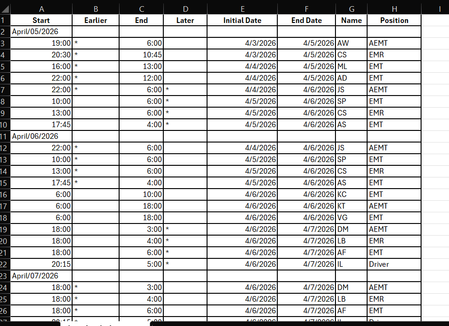
Hi, I have a software for individuals to sign up for shifts, but it is visually hard to see where there are open areas that need to be filled. I need help creating a calendar from this software download that I can update each week. It would have to be much like an hourly scheduler view to easily see when someone is coming on and off shift. But also laid out from Sun-Saturday. There is 3-4 "slots" for each day. It would be great if they could be color coded as well. Slot 1 needs to be anyone that is "AEMT" in the position column, Slot 2 can be anyone listed as "EMT" or "EMR" (caveat to this would be that slot 2 could also be AEMT if there is already an AEMT in slot 1 for the same time slot. Slot 3 is for driver or ride along (or the other 3 positions if there is one listed in the other slots), and possibly 4th slot would just be overflow in case there were 4 people signed up which does not happen very often. Is there anyone who can help me with designing this? Below is what the software generates when converting to excel132Views0likes5Comments