excel
43722 Topics
Formula for Complex Matrices
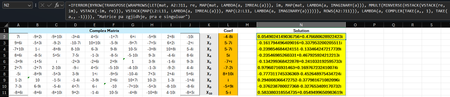
Hi Microsoft Community Hub, I am excited to share a new method I have developed for solving matrices with complex numbers. As many of you know, handling complex matrix operations in environments like Excel or during manual computation often requires separating real and imaginary parts, which increases complexity and the margin for error. I have conceptualized the formula which streamlines this process by providing a more direct approach. This is a dynamic formula and this formula works for any dimension of matrix (see the screenshot below). =IFERROR( BYROW(TRANSPOSE(WRAPROWS(LET( mat, A2:J11, coef, L2:L11, re, MAP(mat, LAMBDA(a, IMREAL(a))), im, MAP(mat, LAMBDA(a, IMAGINARY(a))), MMULT(MINVERSE(HSTACK(VSTACK(re, im), VSTACK(-im, re))), VSTACK(MAP(coef, LAMBDA(a, IMREAL(a))), MAP(coef, LAMBDA(a, IMAGINARY(a)))))), ROWS(A2:J11))), LAMBDA(a, COMPLEX(TAKE(a,, 1), TAKE(a,, -1)))), "Singular Matrix") Linkedin GitHub I hope this solution helps someone. Best regards, IlirU87Views0likes4Comments
Excel Pivot Table shows all records but one row is displaying blanks for some columns
Hello, My Excel pivot table returns all rows that should be returned according to filters applied directly to column filters in the pivot table itself, or via some Slicers that I've created off of this pivot table. For 2 particular Business Units, there is one row (again, that is properly returned as a row in the filtered pivot table - i.e., no 'missing' records) that shows values in the first 4 columns of the pivot table, but does not display the values in the subsequent 9 columns, despite the fact that the data is fully populated in the Source data. The one source field I've added to the 'Values' section of the pivot table (Report Count) does display values as expected. Troubleshooting tried so far: I've ensured that my Named Range data source is properly capturing the entire source dataset - i.e., no dataset rows or columns left off I've refreshed my pivot table numerous times after changing filters directly in the pivot table itself, as well as changing the filters in Slicers built off of that pivot table. In the Pivot Table Options, on the 'Data' tab: the 'Number of items to retain per field' is set to 'None'. And the 'Save source data with file' check box is not checked off. I've deleted/re-added the source data for the problematic, 'invisible' pivot table columns (not showing the data as expected) and refreshed the pivot table, but that did not correct the issue. I inserted a blank row adjacent to 1 of the 2 problematic records in the source data and copied the data from the problematic record into it, and deleted the original record and refreshed my pivot table, which also did not remediate the problem. I've also built another pivot table in the same workbook on a different Excel worksheet (using the same Named Range data source) and added all the same fields for one of the problematic records and they are all displaying normally. The only error message of any kind that is generated is when I go to one of the problematic records in the pivot table itself, select one of the cells in that row that is displaying a blank and then try to click on the Formula bar - the error message is, 'We can't change this part of the pivot table'. But, I believe this is a normal message if Excel senses that you're trying to update data in a pivot table. There are no error other messages or difficulty refreshing to report. Other relevant points: All told, I have 239 total rows in my source data, and all rows appear normally in the pivot table with the exception of these 2 problem records. There have been no other performance/display issues of concern outside of this one. This Excel workbook is mainly utilized on SharePoint by multiple Users, but for more complex updates/troubleshooting, I am easily able to bring it down to work in Excel Desktop as needed - and this problematic display with these 2 records is present regardless of whether I'm working with the file on SharePoint or with Desktop Excel. I can't think of what else to try at the moment - I've never seen anything like this in my 25+ years of working with Excel. I hope I'm missing something simple - any troubleshooting suggestions are greatly appreciated!28Views0likes1Comment
I want to record a VBA macro. The Record Macro button only records OfficeScript. How?
I saw another post drawing the disctinction between the Automate toolbar tab and the Developer tab, but that distinction doesn't seem to work anymore. The Record Macro button only produces script. Is there another way to get VBA recording?20Views1like1CommentHovering Over Notes No Longer Working
Sometime over the past week or so, none of my Excel 365 Notes will display when I hover my mouse over a cell with a Note. This issue occurs in every workbook I open or create. My guess is that it's due to one of my recent updates for the Office Insider program. Please advise.Solved31KViews0likes27CommentsCreating weekly calendar template that has overlapping positions
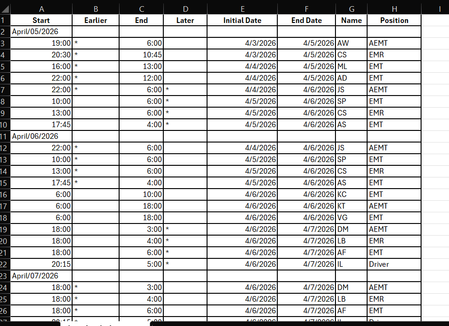
Hi, I have a software for individuals to sign up for shifts, but it is visually hard to see where there are open areas that need to be filled. I need help creating a calendar from this software download that I can update each week. It would have to be much like an hourly scheduler view to easily see when someone is coming on and off shift. But also laid out from Sun-Saturday. There is 3-4 "slots" for each day. It would be great if they could be color coded as well. Slot 1 needs to be anyone that is "AEMT" in the position column, Slot 2 can be anyone listed as "EMT" or "EMR" (caveat to this would be that slot 2 could also be AEMT if there is already an AEMT in slot 1 for the same time slot. Slot 3 is for driver or ride along (or the other 3 positions if there is one listed in the other slots), and possibly 4th slot would just be overflow in case there were 4 people signed up which does not happen very often. Is there anyone who can help me with designing this? Below is what the software generates when converting to excel31Views0likes0CommentsSTOCKHISTORY and Stock Data not working
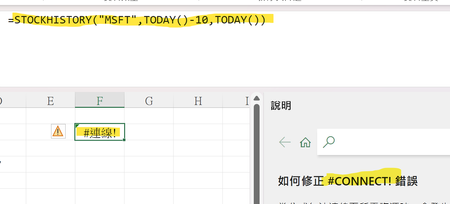
Is it only me? Or everyone else having the same problem? My Excel 365 cannot use STOCKHISTORY Function anymore. It shows #connect! Error. Also, I cannot use the stock data anymore. (The other data types are not functioning as well.) (The error message says "Sorry, we are having a temporary server error. We are trying to fix this problem.") Is it only me? Or everyone else is having this problem?Solved1.1KViews14likes29Comments
Excel editing Conditional Formating rules cursor issue
Hi, using Excel Office365, when I want to edit a conditional formatting rule (I had created, minutes ago) , when right clicking on the specific part of the rule to edit with the mouse, the edit cursor does not positioned where is the mouse cursor .In fact the cursor is blicking on the right side of the rule, and if I move the mouse to the very left at the beginning of the rule, the edit cursor eventually is positioned at the end of the word contracted and(left($AP4,10)<>"Contracted"),$AV4<4) I feel like there is a glitch between the movement of the mouse, and the movement of the cursor. Weird and only happen with this edition of rule, no where else. The only way is to completely scrap the rule and rewrite it. Boring Any idea welcome5.6KViews3likes7Comments
Microsoft Excel Update Changed Formula
I've used Excel for the last 2-3 years to track changes in a sheet by month the data listed is added or changed. The formula I've used worked fine until today, when I started receiving an _xlfn in the formula. It now reads as follows: =IF(ISBLANK($A6),$A2,IF((_xlfn.MAXIFS(A$7:A$41,D$7:D$41,">"&0))>=$A$2,_xlfn.MAXIFS(A$7:A$41,D$7:D$41,">"&0),"")) My goal was to have Excel look if there were updated values in D6 and enter the most recent date associated with that value from A6 to A41. Does Excel no longer support MAXIFS?87Views0likes3Comments
Add secure additional workbook and worksheet protection Use MS account
Instead make the workbook protection including locking cells and editing printing all the features associated with locking a workbook and worksheet away from a password. Instead have it linked to the Microsoft User Account and therefore the workbook or worksheet can only be edited by the creator when they are logged into their account and open the workbook. The current password way is not secure as we all know. If the formulas are encrypted (tied to our Microsoft account), then they never get decrypted on the end user’s machine, so there’s nothing for a hacker to inspect and steal. We would also need to lock or disable macros for untrusted users, VBa would also be hidden from those who are not logged into the creators MS account. This would greatly enhance the security of how office files are shared. The option to use the existing password system could still be selected as an option for those users who prefer it. But add this method of protection in there for those who really need it secure. No additional software would need to be installed or anything. No Azure rights management or anything. No Purview. These features simply dont let a user open the document unless they have rights. We want to share excel files with other users but restrict what they can do with them. Why using Microsoft Account would be more secure Password hashes wouldn’t live inside the file anymore (as they do with current sheet/workbook protection, which is why VBA can brute-force them quickly). Encryption keys could be tied to the user’s identity (e.g., your Microsoft account generates or retrieves a decryption key from Microsoft’s key service). Without that authenticated session, the file cannot be decrypted. Cloud-backed key management would allow revocation — if your account is disabled or you revoke access, the workbook becomes unreadable. Conditional access could apply (require MFA, only allow corporate devices, block risky sign-ins). All creator data is tied to MS account and therefore undetectable and locked to any who are not the creator of the locked document.94Views1like4Comments