Forum Discussion

Help with data fields
- Nov 22, 2022
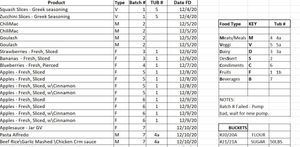
Actually, it occurs to me that if you are not in a position to upgrade to the more current version of Excel, you may be almost as well served by just doing this filtering manually. Are you aware of the tool bar selection, under "Data" called Filter? I've highlighted the section of the tool bar here in this image.
What that does is give you the ability to "manually" filter the data in a table such as yours by selecting the value you want to use.
Notice the little "filter" symbol in the header row. I've used it to select "1" under TUB #, and that filters the entire table so that only the rows with "1" in that field are shown.
Notice the row designations along the left side: there are rows missing now, rows that contain other Tub# values.
You can then copy them manually to a separate sheet, as I've done in the attached file. This is nowhere near as efficient as the FILTER function, which operates dynamically and in real time.....but if your need is to get occasional extracts like this, it may serve you adequately.

First some bad news: You'll need to upgrade to Excel 2021 to get the FILTER function to work. That is probably why it didn't work for you.
Then the good news. I think it would be worth it for your organization to upgrade. If it's not possible, please come back and let me know. There are functions in the older version of Excel that could also work, but less easily.
The FILTER function, as I expected, works easily. I've attached a copy of your workbook.
- In it you'll find a new tab named "Filtered."
- On the "Filtered" sheet there is a cell (H2) where you can select a Tub#
- Then on the left, all of the entries corresponding to that Tub# will appear.
Here are several examples. First, for Tub #1 (the list continues below the image shown)
Here for Tub #2
Finally for Tub #3 (you'll be able to do each tub; these are just examples)

Thanks so much that was definately more code than I knew how to create.
One small problem, it shows tub 3 fine on filtered tab, but when i use the pull down carot to choose a differnt tub, no numbers are listed for choice.
I tried just typing in number 2 --- nope IT GAVE ERROR Name### in all the rows.
Was I dooing something incorrect?
Please advise.... And btw THANKS!!!! so much for your invaluable help with my data issues.
- mathetesNov 22, 2022Gold ContributorYou didn't read all of my message. Specifically you skipped the very first line, where I mention "the bad news": It's not working for you because your version of Excel is too old. So see my newest message for the "manual" way to do it.
But I really would encourage you to see if you can upgrade (or persuade your boss or whoever needs to be persuaded)- Jon__ScottGunnysM60Nov 22, 2022Copper Contributor
I actually realized it wasnt vr 2016 but 2019 .
I did uninstall 2019 and installed 2021
had the same results. Yes I read the bad news part also 🙂 Thanks again for your efforts! Outstanding
Jon Scott
USMC Ret.
- mathetesNov 22, 2022Gold Contributor
I did uninstall 2019 and installed 2021 had the same results
I hope you mean that, with the 2021 version of Excel installed, the FILTER function version then was working for you. That is a function that has lots of applications.