Forum Discussion

Help sorting in Excel
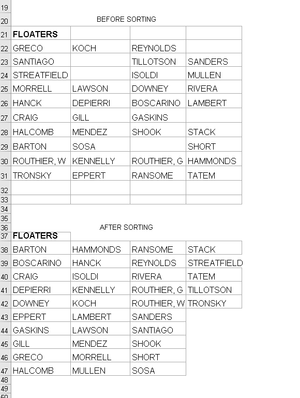

The is nothing special about the result; the point is that this was the first time I had ever put together M code using the advanced editor!
let
    Source = Excel.CurrentWorkbook(){[Name="tblNames"]}[Content],
    SortedList = List.Sort(
        List.Distinct(
            List.RemoveNulls(
                List.Union(
                    Table.ToColumns(Source)
                )
            )
        )
    ),
    n = 1+Number.IntegerDivide(List.Count(SortedList),4),
    LoadToTable = Table.FromColumns(
        List.Split(SortedList,n),
        Table.ColumnNames(Source)
    )
in
    LoadToTable
Thank you for the model code and guidance.

The only what is discussable here is
n = 1+Number.IntegerDivide(List.Count(SortedList),4)why the magic 4 appeared. But that's not clear from the specification - shall resulting table be the same size as the source, or or only same number of columns, or some number of rows and doesn't matter how many columns. If 4 is predefined when no problems, otherwise it shall be calculatable.
- PeterBartholomew1Aug 04, 2020Silver Contributor
True. The 4 should have been
Table.Column.Count(Source)I wanted to change the functionality, just for the same of doing something different as an exercise. The useful side effect is that the process copes better with the situation in which more than a quarter of the cells are null, which potentially reduces the output to 3 columns, depending on the algorithm.
I decided to maintain the number of columns but reduce the records. I do not know what the OP would have wanted, but I suspect he has long since left the discussion.