Forum Discussion

Add a new customer to a list of customers in a table
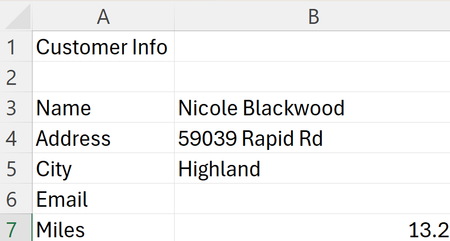


- SeanHaynesJun 19, 2024Copper ContributorI've done some work to make my spreadsheet easier to use and read. I'd like to change:
arr = Application.Transpose(Sheets("New Customer").Range("A29:A53").Value)
to refer to Sheets("New Customer").Range("B15:AG15")
thus eliminating the need for the Transpose function.
I just don't understand VBA enough to make this change.- peiyezhuJun 20, 2024Bronze ContributorThat is true. You got it.
- peiyezhuJun 20, 2024Bronze Contributor
The reason for using `Application.Transpose` in this context is to effectively convert a column range into a row range. By default, the array created from a column range is vertical (one column wide and multiple rows tall). However, when you want to paste this data into a row horizontally, you need to transpose the array so that it becomes horizontal (one row wide and multiple columns tall).
In this code, `arr = Application.Transpose(Sheets("New Customer").Range("B3:B7").Value)` is transposing the column range "B3:B7" from the "New Customer" sheet into a horizontal array. This allows the data to be pasted into the "All Customers" sheet as a row in the specified location.
The use of `Application.Transpose` is a common technique to manipulate array orientation in VBA, especially when dealing with transferring data between rows and columns.