Forum Discussion

icey_wu
Oct 20, 2020Copper Contributor
Compatibility View Settings
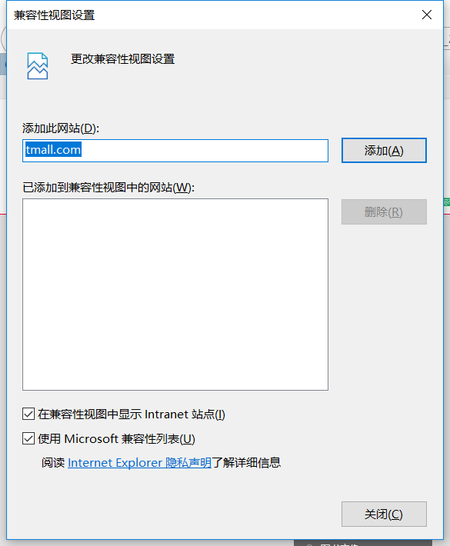
IE browser has compatibility view setting. How to set it in edge?

HotCakeX
Oct 23, 2020MVP
It's this: edge://settings/defaultBrowser
but you said you can't have it, so your option is GPO
but you said you can't have it, so your option is GPO

icey_wu
Oct 26, 2020Copper Contributor
If I enable ie compatibility through group policy, users can choose whether to use IE compatibility mode.
Can the compatibility view in ie be achieved by opening ie compatibility mode in the figure below?
- HotCakeXNov 05, 2020MVPNo, only the latest IE.
why do you even want to use yet an older version of IE? you really, i mean really, need to develop your website using more modern code. - icey_wuNov 05, 2020Copper ContributorAre there any settings in edge to use the old ie engine?
- HotCakeXNov 03, 2020MVPThe compatibility view in Internet explorer is Not the same as Internet Explorer compatibility in Edge.
in Internet explorer, compatibility means using an older engine of IE.
in Edge, compatibility means using latest IE engine, inside Edge, for websites that can't be displayed in Chromium. - icey_wuNov 02, 2020Copper Contributor
Hello, I only got the following results through group policy. You can find the option to open in IE mode in more tools
But now I have a website. Originally, I opened the compatibility view in ie, and then opened it after canceling the option of red box in the figure below.
So my question now is, can I use IE mode in edge to achieve my original effect in IE? Do not need to do other configuration?
- HotCakeXNov 02, 2020MVPOkay this is really confusing now.
use this
https://techcommunity.microsoft.com/t5/discussions/compatibility-view-settings/m-p/1821525/highlight/true#M37356
that you said you could get from group policy - icey_wuNov 02, 2020Copper ContributorI've turned on IE mode, but I haven't found the relevant settings
- HotCakeXNov 02, 2020MVPIf you website only loads when you don't check those boxes then don't do that, instead use the this: edge://settings/defaultBrowser
to reload website on demand in IE mode - HotCakeXOct 30, 2020MVPSorry I don't remember the English title of those check boxes, don't know what they are for..
- HotCakeXOct 28, 2020MVPOh, well yes the button does what it says, users can use it to run a website in IE compatibility mode on demand.
- icey_wuOct 27, 2020Copper ContributorI get this option by setting group policy
- HotCakeXOct 27, 2020MVPSo you have that option after all, how did you get it? last time you said you didn't have it