We are excited to announce the public preview of Argo CD in the Azure Portal for Azure Kubernetes Service.
As GitOps becomes the standard for deploying and operating applications at scale, customers need a way to adopt GitOps with simpler onboarding, secure defaults, and integrated workflows. With Argo CD now available directly in the Portal, teams can enable and manage GitOps without the complexity of manual setup.
Bringing GitOps into the AKS experience
Argo CD is widely used across Kubernetes environments, but setup often requires manual configuration across identity, networking, and registry integrations.
With the Azure Portal experience, customers can:
- Enable Argo CD directly from the AKS cluster
- Configure identity, access, ingress, and registry integration in a guided flow
- Manage and monitor GitOps workflows through Argo CD UI
This reduces onboarding friction and helps you reach your first successful GitOps deployment faster.
GitOps Blade showcasing the new Argo CD extensionTrusted identity and secure access
The Argo CD experience integrates with Microsoft Entra ID to provide a secure, enterprise-ready foundation:
- Secure authentication using Workload Identity federation to Azure Container Registry (ACR) and Azure DevOps, removing long-lived credentials and hard-coded secrets
- Single Sign-On (SSO) using existing Azure identities
Enterprise-grade hardening and security
This preview includes built-in improvements to strengthen security posture:
- Images built on Azure Linux for reduced CVEs and improved baseline security
- Optional automatic patch updates to stay current while maintaining control over change management
Parity with upstream Argo CD
Argo CD in AKS remains aligned with the upstream open-source project, supporting:
- High availability (HA) configurations for production workloads
- Hub-and-spoke architectures for multi-cluster GitOps
- Application and ApplicationSet for scalable deployment across fleets
Getting Started
We invite you to explore the Argo CD experience in the Azure Portal and share feedback.
To get started, go to your AKS cluster in the Azure Portal, navigate to the GitOps experience, and select Enable Argo CD. Follow the guided setup to configure identity, access, ingress, and registry integration with secure defaults.
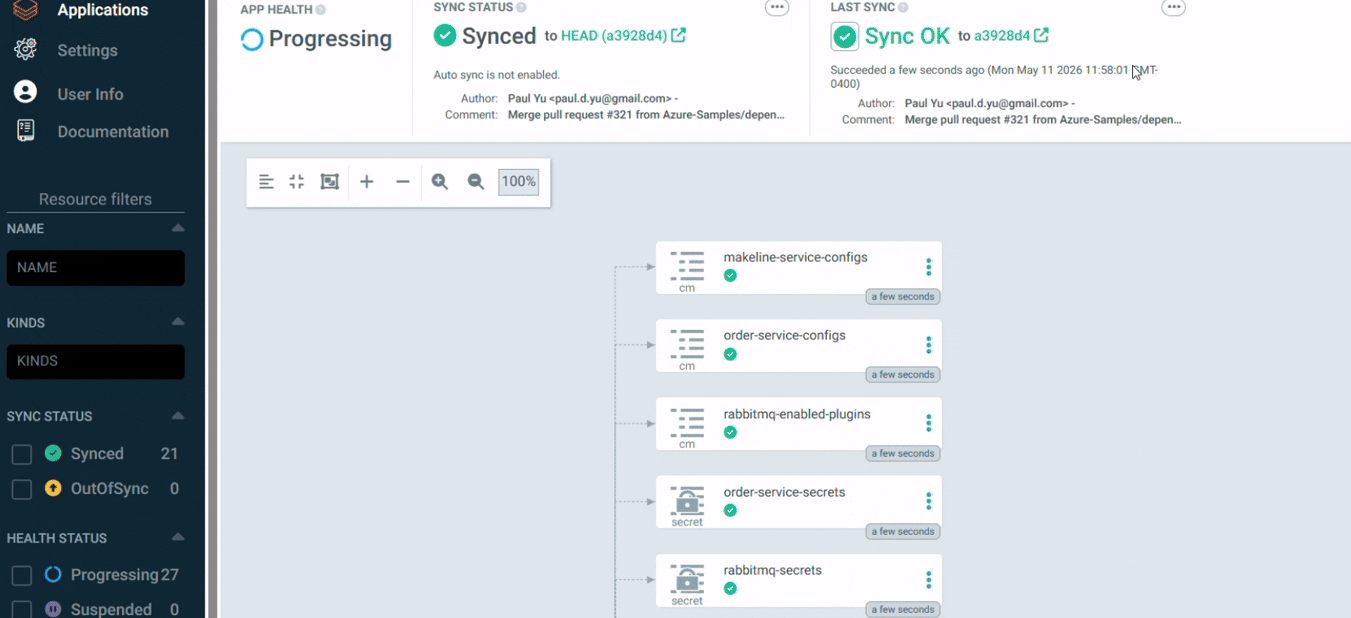
Once enabled, you can monitor your deployment and view application health and sync status from the Argo CD UI linked in the GitOps blade.
Argo CD Management BladeArgo CD UI showing Synced statusFor customers who prefer automation and scripting, the Argo CD extension is also available via Azure CLI public preview.
NOTE: You can choose between Flux and Argo CD as your GitOps solution based on your needs. The Argo CD option is available during the initial GitOps setup experience, while existing Flux users will continue to see their current configuration.

 Microsoft