devops
110 TopicsHow Azure uses AI to turn feedback into improved customer experience
Authors: eshaanbhattad, jenniferjhan, lakshminarasimha, bharadwajr The Challenge: Synthesizing fragmented feedback signals, to improve Azure's experience quality at scale Customers experience products and services end to end, but product experiences are often structured around individual service. One team may only know its top issues, while another may see only its own slice of experience. That structure makes it difficult to identify cross-cutting friction across the broader product experience. The feedback signals themselves are also fragmented. Customers share feedback through in-product surveys, support cases, field conversations, and social channels. Most product teams can see only part of that picture, making it hard to distinguish isolated comments from meaningful trends, understand which issues were having the greatest impact, and avoid missing critical feedback. For the Azure team, the challenges of fragmentation were amplified by scale. The team processed roughly 10,000 to 15,000 customer feedback reports each month, and synthesizing that feedback required 80 to 100 hours of expert analysis. Additional effort was needed to translate findings into consistent engineering work items. As feedback volume grew, manual analysis became increasingly unsustainable creating delays in identifying and addressing customer priorities. Compounding the challenge was the absence of an effective feedback loop to measure the impact of quality improvements. Teams struggled to justify investments in quality over new features because the return on those investments was difficult to quantify. The absence of a closed-loop measurement system made it difficult to consistently assess the customer impact of quality improvements. The team needed a system that could operate across organizational boundaries and across the product development lifecycle: Identify the most critical customer issues across fragmented feedback channels and product areas. Convert those insights into actionable engineering work, help teams address issues effectively, and measure outcomes to close the loop. The solution needed to preserve team-specific context, maintain auditability, continuously improve through feedback, and keep human experts in control of decisions that require judgment. To address these challenges, Microsoft launched the Great Experiences Matter (GEM) initiative. GEM is designed to analyze feedback signals in aggregate, with access controls and privacy safeguards designed to limit exposure of customer-identifiable information while helping teams identify patterns across channels. The Solution: an agentic feedback-to-fix loop with humans in control GEM created an AI-enabled feedback-to-fix workflow that connects customer listening, engineering action, and impact measurement across the product development lifecycle. The workflow uses Microsoft Foundry, Azure Data Explorer, Microsoft Fabric, Azure DevOps, and a set of custom agents to transform large volumes of qualitative feedback into prioritized insights and actionable engineering work. Fig 1. GEM AI-enabled automation workflow The system closes the loop through two connected motions. Find. Agentic workflows remove noise and duplicate reports, assess relevance and actionability, classify feedback against known issues from UX research, cluster related issues, and surface likely root causes. GEM builds on years of deep end-to-end UX research that has identified systemic friction across customer journeys and product boundaries. By continuously triangulating GEM signals with ongoing research, we combine broad, scalable listening with deep human insight to inform a more cohesive Azure experience. The results are surfaced through global scorecards for cross-cutting Azure issues and vertical scorecards tailored to individual product teams. Fig 2. GEM Global scorecard of top issues with Azure, data has been fictionalized to protect intellectual property Fix. The workflow creates Azure DevOps work items with the customer context, likely reproduction steps, recommended next actions, and an auditable trace of the supporting analysis. To date, 42% of the identified issues have been addressed through engineering action. The team is also extending an AI-assisted engineering workflow, using GitHub Copilot cloud agent, that can generate proposed fixes for straightforward issues. Engineers remain responsible for reviewing, refining, approving, and shipping any changes. The architecture is designed for inspection rather than blind automation. The recommendations include an auditable evidence trail allowing reviewers to inspect the source feedback, classifications, supporting references, confidence indicators, and recommendation actions. Human expertise enters the system at several points. Researchers shape the issue taxonomies and qualitative grounding. Product teams define ownership boundaries, business priorities, domain-specific vocabulary, and trusted sources that guide agent analysis. Engineers review and act on resulting work items, while leaders use scorecards to inform investment decisions. This context is captured in configuration files that evolve alongside the products they support. Teams can add new issue categories, refine keywords, clarify ownership boundaries, or identify trusted research sources. The next analysis cycle automatically incorporates the updated context without requiring changes to the underlying agents. That design creates a "feedback loop for the feedback loop". Teams review the root-cause analyses and work-item quality, identify gaps, and refine their configurations. This enables teams to continuously embed domain expertise into the workflow, improving how feedback is interpreted and prioritized without requiring changes to the underlying infrastructure. Their input improves subsequent runs, helping the system become more precise while preserving local product knowledge. The agent also maintains access to reports from previous runs and uses tools such as Web IQ and MCP servers to assess whether previously identified issues are improving, still require attention, or can be confidently closed. Fig 3. Example of the vertical feedback agent reasoning through customer feedback to find new work items One demonstrated example surfaced customer reports that a networking tool lacked IPv6 validation and support. The workflow generated an engineering work item describing the issue, customer impact, likely reproduction path, and recommended actions. The networking team reproduced the issue, validated the finding, and added it to its backlog. The goal is not to remove people from the process. Agents assume much of the cognitive load associated with sorting, clustering, tracing, and drafting, allowing experts to focus on judgment, prioritization, and implementation. Teams remain accountable for what is fixed, what is funded, and what is allowed to ship. The Impact: measurable experience gains at Microsoft production scale GEM began with manual interventions and is now scaling through AI-enabled workflows. The combined approach has produced measurable results across the Azure Portal and individual product experiences: The workflow aggregates and analyzes approximately 10,000 to 15,000 feedback reports each month across in-product, support, and social channels. Automated analysis reduced manual synthesis time by over 95 percent, turning a process that required 110 to 160 hours each month into a workflow that runs in under 60 minutes. Between October 2025 and April 2026, Azure Portal feedback rates declined by 30%. During that same period, GEM helped teams identify and prioritize experience improvements, creating a clearer link between customer feedback, engineering action, and outcome measurement. Service-level outcomes also demonstrate how better signals can drive business impact. For example, improvements to VM Connect experiences reduced overall Core Compute support volume by 1-2% per month, resulting in proportionate cost savings. The Azure Growth team increased subscription conversion by 9.1 percent after prioritizing issues highlighted through GEM. The value goes beyond speed. Leaders gain a more consistent basis for prioritization, and engineering teams receive work that is already connected to customer evidence and impact signals. Most importantly, every completed cycle creates new learning. Teams can measure changes in customer feedback and support volumes following improvements, incorporate partner input into future analyses, and continuously refine both the system and the products it helps improve. Key learnings and transferable practices The GEM experience offers several lessons for teams building agentic systems around complex, qualitative business processes: Start with real problems, not AI - Value comes from understanding the genuine business needs and applying AI where it is demonstrably better than existing approaches. Applying AI without a clearly defined problem often adds complexity without delivering meaningful value. Design for the end-to-end workflow - Value comes from connecting insights to the broader business process, including grounding in prior knowledge, prioritization, engineering action, post-fix measurement and reporting. Standalone AI output creates limited value, while an integrated workflow drives outcomes. Design for human judgment and accountability - Agents can reduce toil and cognitive load, but researchers, product managers, engineers, and leaders remain responsible for validating insights and determining appropriate actions. Ground agents in the knowledge of the teams they serve - Shared models require local context. Editable configuration files allow teams to define ownership, business priorities, releases, examples, and trusted sources without modifying underlying agents. Build observability and feedback mechanisms into the agentic system itself - Making analysis inspectable through reasoning traces, source context, and recommendations enables experts to identify gaps, improve outputs, and build trust over time. Build feedback mechanisms directly into the flow of work, making it effortless for users to provide input on the system. Tailor outputs to the people making decisions - Executives need trends and investment signals. Researchers need evidence and themes. Engineers need reproducible, actionable work. Effective systems deliver the right information to the right audience. Start small and iterate quickly - The AI landscape continues to evolve rapidly. Begin with a well-defined problem, measure outcomes, learn from feedback, and iterate as capabilities mature. Looking forward GEM continues to scale across the Azure Portal ecosystem. In addition to the global scorecard, vertical scorecards are now live with seven teams, expanding to the top 20 portal extensions representing more than 80% of portal traffic and feedback, with longer-term plans to extend coverage across the entire ecosystem. The roadmap includes expanded feedback ingestion, streamlined work-item tracking, AI-assisted remediation workflows, stronger evaluation, and a self-improving architecture. Proposed fixes would remain subject to engineer review, approval, and standard release controls before deployment. GEM is also developing AI-assisted pre-release governance workflows for production code that help identify potential quality issues during development. We will share more about these pre-release workflows in a future post. New tools and models will continue to evolve, but the enduring principle remains the same: combine enterprise-scale automation with clear ownership, trusted grounding, and human control. For Microsoft, Customer Zero means deploying these systems in real production environments, learning from the complexities, and sharing those lessons broadly. GEM shows what becomes possible when AI does more than summarize feedback. It helps an organization listen, act, measure outcomes, and continuously learn at customer scale. Microsoft's Customer Zero blog series gives an insider view of how Microsoft builds and operates Microsoft using our trusted, enterprise-grade agentic platform. Learn best practices from our engineering teams through real-world lessons, architectural patterns, and operational strategies for building, operating, and scaling AI-powered systems across the organization.755Views2likes0CommentsWiring Azure DevOps Pipeline Templates Without the Parameter Sprawl: The Manifest Facade Pattern
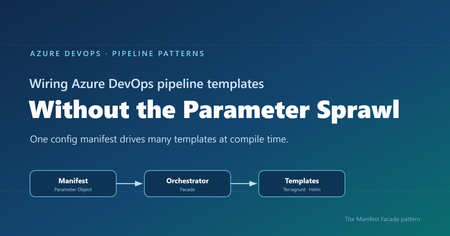
Where reusable pipelines start to hurt Who this is for: Platform and DevOps engineers who build shared Azure DevOps Pipeline Templates and want other teams to adopt them consistently. If you have ever built a set of shared Azure DevOps Pipeline Templates, you probably know how this goes. You write a whole library of clean, well-factored templates: provisioning infrastructure, deploying apps, scanning, promotion, and more. Each one is tidy on its own. Then the first team tries to actually use them together, and things get messy fast. That is exactly what happened to us on a customer engagement, while building a DevOps framework for their engineering teams. The templates themselves were fine. The trouble was wiring them together. Every consumer pipeline had to know how to call each template it used: the right order, which values one template fed another, and the full parameter list for every one of them. As the library grew, those consumer pipelines grew with it, long and repetitive. That friction turned into a real adoption problem. Getting started meant wading through pages of parameters, so teams put it off, copied whatever the team next door had, or quietly built their own thing instead. This post follows that story, from the tangle of parameters to the solution we landed on. Here is how it comes together. Where we started: Good templates, hard to adopt The DevOps framework we built had many templates. To keep this walkthrough concrete, we will follow just two of them: one that provisions infrastructure with Terragrunt (a wrapper around Terraform), and one that deploys an app to Kubernetes with Helm. Both are trimmed down to the essentials here so they are easy to follow. The infrastructure template, templates/infra/terragrunt-deploy.yml : parameters: - name: stack type: string - name: workingDir type: string steps: - script: | cd ${{ parameters.workingDir }} terragrunt plan -out=tfplan terragrunt apply -auto-approve tfplan displayName: "Deploy ${{ parameters.stack }}" The application template, templates/app/helm-deploy.yml : parameters: - name: releaseName type: string - name: chart type: string - name: namespace type: string - name: imageTag type: string steps: - script: | helm upgrade --install ${{ parameters.releaseName }} ${{ parameters.chart }} \ --namespace ${{ parameters.namespace }} \ --set image.tag=${{ parameters.imageTag }} displayName: "Deploy ${{ parameters.releaseName }}" There is nothing wrong with either file. The pain showed up in the pipeline that had to use them, where a team had to stitch the templates together by hand, remember the order, and repeat that boilerplate for every environment. Do that across a dozen services and you get long, copy-pasted pipelines that teams struggle to adopt. And because the wiring is done by hand, it leaves loopholes: a team can skip a step or override a parameter and slip past the guardrails you thought were in place. Challenge 1: Wiring the templates together The obvious move was to hide the wiring behind a single template that owned the order and the plumbing. We called it the orchestrator template: a consumer pipeline called that one template, and it wired up the rest. # templates/deployment-orchestrator.yml (the single orchestrator) parameters: - name: infraStack type: string - name: infraWorkingDir type: string - name: releaseName type: string - name: chart type: string - name: namespace type: string - name: imageTag type: string # ...and this list just kept growing stages: - stage: Infra jobs: - job: infra steps: - template: infra/terragrunt-deploy.yml parameters: stack: ${{ parameters.infraStack }} workingDir: ${{ parameters.infraWorkingDir }} - stage: App dependsOn: Infra jobs: - job: app steps: - template: app/helm-deploy.yml parameters: releaseName: ${{ parameters.releaseName }} chart: ${{ parameters.chart }} namespace: ${{ parameters.namespace }} imageTag: ${{ parameters.imageTag }} A team used it by calling that one template and passing a value for every parameter it exposed: # azure-pipelines.yml (a team's pipeline) parameters: - name: imageTag type: string extends: template: templates/deployment-orchestrator.yml parameters: infraStack: network infraWorkingDir: infra/network releaseName: orders-api chart: charts/orders-api namespace: orders imageTag: ${{ parameters.imageTag }} # ...and a value for every other parameter, too This solved the ordering and the copy-paste, but it handed us a new headache. This one template now had to expose every parameter of every template underneath it, and the list grew each time we added a capability. Worse, a real service usually needed more than one infrastructure stack and more than one Helm release. A flat list of parameters cannot express “two infrastructure stacks and three Helm releases” without silly names like infraStack1 , infraStack2 , and so on. Nobody could learn the thing. We had solved the wiring, only to trade it for a parameter problem. Challenge 2: The orchestrator’s parameter list explodes So how do you shrink that list? Step back and ask what you are really describing: a set of things to deploy. So the input should describe that set, not a long flat list of loose values. That is where the deployment manifest came in: one small config that lists the infrastructure to create and the apps to deploy. It reads about how you would expect: infrastructure: - stack: network workingDir: infra/network applications: - releaseName: orders-api chart: charts/orders-api namespace: orders Now the orchestrator can take that single manifest and loop over it, instead of exposing dozens of separate parameters. Its parameter list collapses to one, and a ${{ each }} loop turns each entry into a stage or job: # templates/deployment-orchestrator.yml (the orchestrator, now manifest-driven) parameters: - name: manifest type: object - name: imageTag type: string stages: - stage: Infra jobs: - ${{ each stack in parameters.manifest.infrastructure }}: - job: infra_${{ stack.stack }} steps: - template: infra/terragrunt-deploy.yml parameters: stack: ${{ stack.stack }} workingDir: ${{ stack.workingDir }} # ...an App stage loops over parameters.manifest.applications the same way And a consumer passes that manifest straight to the orchestrator: # azure-pipelines.yml (a team's pipeline) parameters: - name: imageTag type: string extends: template: templates/deployment-orchestrator.yml parameters: imageTag: ${{ parameters.imageTag }} manifest: infrastructure: - stack: network workingDir: infra/network applications: - releaseName: orders-api chart: charts/orders-api namespace: orders The parameter problem is solved. But hand-writing that whole manifest inside every pipeline is a lot to repeat, so the natural instinct is to pull it out into its own file. That is where things get tricky. Challenge 3: The manifest is read too late to shape the pipeline So we tried exactly that: we moved the manifest into a deployment-manifest.yml file and had the orchestrator read it back and expand it into stages and jobs. It sounded reasonable, but it did not work. To see why, you need to know how Azure DevOps builds a pipeline before it runs anything. An Azure DevOps pipeline actually happens in two phases, and they are further apart than people expect. First comes the build phase, before anything runs. Azure DevOps reads your YAML, pulls in every template, evaluates every ${{ }} expression, and unrolls every ${{ each }} loop. Out of this it produces one final, fully assembled pipeline. At this point no agent has started and no repo has been checked out. Only parameters and template expressions exist yet. Then comes the run phase. The assembled pipeline runs. An agent starts, checks out your code, and only now can a script open a file on disk. Here is the problem. Your deployment-manifest.yml does not exist as far as the pipeline is concerned until an agent checks out the repo, and that checkout happens during the run phase. So if the manifest is supposed to decide how many stages there are, or how many apps each get their own job, that decision has to be made earlier, while the pipeline is still being built. Important: The shape of the pipeline, its stages, jobs, and loops, is locked in while the pipeline is being built. A file you read during the run comes too late to change any of it. That was the wall we hit. The manifest was the right idea, but reading it from a file happened too late for the orchestrator to turn it into stages and jobs. So the manifest could not come from a file read during the run phase. It had to already exist, as an object, before the pipeline was assembled. The Manifest Facade pattern: Build the config while the pipeline is assembled The solution is to stop thinking of the manifest as a file to read, and start thinking of it as an object you build while the pipeline is being assembled. Parameters are available then. Template expressions can build a whole object then. So we added a small template, kept in the team’s own repo, with one job: take a couple of simple inputs, build the full manifest from them, and pass it to the shared orchestrator. We called it the builder, since assembling the manifest is its only job. It stays thin and lives next to the team’s pipeline, while the orchestrator stays in the shared platform repo. This is not a brand-new invention so much as a few familiar ideas working together, applied at pipeline build time. The manifest is a Parameter Object (Martin Fowler’s refactoring for collapsing a long parameter list into one structured value). The orchestrator is a Facade (the Gang of Four pattern for putting one simple, unified interface over a subsystem, here the underlying leaf templates). And the small template in the team’s repo is the piece that assembles that Parameter Object from a couple of inputs. What makes it an Azure DevOps pattern is the timing: the manifest is built as an object while the pipeline is assembled, so it can drive template expansion instead of sitting in a file that only gets read during the run. That is the twist we did not see written down anywhere, so we gave it a name: the Manifest Facade pattern. In practice it comes together in three small pieces: the consumer pipeline references the builder, the builder assembles the manifest and hands it to the shared orchestrator, and the orchestrator expands that manifest into stages and jobs. Here is how the files extend into one another: Here is each piece in turn. Step 1: The consumer references the builder The consumer pipeline extends the builder that lives in its own repo. It also declares the shared platform repo as a resource, so the orchestrator the builder calls is available while the pipeline is built. # azure-pipelines.yml (the team's pipeline) parameters: - name: imageTag displayName: Image tag type: string resources: repositories: - repository: platform type: git name: platform/pipeline-templates ref: refs/tags/v1.0.0 trigger: - main extends: template: config/deployment.yml@self parameters: environment: dev service: orders imageTag: ${{ parameters.imageTag }} Because the image tag is a runtime parameter, it is declared here in the consumer pipeline, which is what makes it appear in the Run pipeline panel for someone to fill in. Beyond that, the team passes only an environment and a service name, and the builder works out the rest. Step 2: The builder assembles the manifest The builder takes those inputs and assembles the whole manifest from them, then hands it to the orchestrator. Every structural value here is a parameter or a template expression, so all of it is ready while the pipeline is being assembled. # config/deployment.yml (builder, in the team's repo) parameters: - name: environment type: string - name: service type: string - name: imageTag type: string extends: template: deployment-orchestrator.yml@platform parameters: imageTag: ${{ parameters.imageTag }} manifest: schemaVersion: v1 infrastructure: - stack: network workingDir: infra/${{ parameters.environment }}/network applications: - releaseName: ${{ parameters.service }} chart: charts/${{ parameters.service }} namespace: ${{ parameters.service }} The builder assembles the manifest inline from the environment and service, then passes it straight to the orchestrator. The image tag is different: it is a runtime parameter the user supplies at queue time, so it is passed through to the orchestrator template and never becomes part of the manifest. The team gets a tiny interface, and the orchestrator still gets the full structure it needs. Step 3: The orchestrator turns the config into stages and jobs The orchestrator takes a single object and loops over it with ${{ each }} . Each stage and job gets generated while the pipeline is assembled. # deployment-orchestrator.yml (shared platform repo) parameters: - name: manifest type: object - name: imageTag type: string stages: # a ValidateManifest stage runs first (covered in the next section) - stage: Infra jobs: - ${{ each stack in parameters.manifest.infrastructure }}: - job: infra_${{ stack.stack }} steps: - template: infra/terragrunt-deploy.yml parameters: stack: ${{ stack.stack }} workingDir: ${{ stack.workingDir }} - stage: App dependsOn: Infra jobs: - ${{ each app in parameters.manifest.applications }}: - job: app_${{ app.releaseName }} steps: - template: app/helm-deploy.yml parameters: releaseName: ${{ app.releaseName }} chart: ${{ app.chart }} namespace: ${{ app.namespace }} imageTag: ${{ parameters.imageTag }} Because the manifest is a real object by the time the loops run, ${{ each }} unrolls it into actual jobs. List two stacks and you get two jobs. List two apps and you get two deploy jobs. And because the team only describes what to deploy, the sensitive wiring like service connections stays inside the platform templates, out of reach. The loophole is gone because the parameter is gone. Why the order of things matters The whole pattern comes down to who does what, and when. The builder turns a simple intent (“deploy orders to dev”) into a full manifest, while the pipeline is being assembled. The orchestrator turns that manifest into real stages and jobs, still while the pipeline is being assembled. Only the leaf templates do the real deployment work during the run: checkout, terragrunt apply , helm upgrade . Nothing about the shape of the pipeline waits for the run, so nothing about it depends on a file that only shows up after checkout. That is the whole trick. If you do have values you genuinely cannot know until the run, like a secret fetched from a vault or an artifact version an earlier stage writes to a variable, those still belong in runtime variables and variable groups. The manifest is for the structure and config you already know when you queue the build, which is almost always the part that was causing the pain. Validating the manifest against a schema Once the manifest became the one interface every team fills in, it needed a contract. We wrote that contract as a JSON Schema and kept it in the shared platform repo under schema/v1/ . The folder name is the version: backward-compatible additions go straight into v1 , and the day we need a breaking change we add a schema/v2/ alongside it, so existing consumers keep working while the schema evolves. Each manifest carries a schemaVersion so the orchestrator knows which contract to hold it to. On top of that, we validate in three layers, each catching a different class of mistake. Layer 1 is build time, for free. Because the orchestrator’s parameters are typed, with manifest declared as an object , Azure DevOps catches a range of structural problems while it expands the templates, before anything runs. For example, if a manifest left out infrastructure or misspelled it, the orchestrator’s ${{ each stack in parameters.manifest.infrastructure }} loop would have nothing valid to iterate over, and the failure would surface during template expansion rather than halfway through a deployment. Layer 2 is a version check that runs at build time. Both the ${{ if }} and parameters.manifest.schemaVersion are resolved while the pipeline is being assembled, so the orchestrator decides right then whether it understands the manifest’s version. If it does not, the only thing it generates is a single failing stage, and the real deployment stages are never built, so nothing runs against a contract the orchestrator does not know: # deployment-orchestrator.yml (shared platform repo) parameters: - name: manifest type: object stages: # Layer 2: reject schema versions this orchestrator does not understand - ${{ if not(containsValue(split('v1', ','), parameters.manifest.schemaVersion)) }}: - stage: UnsupportedSchemaVersion jobs: - job: fail steps: - script: | echo "##vso[task.logissue type=error]Unsupported manifest schemaVersion '${{ parameters.manifest.schemaVersion }}'" exit 1 # the ValidateManifest, Infra, and App stages below are generated only when the version is supported Layer 3 is a run-time check against the full schema. The first stage the orchestrator generates is ValidateManifest . Because the schema lives in the platform repo, the job checks that repo out first. Then it serializes the manifest object to JSON with the convertToJson expression, writes that JSON out to a file, and runs a JSON Schema checker to compare the file against the schema. If the manifest breaks the contract, the pipeline stops here, before any infrastructure or app stage runs: # Layer 3: validate the real manifest object against the JSON Schema - stage: ValidateManifest jobs: - job: validate steps: # the schema lives in the platform repo, so check it out first - checkout: platform - script: | echo '${{ convertToJson(parameters.manifest) }}' > manifest.json pip install check-jsonschema check-jsonschema --schemafile schema/${{ parameters.manifest.schemaVersion }}/deployment.schema.json manifest.json displayName: "Validate manifest against schema" Layer 1 is automatic, Layer 2 rejects an unknown contract at build time so the deployment stages are never generated, and Layer 3 confirms the actual values match the schema before any real work begins. Together they turn “the manifest looked right” into “the manifest is provably valid.” A few trade-offs to keep in mind No pattern comes without trade-offs. A few things worth weighing: The manifest has to be something template expressions can build. You can compose objects, loop, and branch with ${{ if }} , but there is no running arbitrary code while the pipeline is assembled. Anything fancier may need a prep step or a file generated upstream. Every team carries a small builder template. We think that is a fair trade, since it keeps their intent local and readable, but it is one more file per repo. Keep it thin and let the orchestrator hold the real logic. Treat the schema as living documentation. Because the manifest’s JSON Schema spells out every field and what it means, teams can read it to build their own manifest with confidence, instead of reverse-engineering the orchestrator. Pin the shared repo to a tag, like the v1.0.0 above, so a change to the orchestrator does not silently change everyone’s pipeline on the next run. Debugging takes a small shift in habit. When something looks off, use the pipeline’s preview to see the fully assembled YAML before it runs. It shows you exactly what the loops produced. Tip: Use the Azure DevOps pipeline preview to see the fully assembled YAML without running anything. It is the fastest way to confirm your manifest unrolled into the stages and jobs you expected. Wrapping up It is a journey a lot of platform teams will recognize. Clean templates, messy wiring, one orchestrator that fixes the order but drowns in parameters, a config file that brings back sanity, and then the surprise that reading it at the wrong moment means it can never shape the pipeline. The solution is small and it sticks. Put a thin builder template next to each team, let it assemble the manifest from a couple of simple inputs, and let a shared orchestrator turn that manifest into stages and jobs. Teams get an interface they can easily understand and adopt. The platform team keeps the wiring and the guardrails in one place. And the timing gap that trips up so many “just read the config file” attempts stops being a problem, because you are working with it instead of against it. Key takeaways Shared Pipeline Templates stall on adoption when every team has to wire them together by hand. A single orchestrator template fixes the ordering, but a flat parameter list does not scale to real adoption. A config file read during the pipeline run cannot shape the pipeline, because stages and jobs are decided earlier, while the pipeline is assembled. The Manifest Facade pattern builds the config as an object at assembly time, so one small input drives many templates, consistently and with the guardrails baked in. Give the manifest a versioned JSON Schema and validate it in layers, so a broken contract fails fast instead of halfway through a deployment. How are you handling template sprawl in your own pipelines? We would love to hear what has worked for your teams in the comments.376Views1like0Comments
ArchAngel: Skilling the next developer generation for the Agentic transformation.
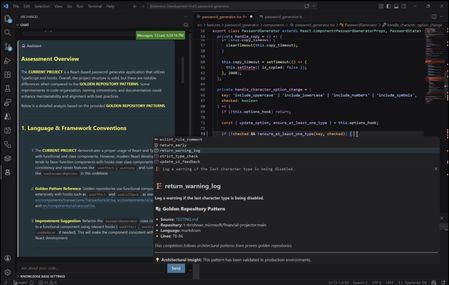
AI is transforming the SDLC at speed but there's a quieter question following close behind. If the code is being written for your junior developers, when do they learn the skills to become senior ones and how can they use these tools without losing understanding of what they've made? Most tools try to solve this by catching issues after the commit, but by then the teaching moment is already gone. What if your developers could learn why something is wrong and how to fix it, as they write it? ArchAngel is built around a simple idea: What if your team’s best engineering practices could exist directly inside the IDE and guide developers as they work? It turns your team's collective wisdom into a mentor that scales to every new hire, every sprint, every repo. GitHub Copilot has led to great strides in reducing developer toil. It allows teams to move faster, automate repetitive work, and spend more time on higher-level design decisions that drive real impact. As these capabilities evolve, especially with more agentic workflows, developers now have even more powerful ways to generate and iterate on code. The next challenge for engineering teams isn’t adoption. It’s how to make the most of these capabilities while maintaining strong engineering standards, consistency, and shared understanding across teams. Even with powerful tools in place, teams still face familiar challenges. Standards are often spread across repositories, documentation, and conversations. Best practices evolve over time but aren’t always easy to discover or apply consistently. Reviews can become repetitive, and senior engineers spend a lot of time reinforcing patterns rather than focusing on system design. AI accelerates development, but it doesn’t automatically understand how your team builds software, the architectural decisions, trade-offs, and conventions that make systems consistent over time. Technically correct code doesn't mean its organisationally aligned. __________________________________________________________________ The Solution: ArchAngel is built for and by developers. It provides a developer driven, AI coding assistant that teaches without taking autonomy. Rather than waiting for devs to commit their code to pick up issues, ArchAngel sits beside through the coding process to guide and provide iterative live feedback. By connecting ArchAngel to your project bases, ArchAngel can be grounded in your 'golden repositories'; The agreed best practices, existing approved repos and organisational standards. ArchAngel can also generate Code Style and Wiki Docs for a quick look summary guide to your best practices, prompting further research. Let's define the tech stack behind this and what makes ArchAngel work: Semantic Kernel and Microsoft Agent Framework (MAF) - Semantic Kernel is a lightweight, open-source development kit that lets you easily build AI agents and integrate the latest AI models. MAF is an orchestration framework that is used to create agents and conversation history to create and support iterative design. Served via Foundry. Introduction to Semantic Kernel | Microsoft Learn Microsoft Agent Framework Overview | Microsoft Learn Microsoft Foundry documentation | Microsoft Learn Language Server Protocol (LSP) - LSP allows you to invoke ArchAngel from any IDE. For VSCode, command palette is used to invoke certain functionality for ArchAngel such as document generation. Official page for Language Server Protocol SQLite - Store your search database locally with SQLite. Config - Setup just like your other dev tools. For VScode, simply load your base repos into archangel.json, authenticate with github and run the "Index from config file" in your command palette. __________________________________________________________________ Meet Priya: A Senior Software Engineer Responsibilities: Design & build scalable software — Architect and deliver high-quality, maintainable systems from concept through to production. Drive engineering excellence — Lead code reviews, enforce best practices, and champion CI/CD, testing, and observability standards. Mentor junior engineers — Coach and develop less experienced team members, fostering technical growth and a collaborative culture. Collaborate cross-functionally — Work with Product, Design, and stakeholders to translate business needs into robust technical solutions. Innovate & improve continuously — Stay ahead of industry trends, reduce technical debt, and drive adoption of tools and processes that elevate team productivity. Meet Joe: A Junior Software Engineer Responsibilities: Write and maintain clean code — Develop, test, and debug features under guidance from senior engineers, following established coding standards. Learn the codebase & tech stack — Ramp up quickly on existing systems, tools, and workflows to become a productive contributor. Participate in code reviews — Submit code for review and actively learn from feedback, while reviewing peers' work to build technical judgement. Collaborate with the team — Contribute to sprint ceremonies, ask questions, flag blockers early, and communicate progress clearly. Invest in personal growth — Pursue learning through documentation, certifications, pair programming, and internal knowledge-sharing sessions. A day in the life Priya is responsible for Joe's development and guiding him to progress his career, however, Priya is extremely busy and she is managing two other junior devs. So reviewing each junior's code to identify the architectural antipatterns and documentation decisions that deviate from best practice, takes time away from the senior work she brings most value to. Enter ArchAngel New hire/Junior joins 4 months into the project with no clue what repos are being used as an example? The dev team used ArchAngel to create Code Style and Wiki Docs so the junior can at a glance view a few of the standards from the repos. The dev team also has the 'golden repos' linked in the ArchAngel config file, so now all the junior has to do is clone, index and start coding. The junior devs use ArchAngel in their VSCode IDE and receive feedback and critique that is educational directly in their IDE as they code, before anything is committed for formal review. Repository informed chat, code completions and docs make onboarding, learning and guiding junior devs an asynchronous task. Giving Priya some breathing room and improving the quality of the PRs her juniors produce! The ArchAngel's educational, constructive criticism and repository-backed way of reviewing code can also be an asset to learn the PR process itself! Learning what ArchAngel looks out for each time, helps to teach juniors to look out for it themselves in PRs and how to critique it with possible alternatives. __________________________________________________________________ Example Architecture: Project Repo: Your project repository, where your team syncs your config files. Setup for success at a team level. Cloud Environment: Where ArchAngel's brainpower comes from. Secure, scale, monitor and govern with the Azure platform to align organisationally. User Environment: Where you and your teams code, build and create the software that powers the business. Fit to your dev team and extend to your tools. Golden Repos: Your golden base of knowledge. This is the indexed and cited source of your coding standards, the team's guiding principle knowledge and the codebases that your team is striving to match at a code quality and standards level. Next Steps: Making ArchAngel For You Configure + Customise ArchAngel to suit your development environment! VNETs (Virtual Networks) enable secure networking configurations within a cloud environment. Enabling your resources and any tools you wish to setup to communicate in secure channels. Azure Virtual Network Documentation - Tutorials, quickstarts, API references | Microsoft Learn Microsoft Foundry - Engage Foundry's full toolset to make ArchAngel customisable and compliant for your organisation. Microsoft Foundry documentation | Microsoft Learn Foundry Tools: What are Foundry Tools? - Foundry Tools | Microsoft Learn API Management (AI Gateway) - Use AI Gateway and APIM to secure, scale, monitor and govern your agents and connections to Microsoft Foundry. API Management documentation | Microsoft Learn LSP (Language Server Protocol) - Add custom event and event handlers through the LSP channels across IDEs. Official page for Language Server Protocol Customisable Document Generation - Refine the prompts that are used to create the documents and format as you wish! The base version is a skimmed document with a few snippets as source designed to be simple to extend. Find the github repo here: rohitmadhavk/ArchAngel: An education coding assistant to help junior devs learn best practice489Views2likes0CommentsDesigning for High Availability: The Operational Reference for Running a Geo-Replicated ACR
By Johnson Shi, Zoey (Zhuyu) Li, Huangli Wu Introduction Three of the most common questions we hear from enterprise teams running geo-replicated Azure Container Registries (ACR) are: "How do I control which region serves my traffic?" — When my AKS clusters are spread across regions, can I pin each one to its co-located replica, or am I stuck with however the global endpoint routes? "What happens during a regional incident — is failover automatic or do I have to act?" — If the registry in one region degrades, does the global endpoint reroute on its own, or do I need to manually disable the affected replica? "What happens after the region recovers — does traffic return on its own?" — Is there a cooldown, a quarantine, or any manual step before failback? We answer those head-on, then go deeper on the operational details that come up when you actually run a geo-replicated registry: authentication across endpoint switches, throttling under load concentration, eventual-consistency failure modes, home region outage scope, webhooks, and private endpoint interaction. We draw on the official geo-replication docs, the global endpoint health-aware failover blog, the regional endpoints engineering design implementation, the regional endpoints public preview and private preview announcements, and the ACR reference for various registry endpoints, . This post also draws notes from the ACR product team on roadmap items that aren't yet documented elsewhere. Key Takeaways Health-aware failover is automatic. When the registry in a region degrades, the global endpoint reroutes away from it on the order of minutes, evaluated per-registry. No customer action required. Failback is automatic too. Once health-aware failover marks a region healthy again, the global endpoint resumes routing to it. There is no cooldown period. Health-aware failover applies only to global endpoint operations. It does not apply to regional endpoints (you're talking to one replica, period) or to dedicated data endpoints (the redirect is per-region). Health-aware failover is not triggered by throttling. It responds to regional ACR service health and Azure infrastructure health, not HTTP 429 responses. Use regional endpoints to manage per-replica throttling. Regional endpoints (Step 2a) give you explicit per-region URLs for workloads that need affinity, capacity planning, push/pull consistency, troubleshooting, or client-side failover. Use myregistry.<region>.geo.azurecr.io . Regional endpoints are available on Premium SKU registries. For workloads that don't need pinning, do nothing (Step 2b). The global endpoint plus health-aware failover handles routing automatically. Re-authenticate when switching endpoints. Each global or regional endpoint is its own authenticated surface; re-auth via az acr login , SDK auth, or the Kubernetes ACR credential provider on endpoint change. Don't run a long-lived DNS cache for the global endpoint. ACR purges DNS server-side on disable and during failover; a long-lived client cache works against that. For production workloads, enable dedicated data endpoints for security and DNS predictability on layer downloads. ACR is working on bounded staleness consistency for cross-replica eventual-consistency failure modes; see the FAQ. Background What is ACR geo-replication? Geo-replication is a Premium SKU feature that turns a single ACR registry into a multi-region, multi-write service. Every geo-replica in every region is writable — you can push, pull, and delete from any of them — and content syncs asynchronously between replicas under an eventual consistency model. Per-push replication time scales with the size and number of images being pushed. Similarly, when creating a new geo-replica, the time to populate the new geo-replica scales with the total size of the registry. A geo-replicated registry exposes a global endpoint at myregistry.azurecr.io . Behind that endpoint, ACR uses an internal traffic manager to direct each request to the replica with the best network performance profile for the caller — usually the closest replica, but not always. When clients are equidistant from multiple replicas, or when the closest replica is experiencing Azure infrastructure degradation, requests may be routed elsewhere. A geo-replicated registry also exposes a regional endpoint at myregistry.<region>.geo.azurecr.io , which allows clients to pin API requests to a specific geo-replica in lieu of global endpoints, which has Azure-managed routing among geo-replicas. Zone redundancy is always enabled for geo-replicas in regions where Azure has multiple availability zones — in those regions, ACR automatically spreads replica data across multiple availability zones within each region to protect against zonal outages. Endpoints and data endpoints: what goes where A common point of confusion: when you push or pull, not every request goes to the same place. The registry endpoints (global endpoint and regional endpoints), as well as the data endpoint, do different jobs. Your choice of data endpoint configuration has real consequences for security and resilience. Two kinds of traffic flow during a typical pull: Registry API traffic — authentication, manifest reads/writes, tag resolution, referrers, repository operations, blob location lookups, listing, metadata. This is everything except the actual layer (blob) bytes. All these API requests go to the global endpoint ( myregistry.azurecr.io ) or, if you've pinned your clients to call these APIs to a specific geo-replica, a geo-replica's regional endpoint ( myregistry.<region>.geo.azurecr.io ). Behind the scenes, the global endpoint internally proxies these requests to a specific geo-replica. Layer (blob) downloads — when the client asks for a blob, the registry doesn't serve the bytes itself. It returns an HTTP 307 redirect to a regional data endpoint (separate endpoint from the global endpoint or regional endpoints), and the client follows the redirect to download the layer from that region. Where that 307 sends you depends on whether you've enabled the registry's dedicated data endpoints feature: Configuration Layer downloads redirect to Default (no dedicated data endpoints) *.blob.core.windows.net (the underlying Azure storage account) Dedicated data endpoints enabled myregistry.<region>.data.azurecr.io for the region you were routed to Private endpoints enabled myregistry.<region>.data.azurecr.io for the region you were routed to Regional by design. Dedicated data endpoints always land you on a specific geo-replica's data endpoint — there is no "global data endpoint." With the global endpoint as your registry endpoint, the 307 redirect picks the data endpoint for whichever region the global endpoint chose to serve you. With a regional endpoint pinned to a specific region, the 307 always redirects you to that same region's data endpoint — never cross-region. Why dedicated data endpoints matter. Dedicated data endpoints are a Premium SKU feature that exists primarily to address security and firewall scoping. By default, layer downloads redirect to *.blob.core.windows.net — a wildcard storage FQDN. Firewall rules to allow that wildcard either let all Azure storage accounts through or none of them, which raises data exfiltration concerns and isn't tightly scoped to your registry. Dedicated data endpoints replace the wildcard with a fully qualified domain in your registry's own domain — myregistry.<region>.data.azurecr.io — so firewall rules can be scoped tightly to your specific registry, in your specific regions. That same design choice can also make layer downloads more predictable during routing changes. With dedicated data endpoints, the data endpoint FQDN is known ahead of time and lives in the registry's domain — one predictable hostname per region, configured once. Without them, the layer download has to resolve a wildcard storage FQDN that points to whichever storage account the registry happens to have provisioned, which is a separate DNS resolution path with its own routing behavior and its own caching profile. Dedicated data endpoints simplify the DNS picture by aligning the data path with the registry path and keeping the entire pull experience inside one set of predictable, scoped FQDNs. For any geo-replicated registry where security and high availability matter, enable dedicated data endpoints. Note: Health-aware failover applies only to operations against the global endpoint, not to regional endpoints or dedicated data endpoints. Take note that health-aware failover only kicks in and directs traffic away from a geo-replica when an Azure region is experiencing significant infrastructure degradation. At this stage, it does not kick in to redirect traffic to another geo-replica if a client's data plane API requests are throttled. See the relevant section below for the full scope when health-aware auto failover kicks in or not. The three traffic control tools ACR geo-replication gives you three complementary tools for controlling where traffic lands. Each one solves a different class of problem, and customers most often run into trouble when they reach for the wrong one. We name them up front and use these names throughout the post: Tool Who controls it What it does Use cases Health-aware failover Platform (automatic) Reroutes the global endpoint away from a region whose registry can't reliably serve requests Regional incidents, automatic recovery Replica enable/disable for global routing Customer (manual) Excludes a specific replica from global endpoint routing without deleting it; data continues syncing DR rehearsals, planned maintenance, quarantining a replica without losing it Regional endpoints Customer (per request) Dedicated per-region URLs ( myregistry.<region>.geo.azurecr.io ) that bypass the internal traffic manager entirely Pinning AKS clusters to co-located replicas, push/pull consistency, capacity planning, troubleshooting, client-side failover Health-aware failover and replica enable/disable both act on the global endpoint. Regional endpoints are a separate URL surface that coexists with the global endpoint — enabling them does not disable the global endpoint myregistry.azurecr.io . You can use both simultaneously and choose per workload. The behavior in question When the registry in one region experiences a real degradation, there are three possible answers to "what happens?": (A) Nothing automatic. The customer must manually disable the affected region's endpoint to stop traffic from being routed there. (B) The system detects the regional front-door failure and reroutes within seconds. (C) A per-registry health evaluation detects the degradation and reroutes the global endpoint within minutes, with no customer action. After the region recovers, routing resumes automatically. The answer today is (C). Before health-aware failover, customers were stuck closer to (A) — the system could see whether the regional reverse proxy responded, but not whether the registry could actually serve real pull and push traffic end to end. Health-aware failover closes that gap. We walk through all three tools in the next section, in order: setting up geo-replication, using regional endpoints to pin specific workloads, keeping the global endpoint for everything else, the manual replica disable mechanism, re-enabling participation in global routing, and what to expect when health-aware failover triggers. Walkthrough The following steps assume an existing Premium SKU registry and the Azure CLI logged in. We use myregistry as the registry name, myrg as the resource group, and eastus as the home region. Substitute <your-registry> , <your-rg> , and <your-region> for your environment. Prerequisites A Premium SKU ACR registry (geo-replication requires Premium) Azure CLI ( az ) installed and logged in For regional endpoints (Step 2a): Azure CLI 2.86.0 or later. All regional endpoints commands ( --regional-endpoints , az acr show-endpoints , az acr login --endpoint ) are available natively in Azure CLI 2.86.0+. If you previously installed the acrregionalendpoint private preview CLI extension, uninstall it with az extension remove --name acrregionalendpoint to prevent conflicts with the built-in CLI commands. Step 1: Add a West US replica to a registry that lives in East US Geo-replication requires the Premium SKU. The create call below fails on Basic or Standard. # Confirm the registry is Premium az acr show --name myregistry --resource-group myrg \ --query sku.name --output tsv # Premium # Create a West US geo-replica az acr replication create --registry myregistry --location westus # Confirm both replicas are present az acr replication list --registry myregistry --output table NAME LOCATION PROVISIONING STATE STATUS REGION ENDPOINT ENABLED ------ ---------- -------------------- -------- ----------------------- eastus eastus Succeeded online True westus westus Succeeded online True Pushes and pulls continue working through the existing replica throughout initial sync. Because the registry is multi-region, multi-write, the existing replica keeps serving traffic while the new replica catches up in the background. Initial replica seeding time is a function of registry size — the total number and cumulative size of images already in the registry that need to be replicated to the new replica — not the size of any single image. Step 2a: Pin workloads to specific regions using regional endpoints Use regional endpoints when a workload needs explicit per-region control. The five common cases: Regional affinity — an AKS cluster in East US should pull from the East US replica, every time, without ever hopping to a more distant replica because of a network performance fluctuation. Predictable routing — workloads that need to know exactly which replica will serve them, for benchmarking, capacity planning, or in-region traffic SLAs. Push/pull consistency — pinning both ends of a publish-then-deploy flow to the same replica eliminates eventual-consistency races. Troubleshooting — reproducing an issue on a specific replica requires sending traffic to that specific replica. Client-side failover — customers with their own health checks and business rules want to implement failover on their own terms, on signals only they can see. Enable regional endpoints on the registry: az acr update -n myregistry -g myrg --regional-endpoints enabled When enabled, ACR automatically creates per-region login server URLs for every existing geo-replica. No per-region configuration is needed. Note: Regional endpoints can be enabled on any Premium SKU registry, even without geo-replication. A registry without geo-replication has a single geo-replica in the home region, which gets one regional endpoint URL. However, the feature is most useful when your registry has at least two geo-replicas, where you can pin different workloads to different replicas for routing control and capacity distribution. Push to a specific region using its regional endpoint: # Log in to the West US regional endpoint az acr login --name myregistry --endpoint westus # Tag and push using the regional endpoint URL docker tag myapp:v1 myregistry.westus.geo.azurecr.io/myapp:v1 docker push myregistry.westus.geo.azurecr.io/myapp:v1 Pin AKS deployments to their co-located replica by using regional endpoint URLs in the deployment manifest. The example below shows two clusters in different regions; each cluster references the regional endpoint for its own region's replica (assuming replicas exist in both eastus and westeurope ): # East US-based AKS cluster pulls from the East US replica apiVersion: apps/v1 kind: Deployment metadata: name: myapp-eastus spec: template: spec: containers: - name: myapp image: myregistry.eastus.geo.azurecr.io/myapp:v1 --- # West Europe-based AKS cluster pulls from the West Europe replica apiVersion: apps/v1 kind: Deployment metadata: name: myapp-westeurope spec: template: spec: containers: - name: myapp image: myregistry.westeurope.geo.azurecr.io/myapp:v1 This eliminates cross-region pulls when global routing would otherwise prefer a different replica for a given client, and it gives you a per-region traffic profile you can plan capacity against. Regional endpoint operational tips View all endpoints. Use az acr show-endpoints to see all endpoint URLs for your registry — global, regional (if enabled), and dedicated data endpoints (if enabled): az acr show-endpoints --name myregistry --resource-group myrg Import from a specific geo-replica. When importing images between registries, you can use a regional endpoint to import from a specific geo-replica of the source registry. This is useful when you want predictable network paths or need to import from a replica in a specific region: az acr import \ --name mydownstreamregistry \ --source myupstreamregistry.westeurope.geo.azurecr.io/myapp:v1 \ --image myapp:v1 Firewall rules for regional endpoints. If you use firewall rules, allow access to the following endpoints for each geo-replica that clients connect to: Endpoint Purpose myregistry.<region>.geo.azurecr.io Regional endpoint for registry operations myregistry.azurecr.io Global endpoint (if also used) myregistry.<region>.data.azurecr.io Layer downloads (if using private endpoints or dedicated data endpoints) *.blob.core.windows.net Layer downloads (if not using private endpoints or dedicated data endpoints) For the full list of endpoint types and FQDN patterns, see the ACR reference for various registry endpoints. DNS-based routing without changing manifests. If you don't want to maintain different deployment manifests per region, you can keep all manifests pointing to the global endpoint ( myregistry.azurecr.io ) and use software-defined networking or a regional traffic manager to resolve the global endpoint to the appropriate regional endpoint based on the originating region's traffic. This achieves the same co-location goals as regional endpoints — predictable routing and reduced latency — without embedding region-specific URLs in your deployment manifests. Step 2b: Keep using the global endpoint for everything else For workloads that don't need explicit pinning, do nothing. The global endpoint at myregistry.azurecr.io continues to work exactly as before, and the global endpoint plus health-aware failover gives you intelligent routing across replicas without configuration. ACR picks the best replica for each client based on network performance and reroutes during regional incidents. Regional endpoints coexist with the global endpoint — enabling them does not disable myregistry.azurecr.io . You can use both simultaneously and choose per workload, mixing pinned workloads (Step 2a) with workloads that ride the global endpoint (Step 2b) in the same registry. Step 3: Take a replica out of global endpoint routing Use this when you need to keep a replica alive but stop it from serving global-endpoint traffic — for DR rehearsals, planned maintenance, or troubleshooting an isolated replica. # Exclude the West US replica from global endpoint routing az acr replication update --registry myregistry --name westus \ --global-endpoint-routing false Confirm the change: az acr replication list --registry myregistry --output table NAME LOCATION PROVISIONING STATE STATUS REGION ENDPOINT ENABLED ------ ---------- -------------------- -------- ----------------------- eastus eastus Succeeded online True westus westus Succeeded online False Requests to myregistry.azurecr.io no longer route to West US. The replica still receives replicated content — and continues to replicate its own content out to other replicas — and storage quota and per-replica costs continue to accrue. If regional endpoints are enabled, the West US regional endpoint URL also continues to work; --global-endpoint-routing controls only the replica's participation in global endpoint routing. A note on naming. The CLI flag --global-endpoint-routing (on az acr replication update ) and the regional endpoints feature (enabled via az acr update --regional-endpoints enabled ) are two different things despite the similar names. --global-endpoint-routing controls whether a replica participates in global endpoint routing. The regional endpoints feature creates per-region URLs ( myregistry.<region>.geo.azurecr.io ) that bypass the global endpoint entirely. They are independent controls. In Azure CLI 2.86.0 and later, the old --region-endpoint-enabled flag has been renamed to --global-endpoint-routing . The old flag name is deprecated and will be removed in Azure CLI 2.87.0 (June 2026). If you have existing scripts or automation that use --region-endpoint-enabled , update them to use --global-endpoint-routing . CLI flags quick reference: Flag Scope Purpose --regional-endpoints Registry-level ( az acr create or az acr update ) Enables dedicated regional endpoint URLs ( myregistry.<region>.geo.azurecr.io ) for all geo-replicas. --global-endpoint-routing Per-geo-replica ( az acr replication create or az acr replication update ) Controls whether the global endpoint routes traffic to a specific geo-replica. Set to false to temporarily exclude a geo-replica from global routing. --data-endpoint-enabled Registry-level ( az acr create or az acr update ) Enables dedicated data endpoints ( myregistry.<region>.data.azurecr.io ) for layer blob downloads. Auto-enabled when at least one private endpoint is configured. This bidirectional sync during disable is intentional. When you re-enable the replica, every image pushed to the registry while the replica was disabled — from any region — is already present, so the replica can serve traffic immediately with no catch-up window. If we stopped syncing on disable, re-enabling would leave the replica with stale data and force a long catch-up before it could safely serve pulls. Step 4: Re-enable the replica to participate in global endpoint routing Re-enable the replica: az acr replication update --registry myregistry --name westus \ --global-endpoint-routing true NAME LOCATION PROVISIONING STATE STATUS REGION ENDPOINT ENABLED ------ ---------- -------------------- -------- ----------------------- eastus eastus Succeeded online True westus westus Succeeded online True There is no cooldown. The global endpoint resumes routing requests to the West US replica as soon as the change takes effect on ACR's side. Because data continued syncing while the replica was disabled (Step 3), the replica is immediately ready to serve pulls — no catch-up window. Note on DNS during disable/enable. When you take a replica out of global routing, ACR purges its own DNS records for that replica from the global endpoint on a fast path — there is no waiting on a published TTL on ACR's side. If clients run their own DNS cache for the global endpoint, however, those clients will keep resolving to the disabled replica until the client cache expires. We can't control client-side caches. The recommendation: do not run a long-lived DNS cache for the global endpoint. A short-lived DNS pin for the duration of a single push (covered in the DNS and Client-Side Considerations section) is fine and even helpful — but a long-lived DNS cache will make --global-endpoint-routing false look broken from the client's perspective. Step 5: What to expect when health-aware failover triggers Health-aware failover is automatic. ACR evaluates registry health on a per-registry basis, and when a registry in a region can't reliably serve requests, the global endpoint reroutes that registry's traffic to a healthy replica. There is no customer-invocable trigger — that's the point. End-to-end timing is on the order of minutes — fast enough to catch real regional degradation, slow enough to ride out transient errors that resolve on their own. DNS TTL may add additional propagation delay before all clients switch to the new region. Scope of health-aware failover. Health-aware failover applies only to operations against the global endpoint — the registry API calls (auth, get manifest, get tag, get referrers, get blob location). It evaluates health when those API calls come in; it does not trigger mid-operation. Two important consequences: Regional endpoints are not in scope. When you talk to a regional endpoint like myregistry.westus.geo.azurecr.io , you're talking to that one replica. There is no automatic reroute. If you've pinned a workload to a regional endpoint and that region degrades, you implement client-side failover by switching the workload to a different regional endpoint. Dedicated data endpoints are not in scope. Once a registry endpoint has redirected you to a dedicated data endpoint, you stay on that region's data endpoint for the duration of the layer download. There is no automatic reroute of an in-flight blob download. The region targeted by the redirect is decided up front by whichever registry endpoint served the blob-location call: the global endpoint chooses based on its per-registry health evaluation, and a regional endpoint always targets its own region. The signals you can use to confirm a failover is in progress: # Check replication status az acr replication list --registry myregistry --output table You can also check Resource Health for the registry in the Azure portal — navigate to your registry and select Resource health under the Help section to see platform-side degradation signals. You'll typically see: Increased pull latency as traffic shifts to a more distant replica Resource Health flagging known issues in the affected region Replication status indicating which replicas are online After the region recovers, the per-registry health evaluation marks it healthy again and the global endpoint resumes routing — automatic, no cooldown, no customer action. Note that health is evaluated per registry, not per region: if a degradation affects only a subset of registries in a region, only those registries are rerouted, and other registries in the same region continue to be served locally with no unnecessary latency penalty. Not triggered by throttling. Health-aware failover is DNS-based and responds to regional ACR service health and Azure infrastructure health. It does not reroute traffic based on HTTP 429 (throttling) responses. If a geo-replica is throttling your requests but the region's infrastructure is healthy, the global endpoint continues routing you to that geo-replica. To manage throttling, use regional endpoints to spread workloads across multiple geo-replicas for better capacity distribution. Note on long-running pushes during a failover. A multi-layer push that spans a failover boundary can land layers and the manifest on different replicas — exactly the failure mode that DNS bouncing produces during a single push. ACR is actively tightening health-aware failover behavior to minimize cross-replica scatter during these scenarios, and the recommendation today remains: pin pushes to a single replica via a regional endpoint when push/pull consistency matters. Common Questions Q1. Performance impact during initial replica creation on a live registry Because ACR is multi-region, multi-write, the existing replica continues serving pull and push traffic throughout the period when a new replica is being seeded. Replication is asynchronous and content propagates in the background; the time to populate a new geo-replica scales with the size of the registry — the cumulative number and total size of images already in the registry — not with any single image. The docs do not publish a quantified degradation percentage or a throttling window for this period, and they do not promise zero performance impact — the safe operating assumption for a live production registry is that existing replicas continue serving traffic normally, with the new replica catching up in the background. Q2. Restricted/updating state during initial sync There is no "restricted" state for the registry during normal replica creation. Writes, control-plane operations, and pushes/pulls against existing replicas continue normally. The only time configuration changes are unavailable is during a home region outage — see the relevant FAQ item later on for the full data-plane-versus-control-plane breakdown. Q3. Cooldown periods and non-straightforward failback scenarios There is no cooldown before failback, manual or automatic. Re-enabling a replica's participation in global endpoint routing takes effect immediately on ACR's side. Health-aware failover returns traffic to a region as soon as its per-registry health evaluation passes again. The failback case that is not seamless: if a recently pushed image has not yet replicated to the failover region, a pull from that region may not find the image until replication catches up. This is a function of eventual consistency, not failback timing — and it's part of a broader class of issues we cover in Q4. Q4. Common pull and push failure modes during the eventual-consistency window DNS bouncing during a single push is one well-known problem, but it isn't the only one. The eventual-consistency window between geo-replicas surfaces in several recurring failure modes worth knowing about: Push-then-immediate-pull-cross-region. Pushing myapp:v1 to one region and immediately pulling it from a different region can fail with manifest unknown until replication catches up. This shows up most painfully in CI/CD pipelines where one CI runner pushes an image and thousands of pods across other regions all try to pull from their local geo-replicas at the same time. Today, customers work around this with indeterminate sleeps before scheduling expensive compute, or with retry logic, or by waiting on a replication-complete signal — none of which is a clean planning story. Tag overwrite races. Pushing myapp:v1 , then re-pushing myapp:v1 shortly after with a fix (same tag, different digest), can leave different replicas resolving the same tag to different digests during the eventual-consistency window. Delete propagation. Deleting a tag or repository in one region takes some time to propagate to other replicas. Pulls from regions where the delete hasn't yet propagated can return the supposedly-deleted content. Mid-push failover scatter. A multi-layer push that spans a health-aware failover boundary or a DNS bouncing event can land layers on one replica and the manifest on another, surfacing as manifest validation errors or blob unknown on subsequent pulls. What ACR is doing about this. We're working on bounded staleness consistency for pushed images across all geo-replicas worldwide, which addresses these four failure modes directly. This will be covered in an upcoming blog post. If you're hitting eventual-consistency brittleness today and want to talk through your scenario, reach out to us on the Azure Container Registry GitHub repository — we want the customer signal to land in the design. Mitigations available today: Pin pushes to a single replica via a regional endpoint. Every sub-request in the push — login, blob uploads, manifest upload — goes to the same replica, eliminating the DNS bouncing and mid-push scatter classes entirely. Use a short-lived client-side DNS cache like dnsmasq scoped to the duration of a single push, only when you're not using regional endpoints. Do not run a long-lived DNS cache for the global endpoint — it interferes with --global-endpoint-routing false and with health-aware failover routing. Build retry logic into pulls that immediately follow a cross-region push. Either retry with backoff or check replication status with ACR webhooks before pulling. ACR can detect and notify you when an image or tag is available for pull in a geo-replica (say geo-replica B), after it has been pushed to another geo-replica (geo-replica A) and background replication has succeeded to geo-replica B. Design publish steps to be idempotent so retries triggered by mid-push failover are safe. Q5. Auth behavior across endpoint switches For safety, treat each global endpoint and each regional endpoint as its own authenticated surface. All registry APIs except the actual blob downloads (auth, manifests, tag resolution, referrers) flow through whichever endpoint you've chosen. If you switch from the global endpoint to a regional endpoint, or from one regional endpoint to another, re-authenticate. That means az acr login , fresh SDK auth, or — for AKS — letting the Kubernetes ACR credential provider handle re-auth, which it does automatically when the endpoint changes. Q6. Throttling under failover and pinning Throttling limits on registry API operations are per-replica, not per-registry. This has two operational implications: During health-aware failover, traffic that was spread across replicas can shift heavily onto whichever replicas remain in the global endpoint's routing pool. Capacity plan to spread traffic across two or three healthy replicas during a failover scenario rather than concentrating onto one — the global endpoint's routing already does this for you when multiple healthy replicas exist, but registries with only two regions configured can hit per-replica limits more easily during a failover. To mitigate, use regional endpoints to spread workloads across multiple geo-replicas and plan per-replica capacity. When pinning via regional endpoints (Step 2a), you concentrate traffic on whichever replica you've pinned to. If you've pinned all your AKS clusters to a single regional endpoint, you may hit that replica's per-region throttling limits at peak. Mitigations: pin different workloads to different regional endpoints across multiple regions for better topology mapping and capacity distribution, or use the global endpoint (Step 2b) for workloads where you don't need explicit pinning so ACR's routing can spread load. We're also working on improving the throttling metrics surfaced during health-aware failover events. Note: Health-aware failover does not reroute traffic based on HTTP 429 (throttling). If you're experiencing throttling but the region's infrastructure is healthy, the global endpoint continues routing you there. Use regional endpoints to explicitly spread load across replicas for capacity planning. Q7. Home region outage scope Geo-replication provides high availability for the data plane. During a home region outage, the control plane is unavailable, which means you can't create or delete replicas, modify network rules, or change replication settings until the home region recovers. ACR Tasks are also bound to the home region and don't run while it's unavailable. The data plane keeps working: Global endpoint continues routing pulls and pushes to healthy replicas. Regional endpoints continue working — you talk directly to specific replicas, and your client-side logic decides which region to use. Authentication, manifests, blob downloads, webhooks continue functioning through any healthy replica. The home region of a registry is fixed at creation and cannot be changed afterward. Microsoft's registry relocation guidance describes a redeployment procedure — creating a new registry in a different region — not an in-place change to an existing registry's home region. Note: If your registry uses a customer-managed key, review the key vault failover and redundancy guidance for maximum resilience. Key vault availability directly affects the registry's ability to encrypt and decrypt data. Q8. Webhooks during failover Webhooks fire from the replica that received the push. Because ACR also replicates content to other geo-replicas, webhooks fire from each geo-replica as the image syncs to it — so a single push results in webhook events from the receiving replica plus an event from each replica as replication completes. During a failover where pushes are routed to a different region, webhooks from those pushes fire from the new region; once the original region recovers and replication catches up, webhook events fire from there too. Webhook consumers should be designed to handle multiple events per pushed image and deduplicate as needed. Q9. Private endpoints with regional endpoints and dedicated data endpoints When a private endpoint is created against a registry, the private endpoint covers all of the registry's endpoint surfaces — the global endpoint, every regional endpoint (if regional endpoints are enabled), and every regional dedicated data endpoint. A single private endpoint in one VNet can reach the global endpoint (which routes you to a suitable replica), any regional endpoint in the same or a different region, and any region's dedicated data endpoint for blob downloads. The trade-off is private IP allocation: each endpoint surface consumes IPs in the VNet. With many replicas plus regional endpoints plus dedicated data endpoints all enabled, private endpoint creation can fail if the VNet runs out of available private IPs. IP address consumption per feature: Configuration IPs consumed per VNet Initial private endpoint (global endpoint + home region dedicated data endpoint) 2 Each geo-replication region added +1 (regional dedicated data endpoint) Regional endpoints enabled +1 per geo-replica Example: A registry with 3 geo-replicas and regional endpoints enabled consumes 7 private IPs per VNet: 1 (global) + 3 (data) + 3 (regional). Without regional endpoints, the same registry requires 4 private IPs: 1 (global) + 3 (data). Subnet sizing: Use at minimum a /27 (32 addresses) subnet for PE subnets on geo-replicated registries, and /24 where possible. To check how many private IPs are already consumed on a subnet: az network vnet subnet show \ --name <subnet-name> \ --vnet-name <vnet-name> \ --resource-group <resource-group> \ --query "{addressPrefix:addressPrefix, usedIPs:length(ipConfigurations || \`[]\`)}" \ --output table See the ACR private endpoints documentation for the full IP-allocation math and sizing guidance. Q10. Geo-replica creation stuck for private endpoint-enabled registries When creating a geo-replica for a registry that has private endpoints configured, the replica provisioning can get stuck in a Creating state if the identity performing the operation doesn't have sufficient permissions to create private endpoint networking resources. Solution: Manually delete the geo-replica that got stuck in the provisioning state. Ensure the identity has the permission Microsoft.Network/privateEndpoints/privateLinkServiceProxies/write before creating the geo-replica again. Also verify that every PE subnet connected to the registry has free IP capacity — if any PE subnet across any connected VNet does not have enough free IPs, the replication provisioning fails and rolls back. The replica appears briefly in a Creating state and then is removed. The resulting error does not identify which subnet or VNet is exhausted. Q11. Metrics, logs, and alerts for the three phases We map each phase to the signals available in the Monitoring Guidance section below. The headline: Resource Health (in the Azure portal) and az acr replication list give you the platform-side signals; Azure Monitor platform metrics are collected automatically, and resource logs require Diagnostic Settings to be enabled on the customer side. Behavior summary Scenario Automatic? Customer Action Required Notes Registry in a region degrades Yes None Health-aware failover; per-registry; minutes-scale; global endpoint operations only Region recovers after a degradation event Yes None No cooldown Pin AKS clusters to co-located replicas No Use regional endpoint URLs in deployment manifests (Step 2a) Coexists with global endpoint No pinning needed for most workloads Yes None — keep using myregistry.azurecr.io (Step 2b) Global endpoint plus health-aware failover Push/pull from the same replica (consistency) No Use a regional endpoint for both push and pull Eliminates DNS bouncing and mid-push scatter Capacity planning per region No Spread workloads across multiple regional endpoints Per-replica throttling; avoid concentrating on one replica DR rehearsal: take a replica out of global routing No az acr replication update --global-endpoint-routing false Data continues syncing both directions; costs continue accruing Re-enable replica participation in global routing No az acr replication update --global-endpoint-routing true No cooldown; replica is immediately ready Switch a workload between endpoints No Re-auth ( az acr login , SDK auth, or Kubernetes ACR credential provider) Each endpoint is its own authenticated surface Initial replica seeding on a live registry N/A None Existing replica continues serving traffic; seeding time scales with registry size Long-running push during a failover No Retry; design publishes to be idempotent Pin via regional endpoint to avoid mid-push scatter; ACR is tightening this behavior Pull of a recently pushed image from a different region No Wait for replication, retry with backoff, or check replication status Eventual consistency; bounded staleness consistency in development Home region outage Data plane: yes; control plane: no Use global or regional endpoints for data plane operations Control plane (replica config, network rules) requires home region DNS and Client-Side Considerations DNS bouncing during a single push is the most common geo-replication push problem in customer threads, and it warrants a section of its own. The failure mode. A docker push is a sequence of HTTP requests: blob uploads for each layer, then a manifest upload that references those layers by digest. If the Linux DNS resolver on the client doesn't cache myregistry.azurecr.io consistently for the duration of the push, individual sub-requests can resolve to different replicas. Because replication is eventually consistent, the manifest can land on a replica that doesn't yet have the layers it references, and the manifest validation fails. The two mitigations: Regional endpoints pin the push to a single replica end-to-end. Every sub-request — login, blob uploads, manifest upload — goes to the same replica. This is the cleanest fix and the one we recommend for any pipeline where push/pull consistency matters. A short-lived client-side DNS cache like dnsmasq scoped to the duration of a single push. For Linux VMs in Azure, follow the DNS name resolution options guidance. The pin should last the push and no longer. For other clients performing pushes, you can customize your stack's DNS resolver to have a similar short-lived DNS cache to pin the global endpoint's resolved DNS for only the duration of an image push operation. A note on long-lived DNS caching for the global endpoint. Don't run a long-lived DNS cache for myregistry.azurecr.io . ACR purges its own DNS records on the server side when a replica is taken out of global routing (Step 3) and during health-aware failover; a long-lived client-side cache will keep clients pointed at the old region after our purge, which makes both the manual disable mechanism and health-aware failover look broken from the client's perspective. Retry behavior: In-flight pushes during a failover may fail. Design publish steps to be idempotent so retries are safe. Pipelines that push in one region and immediately pull from a different region should retry with backoff or check replication status — eventual consistency means the pull may race ahead of replication. ACR is working on bounded staleness consistency that addresses this directly by enabling proxying (on ACR infrastructure) an image pull request from one geo-replica (if it does not have the image) to another geo-replica that has the image; see the relevant FAQ item. Note: Specific retry counts, back-off intervals, and push timeout values are application-layer decisions. The platform behavior is documented; the retry policy belongs to your client. Monitoring Guidance We map the three phases to the signals available from each source. Where a signal requires customer-side configuration, we flag it. Phase A: Initial replication (after creating a new replica) az acr replication list and az acr replication show — confirm the new replica reaches provisioningState: Succeeded and status: online , and view per-replica status. Azure Monitor platform metrics — push count, pull count, and other registry metrics are collected automatically and visible in the Azure portal under Metrics. No customer configuration is needed to view platform metrics. To export metrics or enable resource logs (detailed operation logs), configure Diagnostic Settings on the registry. Phase B: Failover (planned via replica disable, or automatic via health-aware failover) Per-replica regionEndpointEnabled state via az acr replication list — confirms whether a manual disable took effect, i.e. which replicas are currently eligible for global endpoint routing. Note: this flag reflects the manual configuration for configuring a geo-replica's global endpoint routing eligibility; it does not indicate whether health-aware failover has actively rerouted traffic away from a replica. Resource Health for the registry (in the Azure portal under Help > Resource health) — surfaces platform-side degradation signals during incidents. ACR does not yet expose a definitive "this region is currently serving your traffic" signal; Resource Health and client-side latency changes are the best available indicators. Pull latency from clients — increased latency from a more distant replica is the client-observable signal that traffic has rerouted. Azure Monitor platform metrics — visible per-region in the Azure portal Metrics blade. To export metrics or query them programmatically, enable Diagnostic Settings. Phase C: Failback (replica returns to global routing) az acr replication list — confirms regionEndpointEnabled: True (manual) or online status across all replicas (automatic). Pull latency normalizing as clients reach the recovered replica again. Resource Health clearing for the registry (visible in the Azure portal). Note: The health-aware failover blog calls out ongoing work to surface richer signals — including notifications for when routing changes and which region is currently serving your traffic. The signals listed above are what's available today. Pricing Considerations Storage billing vs. storage quota: Storage is billed per geo-replica — a 1 GiB image replicated to 5 geo-replicas is charged as 5 GiB of storage (1 GiB × 5 geo-replicas). However, storage quota (the tier's maximum storage limit) counts the image only once — the same 1 GiB image counts as 1 GiB toward your tier's maximum, not 5 GiB. Data transfer: Geo-replication can reduce costs by enabling in-region image pushes and pulls, which avoids cross-region data transfer charges during these push or pull operations. However, cross-region data transfer charges still apply when ACR replicates pushed content to other geo-replicas as part of eventual consistency. Disabled replicas still cost: When you take a replica out of global routing with --global-endpoint-routing false , storage and per-replica costs continue accruing because data continues syncing bidirectionally. For more information, see ACR pricing. Cleanup Run these commands to undo the walkthrough setup. Order matters: disable regional endpoints before deleting replicas, since regional endpoint URLs depend on which replicas exist. # Disable regional endpoints if you enabled them in Step 2a az acr update -n myregistry -g myrg --regional-endpoints disabled # Re-enable any replicas you disabled in Step 3 (no-op if already enabled) az acr replication update --registry myregistry --name westus \ --global-endpoint-routing true # Delete the West US replica created in Step 1 az acr replication delete --registry myregistry --name westus # Confirm only the home region replica remains az acr replication list --registry myregistry --output table Note: Replica deletion is a control-plane operation that requires the home region to be available. During a home region outage, replica configuration cannot be modified. Summary Table Question Answer When should I use regional endpoints vs the global endpoint? Use regional endpoints (Step 2a) for workloads that need affinity, predictable routing, push/pull consistency, troubleshooting, or client-side failover. Use the global endpoint (Step 2b) for everything else and let health-aware failover handle routing. What should I enable for secure, resilient layer downloads? Enable dedicated data endpoints. They scope firewall rules tightly to your registry and replace wildcard storage DNS with predictable per-region FQDNs. How do I avoid DNS-bouncing manifest validation failures on push? Pin pushes to a single replica via a regional endpoint. A short-lived client-side dnsmasq for the push duration is also fine if you're not using regional endpoints. Should I run a long-lived DNS cache for the global endpoint? No. ACR purges DNS server-side on disable and during failover; client-side caching works against that. Do I need to re-auth when switching endpoints? Yes. Each global or regional endpoint is its own authenticated surface. az acr login , SDK auth, or the Kubernetes ACR credential provider handles the re-auth. What happens during a home region outage? Data plane keeps working through any replica via the global endpoint or regional endpoints. Control plane operations (replica configuration, network rules) are unavailable until the home region recovers. The home region is fixed at registry creation. What's ACR doing about eventual-consistency pain? Bounded staleness consistency for cross-replica pushed images is in development and will be covered in an upcoming blog post. Reach out via GitHub if you want to share your scenario. For the full automation matrix — what's automatic, what requires customer action, and what to expect for each scenario — see the behavior summary above. If you have further questions about ACR geo-replication routing, pinning, capacity planning, eventual consistency, or failover behavior, reach out to us on the Azure Container Registry GitHub repository or file feedback through the Azure portal.355Views0likes0CommentsInside ACR Artifact Cache: Pull-Through Caching at Scale
By: Akash Singhal, Luis Dieguez, Kiran Challa, Nathan Anderson, Tony Vargas, Caroline Barker, Ren Shao, Mabel Egba, Toddy Mladenov, Johnson Shi Introduction For many customers, Azure Container Registry (ACR) is the only registry their workloads can trust, even when images and artifacts originate from a different registry such as Docker Hub, Microsoft Artifact Registry, GitHub Container Registry, Quay, another ACR, or a private registry. ACR Artifact Cache makes this many-to-one model practical by letting a platform team map a downstream ACR repository path to an upstream source repository. Here, upstream means the source registry and repository ACR contacts on behalf of the customer, and downstream means the ACR-facing path customers pull from. From the outside, the experience looks like a normal pull from ACR. Inside the service, that pull moves through the same multi-tenant registry platform that serves ACR traffic across regions, clouds, and data plane stamps. This series is about the gap between that simple external experience and the internal system. The goal is to show what happens inside ACR, why the system is designed this way, and how those design choices shape the behavior customers ultimately observe. Some implementation details are simplified, and the system continues to evolve. The request paths and design constraints are representative, but this article intentionally avoids service-by-service internals that are not necessary to understand the feature. For this overview, the useful mental model is: serve now, hydrate for later. Later sections will show where that model helps, and where it creates engineering pressure. Why serve upstream content from ACR? Pulling directly from an upstream is often sufficient for development, but production systems need stronger guarantees from the pull path. The failure modes are familiar to anyone who has operated containerized workloads at scale: an upstream registry is slow or temporarily unavailable an upstream applies rate limits or burst protection credentials for various upstream sources need to be handled safely ACR-to-ACR scenarios should avoid customer-managed credentials entirely by using managed identity network policy expects pulls to stay inside an approved network boundary a platform team wants one shared, sanitized catalog of public content for first-party consumption while individual teams pull only what they need Let’s take Docker Hub as a concrete example. Docker Hub pull rate limits mean that unauthenticated users and Docker Personal users can exhaust their allowed pulls in a time window, causing shared build agents or Kubernetes nodes to receive rate-limit errors instead of images. That is a useful example because it makes the upstream dependency visible, but it is not the whole story. The broader engineering problem is that upstream-sourced artifacts should behave like local registry dependencies once a customer chooses to route them through ACR. Artifact Cache addresses that problem by letting customers map a downstream ACR namespace to an upstream namespace, pull through ACR, and allow ACR to materialize content locally as it is requested. A pull-through cache inside ACR Azure Container Registry operates across 60+ Azure regions and 6 public and sovereign clouds, serves hundreds of thousands of registries, and handles billions of requests per day. Artifact Cache is only one part of that larger service, but it is large enough to be a distributed systems problem in its own right: more than 100 million image pulls per day, petabyte-scale egress, upstreams with different behavior, and customers who expect registry pulls to remain predictable. This scale matters because Artifact Cache is not deployed beside ACR as a separate service. It is part of the same registry system that serves normal pushes, pulls, tag listing, catalog operations, authentication flows, private networking scenarios, and other registry API traffic. That means Artifact Cache has to fit into ACR's existing resource model and request-serving model. Customers configure cache rules and authentication boundaries through the control plane, then their pulls are served through the data plane. The next sections follow those two parts in order: first the resources customers create, then the runtime path those resources affect. The customer workflow The setup begins in the control plane, where customers define the relationship between an ACR namespace and an upstream source. A customer starts with an ACR and chooses an upstream repository. In the examples below, myregistry.azurecr.io is the customer's ACR login server. The dockerhub/library/node path is the downstream ACR namespace the customer wants to use for cached content. The authentication model depends on the upstream: For a public upstream, the cache rule may not need credentials. For a private upstream, the customer stores upstream credential material in their Azure Key Vault, creates a credential set that references those secrets, and then associates that credential set with a cache rule. At access time, ACR uses the system-assigned managed identity associated with the cache rule to read the referenced Key Vault secrets, so the customer controls access by granting that identity the required secret permissions. ACR materializes those credentials only when it needs to contact the upstream, so the customer-owned Key Vault remains the secret store. For an ACR-to-ACR upstream, the customer can use a user-assigned managed identity. In that scenario, credential sets are not part of the flow; managed identity replaces the credential-set and Key Vault path. At a high level, the customer defines a namespace mapping: docker pull myregistry.azurecr.io/dockerhub/library/node:latest maps to: docker pull docker.io/library/node:latest In ACR, that mapping is stored as a cache rule: a control-plane resource that maps a downstream ACR path to an upstream source path. If the upstream requires authentication, the cache rule links to the appropriate credential boundary: a credential set backed by customer-owned Key Vault secrets, or a user-assigned managed identity for ACR-to-ACR. This is where the control-plane/data-plane split shows up. The control plane manages registry configuration through surfaces such as CLI, portal, Bicep, ARM templates, and other Azure Resource Manager clients. ARM sends those resource operations to the ACR control plane, which creates or updates the cache rule and, when needed, the credential set as child resources under the registry. Those resources do not own customer secrets or identities directly; they link to existing Azure resources such as the customer's Key Vault or an optional user-assigned managed identity. Later, the data plane uses that persisted configuration to decide whether a runtime registry request, such as a pull or tag listing, should be handled by Artifact Cache. After setup, the runtime path begins with the simplest possible pull: docker pull myregistry.azurecr.io/dockerhub/library/node:latest To understand what happens after that command, we need a map of the ACR components that participate in the request path. The ACR components involved The architecture needed for this overview is much smaller than ACR's full internal service graph. ACR is a regionalized service. The control plane operates at the regional level, while data plane stamps serve hot-path registry traffic for the registries assigned to them. A registry is pinned to a stamp, and high-traffic regions may have more than one stamp. Stamp architecture is an ACR concept covered in more detail in the stamp rebalancing post; this article only needs the simplified model below. For this article, ACR has three important boundaries: The regional control plane manages registry resources and provisioning operations. The data plane stamp serves hot-path registry traffic for registries pinned to that stamp. The storage layer holds downstream registry metadata, blobs, and storage-backed event queues. At this level of detail, a data plane stamp is composed of a few major runtime substrates. The registry data plane virtual machine scale set (VMSS) is the core ACR data plane. It runs containerized services including the frontend, the registry API entry point that receives and routes OCI and ACR-specific requests. The data proxy VMSS also runs containerized services and serves selected blob-content paths. It serves eligible blob-content traffic behind ACR's dedicated data endpoint; see the ACR data endpoint documentation. The stamp also includes a runtime cluster for additional data plane services, including services that are not on the hot path. This article will not explain why ACR uses both VMSS-based services and a runtime cluster inside the data plane stamp. That tradeoff is useful context, but it belongs in a separate deep dive. For Artifact Cache, the important point is narrower: the stamp contains the runtime substrates that participate in data plane serving, including runtime-cluster services that process async import and hydration work. The component list is: Component Role Region control plane Manages registry resources and provisioning operations Data plane stamp Serves pinned registries in a region Registry data plane VMSS Core ACR data plane for OCI and ACR-specific APIs Frontend Handles OCI registry API traffic inside the registry data plane Data proxy VMSS Serves selected blob-content paths, including Artifact Cache Runtime Kubernetes Cluster Hosts additional data plane services, including async import and hydration workers Cache rule Maps downstream ACR path to upstream path Credential set or managed identity Provides the upstream authentication boundary when needed Cache Backend service Handles cache-rule-backed pulls Storage queue Regional storage resource used for hydration events Metadata/blob storage Stores downstream manifests, tags, digests, and layer blobs Import workers Run in the data plane runtime cluster and hydrate downstream content asynchronously Upstream registry Public, private, or another ACR registry used as the source The diagram below is a component map rather than a step-by-step pull trace. It shows one visible data plane stamp in West US for myregistry.azurecr.io, with a muted marker to indicate that larger regions can contain multiple stamps. The stamp contains a registry data plane VMSS, a data proxy VMSS, and a runtime Kubernetes cluster. Regional metadata/blob storage and the storage queue sit outside the stamp boundary. The storage queue is also outside the regional control plane cluster; it is a storage resource consumed by data plane runtime-cluster workers. First artifact pull Now return to the pull request: docker pull myregistry.azurecr.io/dockerhub/library/node:latest The request reaches the data plane stamp where myregistry is pinned. The frontend in the registry data plane VMSS handles the registry API request and forwards it to the Cache Backend Service, which checks whether the requested repository path matches a cache rule. If there is no matching cache rule, the request follows the normal ACR path. If a cache rule matches, Artifact Cache logic applies. The next check is local state. ACR looks at downstream metadata and blob storage to determine whether the requested manifest and blobs are already available locally. If the content is present, ACR can serve it from the downstream registry path. If the content is not available locally, ACR resolves the upstream repository path from the cache rule. If the upstream requires authentication, ACR uses the configured auth boundary for that upstream: a credential set for private upstreams, or a user-assigned managed identity for ACR-to-ACR upstreams. The request can then be served through the upstream-backed data path, with the data proxy handling the blob content path. The first pull does not need to wait for durable hydration to complete before the client receives content. Serving the pull and hydrating the downstream registry are related operations, but they are deliberately separated. The trace above follows the same node:latest image used in the setup example. On a cache miss, the data plane queues an async import event for the requested image while still serving the client request. Manifest content returns through the frontend path. For layer blobs, the frontend returns a redirect to the data proxy, and the client follows that redirect while the data proxy streams blob content from the upstream CDN. The data plane serves the customer request, but it also detects that durable downstream state needs to be populated. That durable work is where hydration comes in. Hydration Hydration is the process that materializes upstream content into the downstream ACR registry. ACR performs hydration asynchronously because the data plane workload can be bursty and variable. A deployment or scale-out event can cause many clients to request the same not-yet-hydrated image at nearly the same time. Image size, layer count, multi-platform manifest trees, upstream behavior, queue depth, and retry behavior all matter in a multi-tenant service. The north star is to coordinate those requests: collapse duplicate work, hydrate the content from upstream, and serve all waiting clients without turning one customer action into unnecessary upstream load. That coordination problem is challenging at ACR scale, and we are continuing to improve it. The existing async import path gives Artifact Cache a durable and scalable foundation while that serving path continues to evolve. At a high level, the data plane queues an import event. A notification service consumes the event and dispatches work to import workers in the data plane runtime cluster. Those workers fetch the required content from the upstream registry and write manifests, tags, digests, and layer blobs into ACR metadata and blob storage. When import workers complete, they notify the notification service, which can publish completion signals through ACR eventing surfaces such as Event Grid and webhooks. This allows customers to use webhooks to detect when cached content is fully available locally. You can read more about how it works here. The mental model is that the first pull can serve immediately, while hydration makes future local serving durable. A follow-up post will go deeper on the work ACR does to reduce upstream load during this hydration window. Later pulls After hydration completes, later pulls for the same content can be served from ACR. For digest references, the model is relatively direct because a digest is content-addressed. If ACR has the requested digest and its blobs downstream, the data plane can serve that content locally. Tags are more subtle because tags can change. A tag such as latest is a name that can point to different content over time. Artifact Cache therefore must care about freshness semantics for tag-based pulls. This is one of the reasons a pull-through cache becomes more complex than "fetch once and forget." The benefit is not only lower latency. ACR also reduces repeated dependency on the upstream for content that has already been materialized downstream. Guarding the pull path Once content is hydrated, ACR must serve that content from the customer's registry boundary even when the upstream is slow, unavailable, or returning errors. That distinction matters for tag-based pulls: ACR may need upstream checks to reason about freshness, but an upstream failure should not automatically prevent ACR from serving content that is already available downstream. Artifact Cache also must be careful about how it behaves when upstreams are unhealthy. If an upstream starts returning 5xx errors or throttling requests, ACR should avoid amplifying the problem by repeatedly sending customer-triggered requests upstream. Circuit breaking and upstream work minimization are part of being a good steward of both customer traffic and upstream registry limits. More details to follow in subsequent posts. There is a separate availability question inside ACR: what happens if Artifact Cache-specific components, such as the cache backend path, are operationally unavailable? ACR handles that case gracefully by falling back to normal registry pull behavior: it checks the customer's registry state and serves the image if the requested content already exists in ACR. In other words, cache-backend unavailability should not block pulls for content that is already present in the registry. What we will explore next This overview is the map for the rest of the series. The following posts will go deeper into the parts of the system where the design pressure is highest. Minimizing upstream work We will start with how Artifact Cache avoids making more upstream requests than necessary. This becomes difficult when many clients request the same not-yet-hydrated image at the same time. A Kubernetes scale-out event is the classic example: many nodes may ask for the same image concurrently, and the system must avoid turning one customer's action into unnecessary duplicate upstream work. Making Artifact Cache observable to customers We will also look at how customers understand whether their cache rule is healthy, whether credentials are usable, and why a pull failed. This is hard because a failed pull can involve customer configuration, Key Vault access, managed identity configuration, upstream credentials, upstream availability, data plane request handling, or asynchronous hydration. The engineering challenge is to expose the right customer-facing health and debug signals without turning internal topology into the user interface. Repository semantics in Artifact Cache Finally, we will look at repository semantics. Once upstream content becomes local, the repository is no longer just a mirror. Tags can move upstream, digest references are content-addressed, and customers may push their own content into downstream repositories. The visible repository state can involve both upstream-derived content and customer-owned downstream writes. Closing Artifact Cache is designed to make upstream-sourced artifacts behave like ACR-served content once customers choose to route those artifacts through their registry. The design goal is that customers can pull from ACR and reason about the result using ACR boundaries: registry configuration, local serving, customer-visible health, and predictable repository semantics.653Views3likes0CommentsHow ACR Runs Multi-Tenancy at Scale: Compute Stamp Rebalancing and Why You Never See It Happen
By Johnson Shi, Richard Yuan, Yi Zha, Susan Shi, Jeanine Burke, Bin Du, Clark Porter, Bernie Harris, Eric Du Introduction Two of the most common questions we hear from teams running container workloads at scale on Azure Container Registry (ACR) are: "How does ACR keep my registry's performance predictable when I'm sharing infrastructure with thousands of other tenants?" — Cloud services are inherently multi-tenant. What does ACR actually do to keep my workload from competing with my neighbors during high concurrency data plane API operations? "What happens when one tenant's workload grows large enough to affect the shared infrastructure?" — Is there an active intervention, or does the system just absorb the noise from concurrent registry operations? In this post, we clarify how ACR runs its multi-tenant fleet: the stamp architecture that underpins ACR's compute infrastructure in every Azure region, the practice of proactively rebalancing registries between compute stamps when one stamp gets hot from sustained registry data plane operations, and the additional stamp isolation options available for exceptional workloads. Running multi-tenancy well at scale isn't passive — it's an active operational practice, and customers benefit from it every day without seeing it happen. Key Takeaways An ACR registry can be geo-replicated: a registry can have geo-replicas (which are both read and write-enabled) in multiple Azure regions. Each geo-replica is served by an ACR compute stamp in a particular region — independent compute deployment units that underpin ACR regional infrastructure, each made up of VMSS-backed compute pools, that together serve many registry data plane operations belonging to many tenants. Compute stamps are simultaneously a compute capacity pool, a fault domain, and an update domain. Take note that compute stamps span only the compute component for ACR; ACR in each region maintains a separate pool of storage accounts shared across all compute stamps, which is not the focus of this post. When a compute stamp gets hot, ACR proactively rebalances by moving registries to a less-utilized stamp in the same region. The registry endpoint does not change; the move is transparent to the customer. For exceptional workloads where rebalancing alone would just transfer the problem, ACR can provide additional stamp isolation — placing registries on stamps with fewer co-tenants, providing better traffic isolation, fault domain separation, and update domain independence. This also structurally improves the stamps the tenant used to share with everyone else. ACR engineering uses a mix of reactive signals (outages, sustained errors, throttling, low throughput) and proactive signals (operational telemetry) to decide when to rebalance stamps. Hot-node P95 CPU, discussed in this post, is one of the proactive signals we use — for each 1-minute bin, take the hottest node's average CPU, then percentile across bins. Pool-average hides per-node hot-spotting; single-sample Max is too noisy. All of this is currently manual. Rebalancing decisions, migrations, and isolation provisioning are operator-driven today. We are actively investing in standardizing and automating the practice — automated stamp rebalancing and lifecycle management are on the roadmap. Background What is a stamp? A compute stamp is ACR's unit of compute deployment within a region. At a high level, ACR has the following compute components within a region to serve registry data plane operations: VMSS-backed compute pools. Virtual Machine Scale Sets are Azure's primitive for running a managed group of identical VMs that autoscale together. Each region has several compute stamps, each of which has a pool of VMs that handle registry data plane operations such as authentication, manifest operations, tag resolution, and registry-side metadata — the coordination layer of a container pull — plus a separate pool of VMs running the dataproxy component, which sits between clients and storage. For private endpoint pulls, when a client pulls a layer, the data proxy nodes of a compute stamp fetches from the regional storage pool (or from the data proxy's local compute cache) and streams the bytes back; it is effectively a private endpoint proxy and streaming compute cache layered together. Separately, each region has the following storage components shared across all stamps: A pool of storage accounts. Each ACR region has its own pool of Azure Storage accounts (currently shared across all compute stamps in the region) that hold the actual blob (layer) data and manifest content for the geo-replicas on residing them. Storage accounts are multi-tenant within a stamp and region — multiple registries' blobs may land in the same group of accounts, with strict multi-tenant isolation controls and authorization enforcement. Because the regional storage pool is not part of a compute stamp, a future blog post can cover how ACR is separately investing engineering resources to dynamically scale blobs hosted in a region's pool of storage accounts. Each ACR region typically contains multiple compute stamps serving many tenants' registries, all sharing a pool of storage accounts. For geo-replicated registries, a geo-replica in a region is bound to exactly one underlying ACR compute stamp and several underlying storage accounts. A geo-replicated registry's global endpoint (<registry>.azurecr.io), geo-replica regional endpoints, and geo-replica dedicated data endpoints are resolved via DNS — backed by ACR's own Traffic Manager profile — to a specific stamp serving that region's geo-replica. The stamp is ACR's unit of compute that handles a geo-replica's registry data plane operations and proxies requests to the underlying regional storage pool. The key conceptual point: an ACR compute stamp is simultaneously a capacity pool (autoscale operates on it), a fault domain (incidents on the stamp affect all its tenants), and an update domain (rollouts progress through update domains within the stamp). When we move a registry between compute stamps in the same region, we are moving it between all three at once — and the customer's endpoint URLs do not change. From the customer's perspective, the migration is fully seamless: there are no endpoint changes, no DNS updates to make, and no action required on their part. The registry continues to work exactly as before, and the customer does not need to know or care that the underlying stamp has changed. Why multi-tenancy at scale is an active practice The naive picture is: provision enough capacity, autoscale handles the rest. This works in steady state. It does not work when one tenant's workload grows enough to systematically influence stamp behavior, when traffic shape is bursty enough that averages understate peaks, or when a single large tenant's blast radius becomes uncomfortably concentrated on a shared stamp. None of these is something a passive autoscaler will fix. They require an operator decision: this registry would be better served on that stamp. ACR engineering does this continuously — from routine rebalancing to providing additional isolation for exceptional workloads. How We Do It: Stamp Rebalancing Stamp rebalancing — a recurring practice Several signals can trigger a stamp rebalancing decision — reactive signals such as sustained errors, outages, throttling that customers observe or that we observe in our own telemetry, low throughput on a stamp, or proactive signals like hot-node P95 CPU (described in this post below) breaching a threshold. The most recent rebalancing work used hot-node P95 as the proactive trigger; other rebalancing decisions have been driven by the reactive signals just listed. When any of these fires, ACR engineering identifies the registries contributing most to the problem and picks one or more to move to a less-utilized stamp in the same region. The mechanism is straightforward: we initiate elevated operator actions, the control plane re-binds the registry's home_stamp field, DNS routing follows, in-flight requests on the source stamp drain in 30–60 seconds, and new traffic lands on the destination stamp. The cutover takes minutes. The customer's registry endpoint does not change. Most customers never know it happened; the ones whose registry moved typically see better latency afterward. Rebalancing to an existing cooler stamp is a recurring practice that resolves most multi-tenant pressure. For exceptional workloads where rebalancing to another shared stamp would just transfer the problem, ACR may provide additional stamp isolation — placing registries on stamps with fewer co-tenants, giving the tenant better traffic isolation, fault domain separation, and update domain independence while also structurally improving the stamps that tenant used to share with everyone else. Rebalancing at different scales ACR applies rebalancing across a spectrum of scenarios, from moving a handful of registries to a cooler stamp to providing additional stamp isolation for exceptional workloads. The decision criterion is workload size relative to the shared fleet — if moving a tenant to a different shared stamp would just transfer the hot-stamp problem to the destination, additional stamp isolation is the right answer. For everyone else, rebalancing to an existing stamp is sufficient. Both are manual today; both stamp provisioning and rebalancing mechanisms described are on ACR's roadmap to be automated with less operator involvement. Hot-node P95: one of the signals we use proactively Rebalancing decisions are driven by a mix of reactive and proactive signals. Reactive signals — outages, sustained error rates, frequent throttling, low throughput that customers report or that we see in our own telemetry — are the obvious triggers. But waiting for these means waiting for a customer-visible problem. Proactive signals let us intervene before that happens. Hot-node P95 CPU, showcased in this post, is one of the proactive signals we use, and it was the primary signal for the most recent rebalancing work described in the example below. The choice of CPU metric matters. Three candidates: Pool-average CPU. Averages every node in the pool. Hides per-node hot-spotting — a pool with 6% average CPU can still have one node at 99%. Single-sample Max CPU. The highest 1-minute sample. Captures spikes, but is dominated by single-bin noise that doesn't represent sustained load. Hot-node P95 CPU. For each 1-minute bin, take the hottest node's average CPU. Then percentile across bins over a representative 12-hour peak window. This is "how hot is the worst node, most of the time." Hot-node P95 captures sustained per-node load without being noisy, and it tracks customer-visible behavior more closely than either alternative. A concrete illustration from a recent regional resize: on one shared stamp's dataproxy pool, Max CPU touched 96% — alarming if read alone. But hot-node P95 was 43%, meaning most of the time even the hottest node was comfortably loaded; the 96% was a single 1-minute spike. Using Max as the operating signal would have triggered an unnecessary intervention. Using pool-average would have missed real hot-spotting elsewhere. Hot-node P95 is the right operating point for this particular signal — and it is one input among several that feed the broader rebalancing decision. A Recent Example: Rebalancing Large AI Workloads for Additional Isolation We recently completed the rebalancing of registries belonging to one of the largest AI workloads in the region, providing additional isolation to address the scale of their traffic. The customer's workload had grown to the point where its presence on the shared stamps was systematically influencing stamp behavior — variability that affected their own pull latency, and variability that affected every other tenant on the same shared stamps. The customer had 40 registries homed across two shared stamps in the region, with a severely long-tailed traffic distribution: the top four registries carried 96.7% of the customer's traffic. When that much load is concentrated in four registries, the migration cannot proceed as one batch. We moved them in phases, smallest to largest, with observation windows between phases: Idle and small-traffic tail first — about thirty low-traffic registries, used to validate the cutover tooling against the destination stamp. Medium-traffic registries next — in sub-batches with 24 hours of observation between them. The top four, one at a time — each individually with 48 hours of observation between cutovers. Order: smallest to largest, so each cutover was a sanity check at increasing load. The cumulative effect on the shared stamps the customer had previously occupied: Shared stamp + pool Hot-Node P95 CPU change Max CPU change Stamp A — registry pool -7% flat Stamp A — dataproxy pool -34% 96% → 64% Stamp B — registry pool -33% -3 percentage points Stamp B — dataproxy pool -44% -5 percentage points Stamp A dataproxy is the headline. The hottest node went from briefly touching 96% to maxing out at 64%, with sustained hot-node P95 dropping from 43% to 28.5%. Every other tenant homed on Stamp A — most with no idea this rebalancing happened — now runs on a structurally healthier pool, with more headroom, lower tail latency under load, and lower risk of CPU-driven incidents during traffic spikes. Stamp B saw similar relief. After the rebalancing, we right-sized the shared stamps downward — lowering the VMSS minimum instance count on each to match the new traffic level. Hot-node P95 was the primary signal driving this resize work, the same proactive signal that motivated the rebalancing in the first place: when hot traffic leaves a shared stamp, capacity right-sizing follows. Findings ACR runs this recurring stamp rebalancing practice for one reason: to give customers more guaranteed performance — higher and more predictable pull throughput, lower tail latency, better fault and update isolation — whether through routine rebalancing or additional isolation for exceptional workloads. Every tenant on the rebalanced stamps gets more headroom, more predictable behavior under load, and a smaller blast radius for any single incident or rollout. Three things happen continuously in any ACR region to make this real: registries get rebalanced between stamps as load patterns shift, exceptional workloads get additional stamp isolation when no shared stamp can absorb them sustainably, and stamps get continuously right-sized when load enters or leaves. All three are operator-driven today, all three are being invested in for automation, and all three are guided by a combination of reactive signals (outages, errors, throttling) and proactive signals (hot-node P95 CPU is one of them). The thesis is straightforward: cloud multi-tenancy at scale is not a passive property of the architecture. It is an active operational practice that exists to give customers guaranteed performance and predictable behavior. The customers who benefit most from it are usually the customers who never notice it's happening. Summary Question Answer How does ACR keep multi-tenant performance predictable at scale? By actively moving registries between compute stamps as load shifts — rebalancing in the common case, providing additional isolation for exceptional workloads. What is a compute stamp? An ACR compute deployment unit within a region's geo-replica: VMSS-backed registry and data proxy compute pools. Simultaneously a compute capacity pool, fault domain, and update domain. A region typically contains multiple stamps. Take note that ACR maintains a separate pool of regional storage accounts shared across all compute stamps. Do customers see when their registry moves between stamps? No. Stamps are within a region; the global endpoint and any regional endpoint URLs do not change. The cutover takes minutes; in-flight requests drain in 30–60 seconds. Does providing additional isolation only help the isolated tenant? No — every other tenant who was sharing a stamp with that workload also benefits, because the largest source of variability has been removed from the shared fleet. What signals drive these decisions? A mix of reactive signals (outages, sustained errors, throttling, low throughput) and proactive signals from our own telemetry. Hot-node P95 CPU — the 95th percentile, across a 12-hour peak window, of the hottest node's CPU in each 1-minute bin — is one of the proactive signals, and it was the primary signal for the most recent rebalancing work. Is all of this automated? Not yet. Rebalancing, isolation provisioning, and migrations are operator-driven today. Standardizing and automating these practices is an active investment.458Views0likes0CommentsThe Agent that investigates itself
Azure SRE Agent handles tens of thousands of incident investigations each week for internal Microsoft services and external teams running it for their own systems. Last month, one of those incidents was about the agent itself. Our KV cache hit rate alert started firing. Cached token percentage was dropping across the fleet. We didn't open dashboards. We simply asked the agent. It spawned parallel subagents, searched logs, read through its own source code, and produced the analysis. First finding: Claude Haiku at 0% cache hits. The agent checked the input distribution and found that the average call was ~180 tokens, well below Anthropic’s 4,096-token minimum for Haiku prompt caching. Structurally, these requests could never be cached. They were false positives. The real regression was in Claude Opus: cache hit rate fell from ~70% to ~48% over a week. The agent correlated the drop against the deployment history and traced it to a single PR that restructured prompt ordering, breaking the common prefix that caching relies on. It submitted two fixes: one to exclude all uncacheable requests from the alert, and the other to restore prefix stability in the prompt pipeline. That investigation is how we develop now. We rarely start with dashboards or manual log queries. We start by asking the agent. Three months earlier, it could not have done any of this. The breakthrough was not building better playbooks. It was harness engineering: enabling the agent to discover context as the investigation unfolded. This post is about the architecture decisions that made it possible. Where we started In our last post, Context Engineering for Reliable AI Agents: Lessons from Building Azure SRE Agent, we described how moving to a single generalist agent unlocked more complex investigations. The resolution rates were climbing, and for many internal teams, the agent could now autonomously investigate and mitigate roughly 50% of incidents. We were moving in the right direction. But the scores weren't uniform, and when we dug into why, the pattern was uncomfortable. The high-performing scenarios shared a trait: they'd been built with heavy human scaffolding. They relied on custom response plans for specific incident types, hand-built subagents for known failure modes, and pre-written log queries exposed as opaque tools. We weren’t measuring the agent’s reasoning – we were measuring how much engineering had gone into the scenario beforehand. On anything new, the agent had nowhere to start. We found these gaps through manual review. Every week, engineers read through lower-scored investigation threads and pushed fixes: tighten a prompt, fix a tool schema, add a guardrail. Each fix was real. But we could only review fifty threads a week. The agent was handling ten thousand. We were debugging at human speed. The gap between those two numbers was where our blind spots lived. We needed an agent powerful enough to take this toil off us. An agent which could investigate itself. Dogfooding wasn't a philosophy - it was the only way to scale. The Inversion: Three bets The problem we faced was structural - and the KV cache investigation shows it clearly. The cache rate drop was visible in telemetry, but the cause was not. The agent had to correlate telemetry with deployment history, inspect the relevant code, and reason over the diff that broke prefix stability. We kept hitting the same gap in different forms: logs pointing in multiple directions, failure modes in uninstrumented paths, regressions that only made sense at the commit level. Telemetry showed symptoms, but not what actually changed. We'd been building the agent to reason over telemetry. We needed it to reason over the system itself. The instinct when agents fail is to restrict them: pre-write the queries, pre-fetch the context, pre-curate the tools. It feels like control. In practice, it creates a ceiling. The agent can only handle what engineers anticipated in advance. The answer is an agent that can discover what it needs as the investigation unfolds. In the KV cache incident, each step, from metric anomaly to deployment history to a specific diff, followed from what the previous step revealed. It was not a pre-scripted path. Navigating towards the right context with progressive discovery is key to creating deep agents which can handle novel scenarios. Three architectural decisions made this possible – and each one compounded on the last. Bet 1: The Filesystem as the Agent's World Our first bet was to give the agent a filesystem as its workspace instead of a custom API layer. Everything it reasons over – source code, runbooks, query schemas, past investigation notes – is exposed as files. It interacts with that world using read_file, grep, find, and shell. No SearchCodebase API. No RetrieveMemory endpoint. This is an old Unix idea: reduce heterogeneous resources to a single interface. Coding agents already work this way. It turns out the same pattern works for an SRE agent. Frontier models are trained on developer workflows: navigating repositories, grepping logs, patching files, running commands. The filesystem is not an abstraction layered on top of that prior. It matches it. When we materialized the agent’s world as a repo-like workspace, our human "Intent Met" score - whether the agent's investigation addressed the actual root cause as judged by the on-call engineer - rose from 45% to 75% on novel incidents. But interface design is only half the story. The other half is what you put inside it. Code Repositories: the highest-leverage context Teams had prewritten log queries because they did not trust the agent to generate correct ones. That distrust was justified. Models hallucinate table names, guess column schemas, and write queries against the wrong cluster. But the answer was not tighter restriction. It was better grounding. The repo is the schema. Everything else is derived from it. When the agent reads the code that produces the logs, query construction stops being guesswork. It knows the exact exceptions thrown, and the conditions under which each path executes. Stack traces start making sense, and logs become legible. But beyond query grounding, code access unlocked three new capabilities that telemetry alone could not provide: Ground truth over documentation. Docs drift and dashboards show symptoms. The code is what the service actually does. In practice, most investigations only made sense when logs were read alongside implementation. Point-in-time investigation. The agent checks out the exact commit at incident time, not current HEAD, so it can correlate the failure against the actual diffs. That's what cracked the KV cache investigation: a PR broke prefix stability, and the diff was the only place this was visible. Without commit history, you can't distinguish a code regression from external factors. Reasoning even where telemetry is absent. Some code paths are not well instrumented. The agent can still trace logic through source and explain behavior even when logs do not exist. This is especially valuable in novel failure modes – the ones most likely to be missed precisely because no one thought to instrument them. Memory as a filesystem, not a vector store Our first memory system used RAG over past session learnings. It had a circular dependency: a limited agent learned from limited sessions and produced limited knowledge. Garbage in, garbage out. But the deeper problem was retrieval. In SRE Context, embedding similarity is a weak proxy for relevance. “KV cache regression” and “prompt prefix instability” may be distant in embedding space yet still describe the same causal chain. We tried re-ranking, query expansion, and hybrid search. None fixed the core mismatch between semantic similarity and diagnostic relevance. We replaced RAG with structured Markdown files that the agent reads and writes through its standard tool interface. The model names each file semantically: overview.md for a service summary, team.md for ownership and escalation paths, logs.md for cluster access and query patterns, debugging.md for failure modes and prior learnings. Each carry just enough context to orient the agent, with links to deeper files when needed. The key design choice was to let the model navigate memory, not retrieve it through query matching. The agent starts from a structured entry point and follows the evidence toward what matters. RAG assumes you know the right query before you know what you need. File traversal lets relevance emerge as context accumulates. This removed chunking, overlap tuning, and re-ranking entirely. It also proved more accurate, because frontier models are better at following context than embeddings are at guessing relevance. As a side benefit, memory state can be snapshotted periodically. One problem remains unsolved: staleness. When two sessions write conflicting patterns to debugging.md, the model must reconcile them. When a service changes behavior, old entries can become misleading. We rely on timestamps and explicit deprecation notes, but we do not have a systemic solution yet. This is an active area of work, and anyone building memory at scale will run into it. The sandbox as epistemic boundary The filesystem also defines what the agent can see. If something is not in the sandbox, the agent cannot reason about it. We treat that as a feature, not a limitation. Security boundaries and epistemic boundaries are enforced by the same mechanism. Inside that boundary, the agent has full execution: arbitrary bash, python, jq, and package installs through pip or apt. That scope unlocks capabilities we never would have built as custom tools. It opens PRs with gh cli, like the prompt-ordering fix from KV cache incident. It pushes Grafana dashboards, like a cache-hit-rate dashboard we now track by model. It installs domain-specific CLI tools mid-investigation when needed. No bespoke integration required, just a shell. The recurring lesson was simple: a generally capable agent in the right execution environment outperforms a specialized agent with bespoke tooling. Custom tools accumulate maintenance costs. Shell commands compose for free. Bet 2: Context Layering Code access tells the agent what a service does. It does not tell the agent what it can access, which resources its tools are scoped to, or where an investigation should begin. This gap surfaced immediately. Users would ask "which team do you handle incidents for?" and the agent had no answer. Tools alone are not enough. An integration also needs ambient context so the model knows what exists, how it is configured, and when to use it. We fixed this with context hooks: structured context injected at prompt construction time to orient the agent before it takes action. Connectors - what can I access? A manifest of wired systems such as Log Analytics, Outlook, and Grafana, along with their configuration. Repositories - what does this system do? Serialized repo trees, plus files like AGENTS.md, Copilot.md, and CLAUDE.md with team-specific instructions. Knowledge map - what have I learned before? A two-tier memory index with a top-level file linking to deeper scenario-specific files, so the model can drill down only when needed. Azure resource topology - where do things live? A serialized map of relationships across subscriptions, resource groups, and regions, so investigations start in the right scope. Together, these context hooks turn a cold start into an informed one. That matters because a bad early choice does not just waste tokens. It sends the investigation down the wrong trajectory. A capable agent still needs to know what exists, what matters, and where to start. Bet 3: Frugal Context Management Layered context creates a new problem: budget. Serialized repo trees, resource topology, connector manifests, and a memory index fill context fast. Once the agent starts reading source files and logs, complex incidents hit context limits. We needed our context usage to be deliberately frugal. Tool result compression via the filesystem Large tool outputs are expensive because they consume context before the agent has extracted any value from them. In many cases, only a small slice or a derived summary of that output is actually useful. Our framework exposes these results as files to the agent. The agent can then use tools like grep, jq, or python to process them outside the model interface, so that only the final result enters context. The filesystem isn't just a capability abstraction - it's also a budget management primitive. Context Pruning and Auto Compact Long investigations accumulate dead weight. As hypotheses narrow, earlier context becomes noise. We handle this with two compaction strategies. Context Pruning runs mid-session. When context usage crosses a threshold, we trim or drop stale tool calls and outputs - keeping the window focused on what still matters. Auto-Compact kicks in when a session approaches its context limit. The framework summarizes findings and working hypotheses, then resumes from that summary. From the user's perspective, there's no visible limit. Long investigations just work. Parallel subagents The KV cache investigation required reasoning along two independent hypotheses: whether the alert definition was sound, and whether cache behavior had actually regressed. The agent spawned parallel subagents for each task, each operating in its own context window. Once both finished, it merged their conclusions. This pattern generalizes to any task with independent components. It speeds up the search, keeps intermediate work from consuming the main context window, and prevents one hypothesis from biasing another. The Feedback loop These architectural bets have enabled us to close the original scaling gap. Instead of debugging the agent at human speed, we could finally start using it to fix itself. As an example, we were hitting various LLM errors: timeouts, 429s (too many requests), failures in the middle of response streaming, 400s from code bugs that produced malformed payloads. These paper cuts would cause investigations to stall midway and some conversations broke entirely. So, we set up a daily monitoring task for these failures. The agent searches for the last 24 hours of errors, clusters the top hitters, traces each to its root cause in the codebase, and submits a PR. We review it manually before merging. Over two weeks, the errors were reduced by more than 80%. Over the last month, we have successfully used our agent across a wide range of scenarios: Analyzed our user churn rate and built dashboards we now review weekly. Correlated which builds needed the most hotfixes, surfacing flaky areas of the codebase. Ran security analysis and found vulnerabilities in the read path. Helped fill out parts of its own Responsible AI review, with strict human review. Handles customer-reported issues and LiveSite alerts end to end. Whenever it gets stuck, we talk to it and teach it, ask it to update its memory, and it doesn't fail that class of problem again. The title of this post is literal. The agent investigating itself is not a metaphor. It is a real workflow, driven by scheduled tasks, incident triggers, and direct conversations with users. What We Learned We spent months building scaffolding to compensate for what the agent could not do. The breakthrough was removing it. Every prewritten query was a place we told the model not to think. Every curated tool was a decision made on its behalf. Every pre-fetched context was a guess about what would matter before we understood the problem. The inversion was simple but hard to accept: stop pre-computing the answer space. Give the model a structured starting point, a filesystem it knows how to navigate, context hooks that tell it what it can access, and budget management that keeps it sharp through long investigations. The agent that investigates itself is both the proof and the product of this approach. It finds its own bugs, traces them to root causes in its own code, and submits its own fixes. Not because we designed it to. Because we designed it to reason over systems, and it happens to be one. We are still learning. Staleness is unsolved, budget tuning remains largely empirical, and we regularly discover assumptions baked into context that quietly constrain the agent. But we have crossed a new threshold: from an agent that follows your playbook to one that writes the next one. Thanks to visagarwal for co-authoring this post.14KViews7likes0CommentsAnnouncing Public Preview of Argo CD extension in AKS Azure Portal Experience
We are excited to announce the public preview of Argo CD in the Azure Portal for Azure Kubernetes Service. As GitOps becomes the standard for deploying and operating applications at scale, customers need a way to adopt GitOps with simpler onboarding, secure defaults, and integrated workflows. With Argo CD now available directly in the Portal, teams can enable and manage GitOps without the complexity of manual setup. Bringing GitOps into the AKS experience Argo CD is widely used across Kubernetes environments, but setup often requires manual configuration across identity, networking, and registry integrations. With the Azure Portal experience, customers can: Enable Argo CD directly from the AKS cluster Configure identity, access, ingress, and registry integration in a guided flow Manage and monitor GitOps workflows through Argo CD UI This reduces onboarding friction and helps you reach your first successful GitOps deployment faster. Trusted identity and secure access The Argo CD experience integrates with Microsoft Entra ID to provide a secure, enterprise-ready foundation: Secure authentication using Workload Identity federation to Azure Container Registry (ACR) and Azure DevOps, removing long-lived credentials and hard-coded secrets Single Sign-On (SSO) using existing Azure identities Enterprise-grade hardening and security This preview includes built-in improvements to strengthen security posture: Images built on Azure Linux for reduced CVEs and improved baseline security Optional automatic patch updates to stay current while maintaining control over change management Parity with upstream Argo CD Argo CD in AKS remains aligned with the upstream open-source project, supporting: High availability (HA) configurations for production workloads Hub-and-spoke architectures for multi-cluster GitOps Application and ApplicationSet for scalable deployment across fleets Getting Started We invite you to explore the Argo CD experience in the Azure Portal and share feedback. To get started, go to your AKS cluster in the Azure Portal, navigate to the GitOps experience, and select Enable Argo CD. Follow the guided setup to configure identity, access, ingress, and registry integration with secure defaults. Once enabled, you can monitor your deployment and view application health and sync status from the Argo CD UI linked in the GitOps blade. For customers who prefer automation and scripting, the Argo CD extension is also available via Azure CLI public preview. NOTE: You can choose between Flux and Argo CD as your GitOps solution based on your needs. The Argo CD option is available during the initial GitOps setup experience, while existing Flux users will continue to see their current configuration.797Views0likes0CommentsManaging Multi‑Tenant Azure Resource with SRE Agent and Lighthouse
Azure SRE Agent is an AI‑powered reliability assistant that helps teams diagnose and resolve production issues faster while reducing operational toil. It analyzes logs, metrics, alerts, and deployment data to perform root cause analysis and recommend or execute mitigations with human approval. It’s capable of integrating with azure services across subscriptions and resource groups that you need to monitor and manage. Today’s enterprise customers live in a multi-tenant world, and there are multiple reasons to that due to acquisitions, complex corporate structures, managed service providers, or IT partners. Azure Lighthouse enables enterprise IT teams and managed service providers to manage resources across multiple azure tenants from a single control plane. In this demo I will walk you through how to set up Azure SRE agent to manage and monitor multi-tenant resources delegated through Azure Lighthouse. Navigate to the Azure SRE agent and select Create agent. Fill in the required details along with the deployment region and deploy the SRE agent. Once the deployment is complete, hit Set up your agent. Select the Azure resources you would like your agent to analyze like resource groups or subscriptions. This will land you to the popup window that allows you to select the subscriptions and resource groups that you would like SRE agent to monitor and manage. You can then select the subscriptions and resource groups under the same tenant that you want SRE agent to manage; Great, So far so good 👍 As a Managed Service Provider (MSP) you have multiple tenants that you are managing via Azure Lighthouse, and you need to have SRE agent access to those. So, to demo this will need to set up Azure Lighthouse with correct set of roles and configuration to delegate access to management subscription where the Centralized SRE agent is running. From Azure portal search Lighthouse. Navigate to the Lighthouse home page and select Manage your customers. On My customers Overview select Create ARM Template Provide a Name and Description. Select subscriptions on a Delegated scope. Select + Add authorization which will take you to Add authorization window. Select Principal type, I am selecting User for demo purposes. The pop-up window will allow Select users from the list. Select the checkbox next to the desired user who you want to delegate the subscription and hit Select Then select the Role that you would like to assign the user from the managing tenant to the delegated tenant and select add. You can add multiple roles by adding additional authorization to the selected user. This step is important to make sure the delegated tenant is assigned with the right role in order for SRE Agents to add it as Azure source. Azure SRE agent requires an Owner or User Administrator RBAC role to assign the subscription to the list of managed resources. If an appropriate role is not assigned, you will see an error when selecting the delegated subscriptions in SRE agent Managed resources. As per Lighthouse role support Owner role isn’t supported and User access Administrator role is supported, but only for limited purpose. Refer Azure Lighthouse documentation for additional information. If role is not defined correctly, you might see an error stating: 🛑Failed to add Role assignment “The 'delegatedRoleDefinitionIds' property is required when using certain roleDefinitionIds for authorization. To allow a principalId to assign roles to a managed identity in the customer tenant, set its roleDefinitionId to User Access Administrator. Download the ARM template and add specific Azure built-in roles that you want to grant in the delegatedRoleDefinitionIds property. You can include any supported Azure built-in role except for User Access Administrator or Owner. This example shows a principalId with User Access Administrator role that can assign two built in roles to managed identities in the customer tenant: Contributor and Log Analytics Contributor. { "principalId": "00000000-0000-0000-0000-000000000000", "principalIdDisplayName": "Policy Automation Account", "roleDefinitionId": "18d7d88d-d35e-4fb5-a5c3-7773c20a72d9", "delegatedRoleDefinitionIds": [ "b24988ac-6180-42a0-ab88-20f7382dd24c", "92aaf0da-9dab-42b6-94a3-d43ce8d16293" ] } In addition SRE agent would require certain roles at the managed identity level in order to access and operate on those services. Locate SRE agent User assigned managed identity and add roles to the service principal. For the demo purpose I am assigning Reader, Monitoring Reader, and Log Analytics Reader role. Here is the sample ARM template used for this demo. { "$schema": "https://schema.management.azure.com/schemas/2019-08-01/subscriptionDeploymentTemplate.json#", "contentVersion": "1.0.0.0", "parameters": { "mspOfferName": { "type": "string", "metadata": { "description": "Specify a unique name for your offer" }, "defaultValue": "lighthouse-sre-demo" }, "mspOfferDescription": { "type": "string", "metadata": { "description": "Name of the Managed Service Provider offering" }, "defaultValue": "lighthouse-sre-demo" } }, "variables": { "mspRegistrationName": "[guid(parameters('mspOfferName'))]", "mspAssignmentName": "[guid(parameters('mspOfferName'))]", "managedByTenantId": "6e03bca1-4300-400d-9e80-000000000000", "authorizations": [ { "principalId": "504adfc5-da83-47d4-8709-000000000000", "roleDefinitionId": "e40ec5ca-96e0-45a2-b4ff-59039f2c2b59", "principalIdDisplayName": "Pranab Mandal" }, { "principalId": "504adfc5-da83-47d4-8709-000000000000", "roleDefinitionId": "18d7d88d-d35e-4fb5-a5c3-7773c20a72d9", "delegatedRoleDefinitionIds": [ "b24988ac-6180-42a0-ab88-20f7382dd24c", "92aaf0da-9dab-42b6-94a3-d43ce8d16293" ], "principalIdDisplayName": "Pranab Mandal" }, { "principalId": "504adfc5-da83-47d4-8709-000000000000", "roleDefinitionId": "b24988ac-6180-42a0-ab88-20f7382dd24c", "principalIdDisplayName": "Pranab Mandal" }, { "principalId": "0374ff5c-5272-49fa-878a-000000000000", "roleDefinitionId": "acdd72a7-3385-48ef-bd42-f606fba81ae7", "principalIdDisplayName": "sre-agent-ext-sub1-4n4y4v5jjdtuu" }, { "principalId": "0374ff5c-5272-49fa-878a-000000000000", "roleDefinitionId": "43d0d8ad-25c7-4714-9337-8ba259a9fe05", "principalIdDisplayName": "sre-agent-ext-sub1-4n4y4v5jjdtuu" }, { "principalId": "0374ff5c-5272-49fa-878a-000000000000", "roleDefinitionId": "73c42c96-874c-492b-b04d-ab87d138a893", "principalIdDisplayName": "sre-agent-ext-sub1-4n4y4v5jjdtuu" } ] }, "resources": [ { "type": "Microsoft.ManagedServices/registrationDefinitions", "apiVersion": "2022-10-01", "name": "[variables('mspRegistrationName')]", "properties": { "registrationDefinitionName": "[parameters('mspOfferName')]", "description": "[parameters('mspOfferDescription')]", "managedByTenantId": "[variables('managedByTenantId')]", "authorizations": "[variables('authorizations')]" } }, { "type": "Microsoft.ManagedServices/registrationAssignments", "apiVersion": "2022-10-01", "name": "[variables('mspAssignmentName')]", "dependsOn": [ "[resourceId('Microsoft.ManagedServices/registrationDefinitions/', variables('mspRegistrationName'))]" ], "properties": { "registrationDefinitionId": "[resourceId('Microsoft.ManagedServices/registrationDefinitions/', variables('mspRegistrationName'))]" } } ], "outputs": { "mspOfferName": { "type": "string", "value": "[concat('Managed by', ' ', parameters('mspOfferName'))]" }, "authorizations": { "type": "array", "value": "[variables('authorizations')]" } } } Login to the customers tenant and navigate to the service provides from the Azure Portal. From the Service Providers overview screen, select Service provider offers from the left navigation pane. From the top menu, select the Add offer drop down and select Add via template. In the Upload Offer Template window drag and drop or upload the template file that was created in the earlier step and hit Upload. Once the file is uploaded, select Review + Create. This will take a few minutes to deploy the template, and a successful deployment page should be displayed. Navigate to Delegations from Lighthouse overview and validate if you see the delegated subscription and the assigned role. Once the Lighthouse delegation is set up sign in to the managing tenant and navigate to the deployed SRE agent. Navigate to Azure resources from top menu or via Settings > Managed resources. Navigate to Add subscriptions to select customers subscriptions that you need SRE agent to manage. Adding subscription will automatically add required permission for the agent. Once the appropriate roles are added, the subscriptions are ready for the agent to manage and monitor resources within them. Summary - Benefits This blog post demonstrates how Azure SRE Agent can be used to centrally monitor and manage Azure resources across multiple tenants by integrating it with Azure Lighthouse, a common requirement for enterprises and managed service providers operating in complex, multi-tenant environments. It walks through: Centralized SRE operations across multiple Azure tenants Secure, role-based access using delegated resource management Reduced operational overhead for MSPs and enterprise IT teams Unified visibility into resource health and reliability across customer environments1.1KViews2likes1Comment