Forum Discussion

Belisaire
Aug 16, 2021Copper Contributor
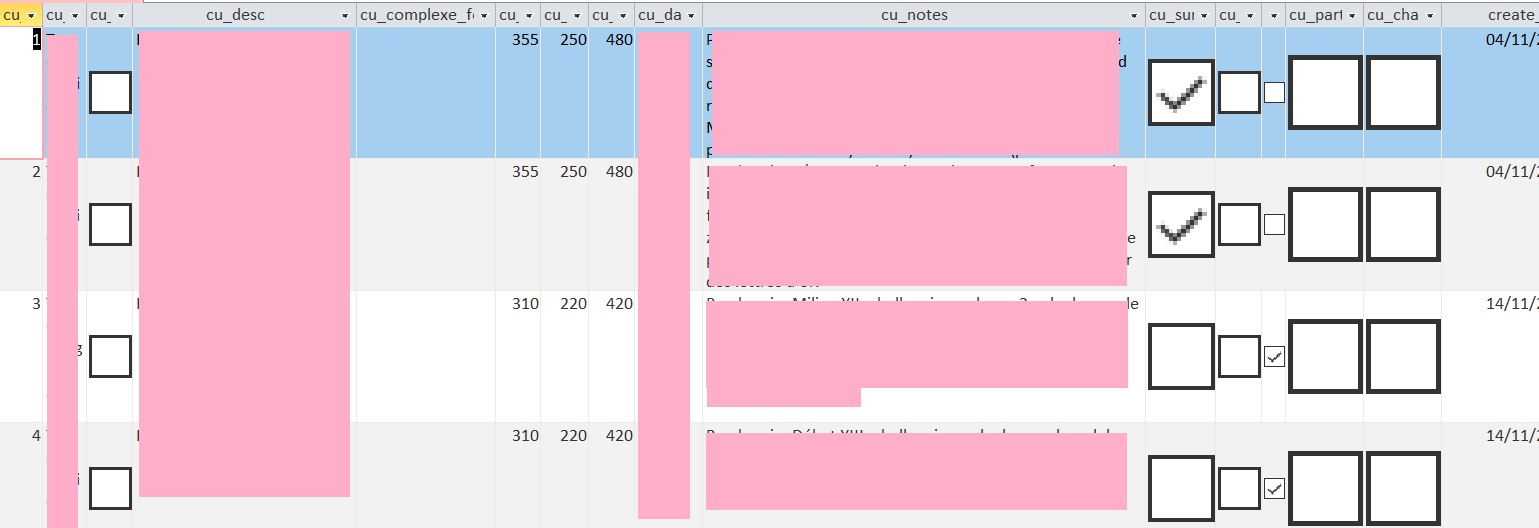
Problem display size boolean fields
Hi, I started today to use Access 2016 on a new computer (HP, windows 10) and I am encoutering a problem which did not occure on my old computer (also HP, windows 10). I use Office 365. The size of ...

Belisaire
Aug 20, 2021Copper Contributor
Here is a picture of 1) a table (you can see that the "real size" box exist beneath the huge one) 2) a form (the boxes are smaller and do not change size if I change the size of the column) 3) a request (the size is almost correct and doesn't change if I change the size of the column).
I have tried to "compact and repair" the database (several times) but nothing happens.

isladogs
Aug 20, 2021MVP
I now suspect the issue isn't within Access itself. You could check by putting checkboxes on an Excel user form and seeing whether the same result occurs. Or possibly by just exporting your table/query to Excel
Perhaps it is a glitch caused by an outdated driver for your graphics controller. Try updating the driver by looking at optional update in Windows update.
Perhaps it is a glitch caused by an outdated driver for your graphics controller. Try updating the driver by looking at optional update in Windows update.
- isladogsAug 20, 2021MVPI would still suggest checking for an updated graphics driver. Other than that I'm out of ideas.
If you want to upload a cut down version of your database, I'm willing to look at it - BelisaireAug 20, 2021Copper ContributorI have checked by putting checkboxes in Excel and they are displayed normally.
I have checked for an update but Windows does not find new ones, it seemes perfectly updated.