Forum Discussion

Word - language - UK/US English

Hello Tedraker ,
try the Windows setting for language. Choose English (UK) and delete English (US). Careful, though, as this changes the keyboard setting, which is important if - when you are logging in - you are using the top (number) row.
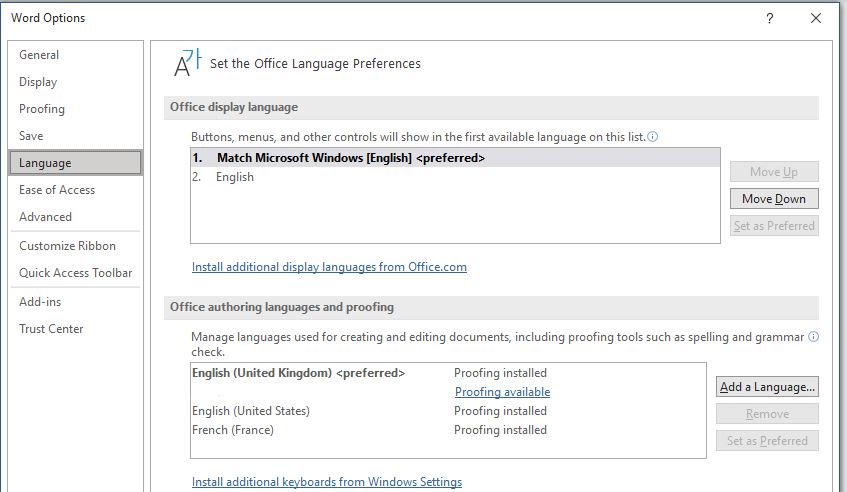
Also, go (in Word) to 'Review' → 'Language' → 'Language Preferences' and add/remove language, you may need to install the UK proofing version.
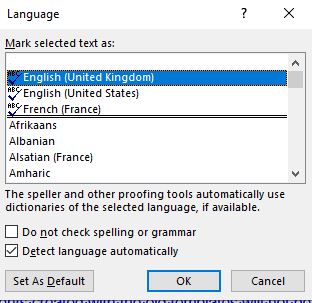
Also, when you are in a document, you can set English (UK) as you default language in Normal.dot.
I hope some of these will be the help you need.

 TedrakerJun 16, 2021Copper Contributor
Lenka_Kerumova Many thanks but none of these things work. I wonder if there's another programme I can use that works in UK English and is compatible with Word?
- Lenka_KerumovaJun 16, 2021Iron Contributor
Hello Tedraker,
Are you sure you set the normal.dot to have the English UK as the preferred proofing language? Attached is a snapshot of another way how to set your proofing language. You get to it via Word → File → Options → Language.
You don't need another programme, just play around with what you've been given. It works, believe me.
