Forum Discussion

Word - 2 columns several sections
- Nov 21, 2024
For a single page layout like that, I would mimic newspaper columns by using a table with the appropriate number of rows and columns. The downside is that you may have to manually move text paragraphs during editing, but that won't cause much extra work in a single-page document.
If you want to create true columnar sections, you'd need two continuous section breaks on the page.

Hi,
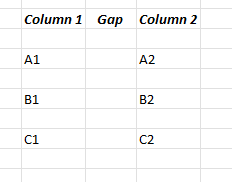
I used excel to illustrate what I want the document to look like. It does not mean it will be an excel embedded.
Basically, my WORD document page will have comprise of three sections of TEXT. All the three sections will be using 2 columns layout. All the three sections will fit into 1 page of word document sharing the same header/footer, page orientation and margins.
First section - Chapter 1 - 2 columns of text only relating to Chapter 1
Second section - Chapter 2 - 2 columns of text only relating to Chapter 2
Third section - Chapter 3 - 2 columns of text. only relating to Chapter 3

For a single page layout like that, I would mimic newspaper columns by using a table with the appropriate number of rows and columns. The downside is that you may have to manually move text paragraphs during editing, but that won't cause much extra work in a single-page document.
If you want to create true columnar sections, you'd need two continuous section breaks on the page.