Forum Discussion

Untick trust center setting to "remove personal information from file properties on save"
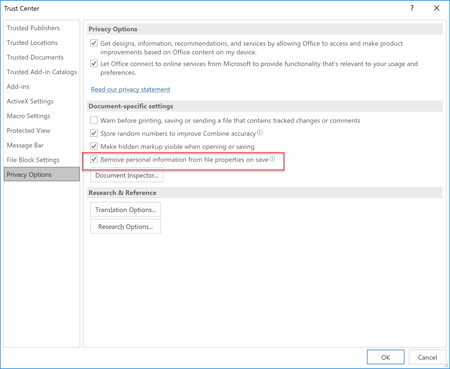

Did you ever figure this out? My computer is doing this all of a sudden and I didn't set anything, it is driving me crazy. I found the setting but it won't let me uncheck it.

If "Remove personal information from file properties on save" is grayed out, then some other setting is causing the loss of personal info in your document.
What happens, exactly, as you reopen a document in Word?
- LauraStovallJan 11, 2024Copper Contributor
Stefan_Blom I'm trying to insert a photo but I can't get that to work. Jesus what a day.
- Stefan_BlomJan 11, 2024MVP
You should be able to paste a screen shot from the clipboard into a reply here.
Is the document stored in OneDrive? Is it shared (since the error message mentions collaboration)?
- LauraStovallJan 16, 2024Copper ContributorIt is a shared document and yes, it is on OneDrive. Sorry for the delayed response, I've been slammed.
- LauraStovallJan 11, 2024Copper Contributor
When I open the document it has a warning at the top that says "this document is set to automatically remove personal information when saved and can impact your collaboration experience" then there is a box that says "Change Settings" and if I click that then the warning goes away and it doesn't open into any settings but then it is back when I try to open it again. It is annoying and I didn't make any changes to any settings. I've gone through all the steps I've read online but I can't get it to fix. It is like I have to change each document when it lets me uncheck that but then it comes back again. Hope this makes sense.
 Jason_SharpFeb 05, 2024Copper Contributor
LauraStovall Hi Laura, did you have any luck finding a solution. I am having the same issue and none of the suggestions have made the change persistent? Wondering if this is something that can only be changed by the original author of the template.
- Stefan_BlomFeb 06, 2024MVP
To change this setting permanently, you have to open the actual template file for editing. If you are in an organization, you may not be able to do that, or you are able to do it but the template gets overwritten regularly, for example with a log-in script defined by the network admin.