Forum Discussion

Trying to create a form field that uses images (but not a simple one!)...
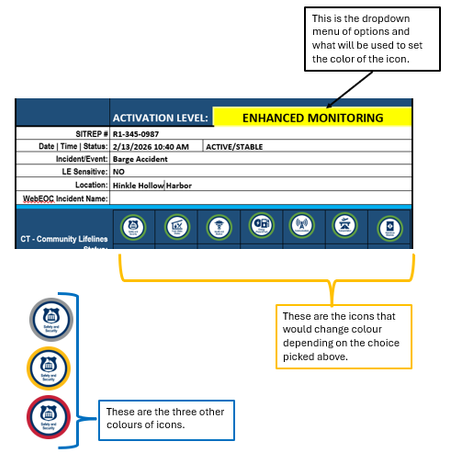
- Feb 19, 2026
This is not going to be quick, or simple.
Are they all displayed in a row as shown?
Are they ever used one at time?
Is the border color the same for all icons?
Are they displayed multiple places in the document?
Can you utilize macros?
Without knowing details, I am recommending that you get background on the following Word concepts and tools:
- Building Blocks to hold your images in a template for insertion in documents
- Building Block Gallery Content Controlsto give you a menu. These can be ...
- Mapped Content Controls by Greg Maxey to be the same in multiple places
- Repeating Data (Populating Multiple Like Fields) by Greg Maxey
- These can be stored in a custom Global Template (https://www.addbalance.com/usersguide/templates.htm#Global)
You may be best off with a custom dialog box (User Form).

To add to the suggestions that Charles has given you, I would think that to create a user-friendly form with that functionality, some advanced Ribbon Customization will be required. Greg Maxey's website would be a good place to start, but you may need a copy of the Ribbon Customization Bible - RibbonX - Customizing the Office 2007 Ribbon by Robert Martin, Ken Puls and Teresa Hennig.

I agree with Ribbon customization to create the most easily used form. However, you can come close with QAT customization through the interface with a much shallower learning curve.
Modifying the Quick Access Toolbar (QAT) in Microsoft Word
The key is that you can store these customizations in your template without learning XML and Ribbon customization. Ribbon Customization, though, remains the ultimate in utility.