Forum Discussion

Trying to create a form field that uses images (but not a simple one!)...
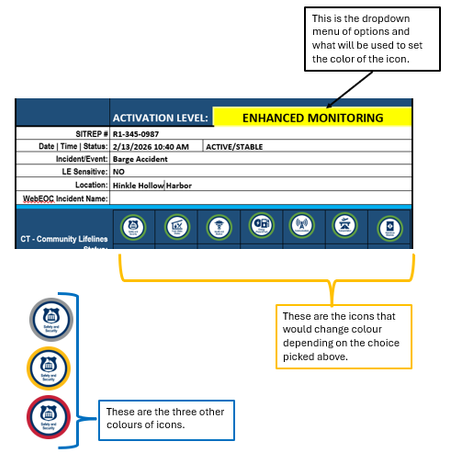
- Feb 19, 2026
This is not going to be quick, or simple.
Are they all displayed in a row as shown?
Are they ever used one at time?
Is the border color the same for all icons?
Are they displayed multiple places in the document?
Can you utilize macros?
Without knowing details, I am recommending that you get background on the following Word concepts and tools:
- Building Blocks to hold your images in a template for insertion in documents
- Building Block Gallery Content Controlsto give you a menu. These can be ...
- Mapped Content Controls by Greg Maxey to be the same in multiple places
- Repeating Data (Populating Multiple Like Fields) by Greg Maxey
- These can be stored in a custom Global Template (https://www.addbalance.com/usersguide/templates.htm#Global)
You may be best off with a custom dialog box (User Form).

This is not going to be quick, or simple.
Are they all displayed in a row as shown?
Are they ever used one at time?
Is the border color the same for all icons?
Are they displayed multiple places in the document?
Can you utilize macros?
Without knowing details, I am recommending that you get background on the following Word concepts and tools:
- Building Blocks to hold your images in a template for insertion in documents
- Building Block Gallery Content Controlsto give you a menu. These can be ...
- Mapped Content Controls by Greg Maxey to be the same in multiple places
- Repeating Data (Populating Multiple Like Fields) by Greg Maxey
- These can be stored in a custom Global Template (https://www.addbalance.com/usersguide/templates.htm#Global)
You may be best off with a custom dialog box (User Form).