Forum Discussion

Jojo_online
Oct 21, 2019Copper Contributor
[Solved] Word 2016: all blank, enter etc. in the text shown strangely in some specific symbols
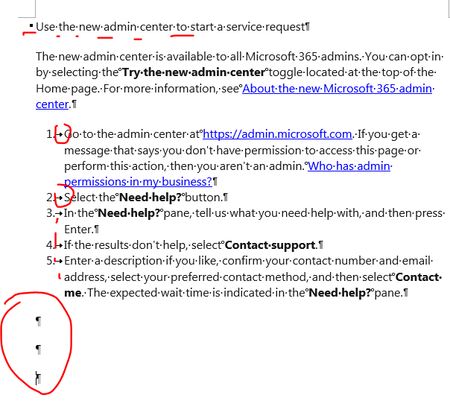
Hello! Recently my word 2016 got automatically update. Then a issue happened that all blank, enter etc. in the text are shown strangely in some specific symbols. Is there anyone who met the same sit...

Jay Freedman
Oct 21, 2019MVP
Those are "nonprinting" characters, which are displayed if the ¶ button on the Home ribbon is turned on (or if the "Show all formatting marks" check box is checked in the File > Options > Display page). Click the ¶ button to turn it off, or go to the Options page and clear the check box and any other boxes that are checked in that group.
For an explanation of the various characters, see http://wordfaqs.ssbarnhill.com/NonprintChars.htm.
For an explanation of the various characters, see http://wordfaqs.ssbarnhill.com/NonprintChars.htm.

Jojo_online
Oct 21, 2019Copper Contributor
Jay Freedman Very detailed explanation. Thanks a lot!