Forum Discussion

SOLVED: Find and replace (using wildcards) text at the end of lines in tables

([0-9]{2,4})r.
with
\1 r.
to put a space before the r. if there isn't one. Then use an ordinary replace to replace a space followed by r and a period (.) with nothing.
I assume that it is unlikely that in ordinary text, you would have a sentence ending with a space followed by r and a period

Every line that ends with a date would end with a г.
I was born in 1982 г.
My father was born in 1948 г.
So if it's in the normal text, I can easily process it, because there's this specific character ^p or ^13 that I can use to limit my Find&Replace operations to.
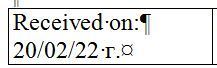
Whereas in a table, there's no paragraph at the end of the last line in the cell.
- Mar 12, 2022
You do not need to include the ^p or ^13 UNLESS you do NOT want to remove the r. from
I was born in 1982 r. so I am now 40.
or
I was born in 1982r. so I am not 40.If you want to leave the r. alone in those cases, you could do what you want by using VBA.
Selection.HomeKey wdStory
With Selection.Find
Do While .Execute(FindText:="[0-9]{2,4}r.", Forward:=True, _
MatchWildcards:=True, Wrap:=wdFindStop, MatchCase:=True) = True
If Selection.Information(wdWithInTable) = True Then
Selection.Text = Left(Selection.Text, Len(Selection.Text) - 2)
End If
Selection.Collapse wdCollapseEnd
Loop
End With
Selection.HomeKey wdStory
With Selection.Find
Do While .Execute(FindText:="[0-9]{2,4} r.", Forward:=True, _
MatchWildcards:=True, Wrap:=wdFindStop, MatchCase:=True) = True
If Selection.Information(wdWithInTable) = True Then
Selection.Text = Left(Selection.Text, Len(Selection.Text) - 3)
End If
Selection.Collapse wdCollapseEnd
Loop
End With- FunfunfanMar 12, 2022Copper ContributorYes, I want it removed from everywhere. It's a useless parasite. Just trying to avoid wreaking havoc to the rest of the text structure.
Thanks for the macro.
BTW, I found the solution on the internet:
1. Select all tables,
2. Format all tables with some specific style (some strange font, for example - Trebuchet MS).
3. Ctrl+H -> Find what: Format: Font: Trebuchet MS
Replace with: ^&§
(or some other strange character)
Replace all
4. ([0-9])г.§
([0-9]) г.§
\1
5. Remove formatting in Find what:
6. Replace all § with nothing- Mar 12, 2022I believe that running the macro would be a less painful method.