Forum Discussion

Overlapping numberss
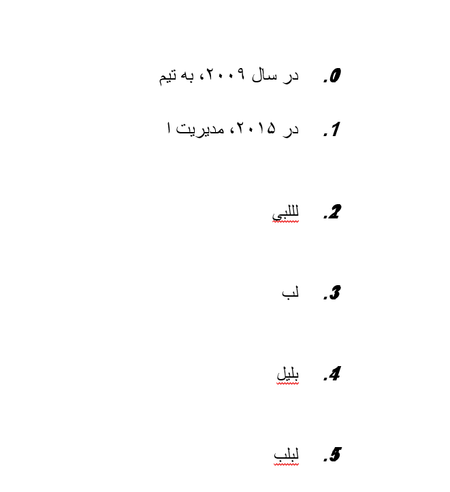
- Jul 17, 2025
The Adjust List Indents dialog box isn't always sufficient when it comes to list formatting. However, the overlapping numbers are caused by the the Spacing setting for the list numbers, and you can fix this using the Multilevel List dialog box.
Do the following: Click in the very first item in the numbered list. On the Home tab, click Multilevel List (in the Paragraph group) and then click Define New Multilevel List. In the dialog box, click level 1 and then click Font. In the Font dialog, go to the Advanced tab and change the Spacing back to "Normal" (it is currently set to "Condensed" as shown in the screen shot). Confirm with OK. Repeat this step for other numbering levels, if necessary.

Hi
Thank you for your answer.
On Word 2016, right clicking on Number list and selecting ََAdjust list indents. . . and changing any of the 3 parameters on that window do not solve this problem. Are you manage to fix this problem on attached docx file?

The Adjust List Indents dialog box isn't always sufficient when it comes to list formatting. However, the overlapping numbers are caused by the the Spacing setting for the list numbers, and you can fix this using the Multilevel List dialog box.
Do the following: Click in the very first item in the numbered list. On the Home tab, click Multilevel List (in the Paragraph group) and then click Define New Multilevel List. In the dialog box, click level 1 and then click Font. In the Font dialog, go to the Advanced tab and change the Spacing back to "Normal" (it is currently set to "Condensed" as shown in the screen shot). Confirm with OK. Repeat this step for other numbering levels, if necessary.
- abidiashtianiJul 18, 2025Copper Contributor
Thankyou, the problem solved with your guide.
But the meaning of the title: "Define New . . ." is a bit confusing, because we want to adjust the existing list.
- Stefan_BlomJul 21, 2025MVP
I agree that "Define New" is misleading. For some reason, that is the name Microsoft picked for the command. :-(
In spite of the name, "Define New" will modify the existing format, under the circumstances described in this thread.