Forum Discussion

Issue with hyperlinking documents
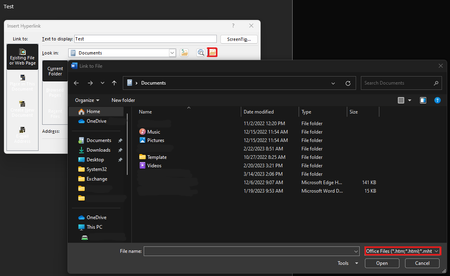

RasmusP Using a macro with the following code will display a file picker dialog with the file type set to All Files (*.*) and then when a file is selected, a hyperlink to that file will be inserted with the text that was selected when the macro was run as the display text.
Dim FD As FileDialog
Dim strAddress As String
Set FD = Application.FileDialog(msoFileDialogFilePicker)
With FD
    .Title = "Select the to which you want the link to address."
'    .InitialFileName = " insert path to desired folder"
    .Filters.Clear
    .Filters.Add "All Files", "*.*"
    .AllowMultiSelect = False
    If .Show = -1 Then
        strAddress = .SelectedItems(1)
    Else
        MsgBox "You did not select a file."
        Exit Sub
    End If
End With
ActiveDocument.Hyperlinks.Add Selection.Range, strAddress, , , Selection.Text
Thanks Doug,
I've been trying to get this macro to work but i can't seem to get it to work. I don't have much experience with macros so i tried following guides but for some reason it's still not working. Any suggestions?
Otherwise the ideal solution would be to just change the setting instead of creating a click elsewhere like this macro would do.
- Mar 24, 2023
RasmusP Did you put the code inside a Sub macroname() End Sub construction such as
Sub InsertLink()
[put code here]
End Sub
It you assign the macro to a button on the quick access toolbar, I believe that your user will find it to be an easier way to insert a hyperlink.