Forum Discussion

Insert a text

ranjank3010 Use
Dim i As Long, j As Long
Dim rng As Range
If Selection.Information(wdWithInTable) = False Then
MsgBox "The selection is not inside a table."
Exit Sub
End If
With ActiveDocument
For i = 1 To .Tables.Count
If Selection.Range.Start > .Tables(i).Range.Start And Selection.Range.End < .Tables(i).Range.End Then
Exit For
End If
Next i
Set rng = .Tables(i).Range
rng.Collapse wdCollapseStart
rng.MoveStart wdCharacter, -1
rng.InsertBefore vbCr & "AAA"
For j = i + 1 To .Tables.Count
If MsgBox("Do you wish to insert the End tag after this table", vbQuestion + vbYesNo) = vbYes Then
Set rng = .Tables(j).Range
rng.Collapse wdCollapseEnd
rng.InsertAfter "BBB" & vbCr
Exit For
End If
Next j
End With

Could you plese review the code once and do the needful.
Thanks a lot....
- Mar 14, 2022Can you upload a copy of the document on which you were trying to run the macro.
- ranjank3010Mar 15, 2022Copper Contributor
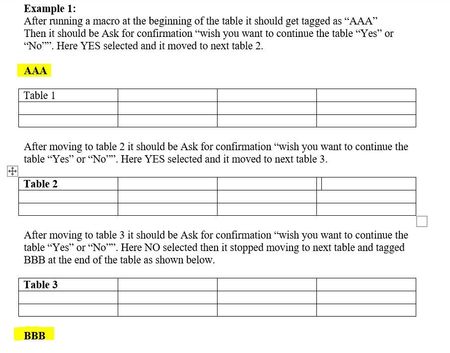
My apologies for the inconvenience, it is working fine but here my purpose is not fulfilling, because when I select "NO" the cursor moves to the table end, and when it moves to the table end, I cannot confirm whether I should move forward or not by looking at the table.
However, the cursor is stable and when selecting yes, yes, yes and no, it is tagging BBB at the end of the fourth table, without seeing this cursor on the table end row, I cannot confirm whether to click yes or no. If you added a movement of table on cursor for yes or no, it should be affected.
Thanks a lot....
Your Help is Highly Appreciated....