Forum Discussion

I have a massive gap that I CANNOT HIGHLIGHT or try and remove.
As per the title. I have a massive gap on my resume that I cannot get rid of and it splits my text up. I have tried a lot of things. It isn't the footer, I can't see anything wrong with the text. It is just so annoying and I want it gone, so I can make my resume look professional. Refer to pics below.
PLEASE HELP!!!!
3 Replies
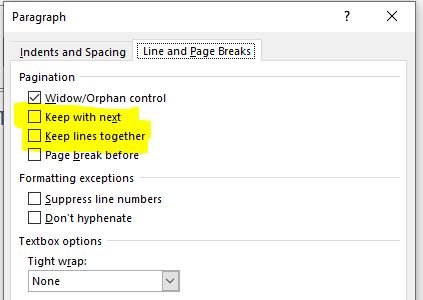
This could be several things, but my first guess is that the split paragraph is formatted as "Keep with next" (Paragraph dialog box) which forces its last two text lines onto the next page.
 MarshallTR1266Copper ContributorThank you I’ll try this. How can I solve it?
 Lenka_KerumovaIron Contributor
Hello MarshallTR1266 ,
Stefan_Blom just told you what the issue is - and its solution. You'll find it in the Paragraph menu.
If the "Keep with next" is not the culprit, right below is another one, equally massively misused, and that's "Keep lines together". Neither should be used on paragraphs in a document like this.