Forum Discussion

userr23r3fq4f
Jan 18, 2022Copper Contributor
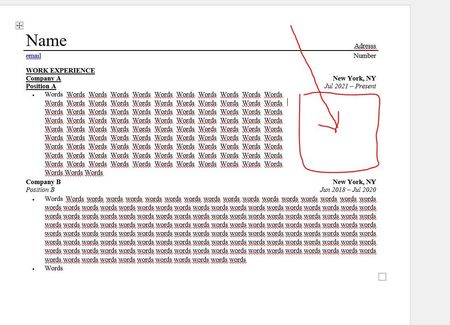
How to remove wide space on the right side of the page
Hi, I'm having trouble updating my resume document. It was previously formatted by a professional service that was pretty sleek with the design, now as I created a new section/paragraph writing my...

Jan 18, 2022
It is quite likely that the document is laid out as a table. If when you have the selection in the text, the Table Design and Layout tabs are visible on the ribbon, go to the Layout tab and click on the View Gridlines button in the Table section of the ribbon. Having done that, you may see an empty cell to the right of the text and if so, select the cell containing the text and the empty cell and right click and then left click on Merge Cells.

userr23r3fq4f
Jan 19, 2022Copper Contributor
Doug_Robbins_Word_MVP that works! thank you Doug. This has been tremendously helpful. Much appreciated.