Forum Discussion

debojitacharjee
May 18, 2023Copper Contributor
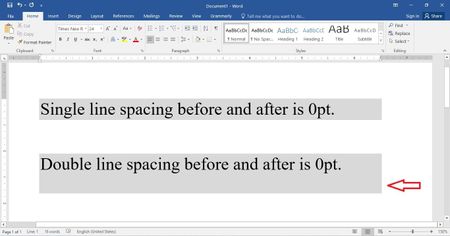
How to make the shading look uniform around a double spaced line in MS Word?
When I use the shading on a line (with double-spaced 0pt before and after) in MS Word, I see that the shading area exceeds more at the bottom of the line. However, this doesn't happen with single...

debojitacharjee
May 23, 2023Copper Contributor
Your method seems to be working for me, but the only thing I didn't like about this process is that I will have to make these adjustments manually for every para on which I need to apply the shading. Can't this be done like a default configuration so that this would be done automatically as soon as I apply the shading on a para?

May 23, 2023
debojitacharjee Put the selection somewhere in a paragraph to which you want to add such shading and then run a macro containing the following code
Dim rng As Range
Set rng = Selection.Paragraphs(1).Range
rng.Collapse wdCollapseStart
ActiveDocument.Fields.Add rng, wdFieldEmpty, "Advance \d 12"
rng.Paragraphs(1).Shading.BackgroundPatternColor = wdColorLightBlue- May 23, 2023
debojitacharjee If you turn on the display of non-printing characters, I believe that you will see a pilcrow (¶) at the end of the line.
This is what it does here
- debojitacharjeeMay 23, 2023Copper Contributor
Doug_Robbins_Word_MVP This doesn't work for the whole para, but only applies to one line.