Forum Discussion

Hilarious word experience
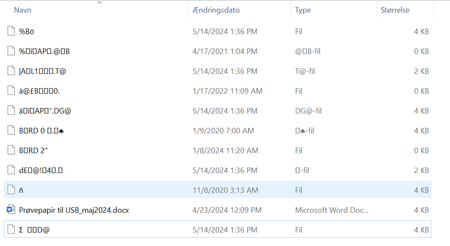

Not hilarious, I am sure.
Doing anything to a document on a USB stick from within Word remains one of the best ways to corrupt a document. It may be too late.
You should NEVER work with a word document on removable media from within Word. While there are ways to safely do it, using removable media is the greatest source of document corruption reported recently.
All work in Word should be on documents on a hard drive or cloud storage if possible.
This means you should not save to removable media, you should not open or print from removable media.
With a document closed in Word, you should copy back and forth from the removable media and your hard drive using Windows, not Word.
Working within Word on documents that are on removable media will cause document corruption unless strict protocols are observed.
Be very careful using flashdrives/usb drives/memory sticks.
- Do not manipulate any document on them from within Word.
- Do not save a document to a flashdrive from within Word.
- Do not print a document on a flashdrive from within Word or using Word.
- Do not open a document on a flashdrive from within Word or using Word.
Doing any of these — from within Word — can cause document corruption unless strict protocols are observed.
Instead, use the flashdrive to transport documents but do any work on them with a copy on your hard disk drive.
- If, for some reason (i.e. shared computer) you must use a flashdrive, follow the procedures to Safely Remove the memory stick from the computer. In Windows, this means to right-click on the drive icon and pick Eject.
===============================
I hope you did your primary work on your hard drive and have backups.