Forum Discussion

(Help) My "Style" is indenting the 2nd line further in than the 1st line
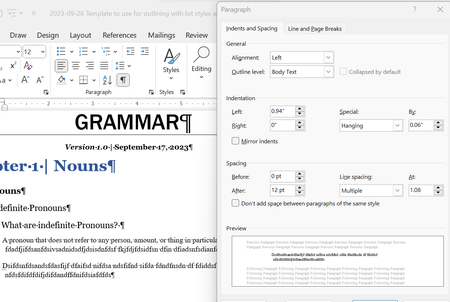

I can't explain it from what you've shown, but you can fix it.
In a paragraph with the style applied, in the Ruler align the two settings that are not aligned. You circled these settings in one of your screenshots.
Then right-click on the Style's name in the [Quick] Styles Gallery or the Styles Pane and tell Word to update the style to match formatting.
Otherwise, to have someone look at it, please post a link to a document with the problem.
Here is my article on how to do this.

Charles, thank you for your response. I have tried aligning the text using this Ruler method you have mentioned, but it still appears that the lines are slightly off. Here is a link to the document: https://sjcl-my.sharepoint.com/:w:/r/personal/adam_balakian_student_sjcl_edu/Documents/2023-09-26%20Template%20to%20use%20for%20outlining%20with%20list%20styles%20and%20styles%2015.2.1.docx?d=w08d4bca43c2e4d4199a597824cf6a4f2&csf=1&web=1&e=uiqnke
- Charles_KenyonSep 27, 2023Bronze ContributorSorry, I do not have access to your SharePoint files.
- adamneedshelpwithwordSep 27, 2023Copper Contributor
Charles_Kenyonapologies. This link should work: https://sjcl-my.sharepoint.com/:w:/g/personal/adam_balakian_student_sjcl_edu/EaS81AguPEFNmaWXgkz2pPIBA9QWxe8thPt5_oOQPhtutg?e=N2x7CN
- Stefan_BlomSep 28, 2023MVP
Since you are dealing with numbered styles, all indentation settings (except for any indents from the right) must be managed from within the Multilevel List dialog box. See https://shaunakelly.com/word/numbering/numbering20072010.html.
