Forum Discussion

Big_Jim_Slade
Feb 07, 2023Copper Contributor
Getting a Blob with Section Breaks
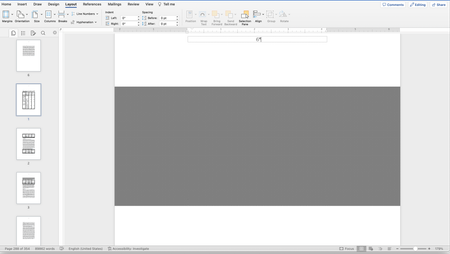
I am frequently getting blobs like this when I insert breaks into a document. The actual break is in the wrong place and text is obscured. Is there any solution to this? Word for Mac.

Big_Jim_Slade
Feb 07, 2023Copper Contributor
The giant gray thing is the "blob" is where the section break was entered. It covers up some of the text. I have seen it frequently since "upgrading" to V16.
I need the section break because I have a 750 page document that consists of subdocuments where the footnotes need to restart and I have places where I need to switch back and forth between landscape and portrait. I have Word 16.69 and Mac OS 13.2.
I need the section break because I have a 750 page document that consists of subdocuments where the footnotes need to restart and I have places where I need to switch back and forth between landscape and portrait. I have Word 16.69 and Mac OS 13.2.

Charles_Kenyon
Feb 08, 2023Bronze Contributor
Big_Jim_Slade You mention subdocuments. Are you using the Master Documents "Feature"?
If so, I urge you to read Master Documents "Feature" in Microsoft Word. The blob may be an artidfact of the Master Document view.
- Big_Jim_SladeFeb 08, 2023Copper Contributor
Charles_Kenyon No, I am not.
- Charles_KenyonFeb 08, 2023Bronze Contributor
Can you save a pared-down version of your document that displays the problem on OneDrive and post a view link here?
Why a sample file is important for troubleshooting - - - - - - - and how to do it.