Forum Discussion

Formatting text in Controls filled by PowerAutomate
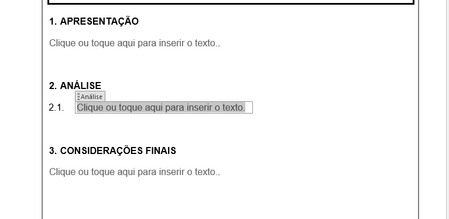

You need to be using Define New MultiLevel List, not Apply Numbering. This is not done through paragraph formatting or paragraph style formatting. This is not intuitive nor straightforward. See Automatic Numbering in Word - my 5-page pdf
 williamazevedo2210Mar 11, 2025Copper Contributor
Hi Charles!
I couldn't apply your solution; the text behaved the same way as before. As far as I can understand, the numbering should be "inside" the text box, but even following your instructions it kept being inserted outside resulting on what I explained in the post.
Besides, I was just told about the need of including images in the documents, what is so complicated through a single SharePoint List that I just changed methods: a trigger list to create a partially populated document in a SharePoint library that can be edited directly.
Thank you very much for your attention and for your help!