Forum Discussion

williamazevedo2210
Feb 28, 2025Copper Contributor
Formatting text in Controls filled by PowerAutomate
Hi. I've got a Word document template filled with SharePoint Lists data after running a PowerAutomate flow. There is some content that I need to be presented in the document as a numbered list, w...

Kidd_Ip
Feb 28, 2025MVP
How about this:
- Open your Word document: Start by opening the document where you want to create the numbered list.
- Select the text: Highlight the text that you want to format as a numbered list.
- Apply numbering: Go to the "Home" tab, click on the "Numbering" button in the "Paragraph" group, and select the numbering style you want to use.
- Create a multilevel list: If you need a multilevel list (e.g., 2.1, 2.2), click on the "Multilevel List" button next to the "Numbering" button and choose the desired list style.
- Adjust the levels: To adjust the levels of your list items, place your cursor at the beginning of the line you want to change, and press "Tab" to increase the level or "Shift+Tab" to decrease the level.
Apply the multilevel numbering:
2. ANÁLISE
    2.1. Identificou-se que (…)
    2.2. Etcetcetct (…)
 williamazevedo2210Mar 06, 2025Copper Contributor
Hi, thank you for your response!
Open your Word document: Start by opening the document where you want to create the numbered list.
I sincerely wasn't sure if you meant the template or the resulting document generated from the SharePoint List entry, so I applied it to the template because it made more sense to me. After that, I generated the file using the automation.
Select the text: Highlight the text that you want to format as a numbered list.
Apply numbering: Go to the "Home" tab, click on the "Numbering" button in the "Paragraph" group, and select the numbering style you want to use.
Create a multilevel list: If you need a multilevel list (e.g., 2.1, 2.2), click on the "Multilevel List" button next to the "Numbering" button and choose the desired list style.
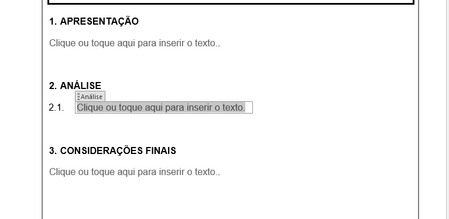
Done. Here's the result:
The numbering and spacing were applied in the first paragraph, but not in the second. Can it be some kind of limitation to the control?