Forum Discussion

Different footer when continuous section break is mid-page
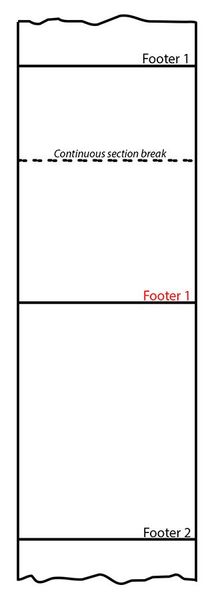

lb483 What is the purpose of the Continuous Section Break? There is no way to change the way that Word displays footers after a Continuouse Section Break, so the only thing that you can do is to move it to the bottom of the previous page. If the reason for it is because you want to implement newspaper style columns on part of the page, insert a second Continuous Section Break to allow you to implement those columns.
 lb483Jun 26, 2024Tin Contributor
Doug_Robbins_Word_MVP - Thanks for the information.
I'm writing an instruction guide and I'm using the footer to include a "continued..." indication so that people know there are further steps over that page.
Once the final command has been performed, I want to clear the footer so that it doesn't display the "continued..." message. The intention was for the section break to allow a different footer to be used but it doesn't take effect until the subsequent page which, in this scenario, is too late.
- lb483Jun 27, 2024Tin ContributorI found a workaround. By using different odd and even footers, I was able to add the continuous section break one page earlier than needed. The page containing the section break will display the original footer (as we haven't reached the end of the instructions) but the next page will be into section 2 (for example), so I can change the footer as this will be either even or odd but definitely not the same as the page containing the section break. Hope that's clear.