Forum Discussion

Changed and missing Shortcut key in Swedish version of Word
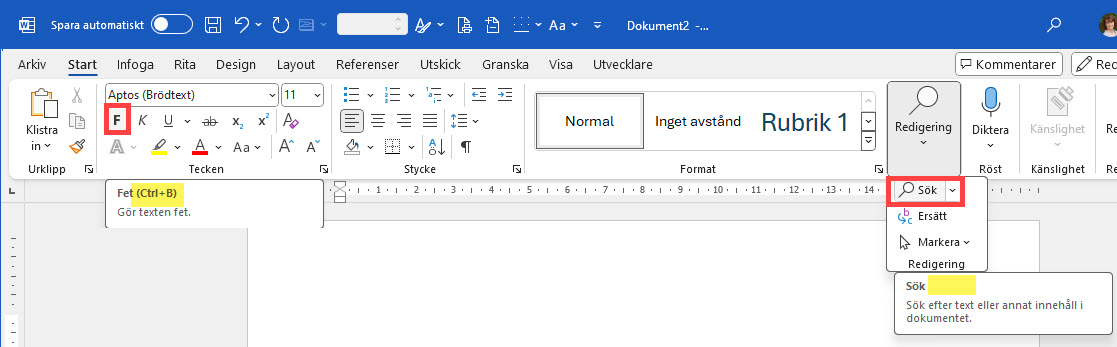
- Nov 30, 2024
Please let search to change into Ctrl-F (or let it be the sane default option as every other program in existence).
Some users have reported that this is now fixed. If it isn't fixed for you, you can manually recreate the shortcut via the Customize Keyboard dialog box (File > Options > Customize Ribbon > Customize). I am currently not at a Windows machine, but I believe that you should look for EditFind in the list of All Commands.

Please let search to change into Ctrl-F (or let it be the sane default option as every other program in existence).
This is the only change that would make me consider upgrading to Office 365, the number of times I got a bold search term written into my document...

Please let search to change into Ctrl-F (or let it be the sane default option as every other program in existence).
Some users have reported that this is now fixed. If it isn't fixed for you, you can manually recreate the shortcut via the Customize Keyboard dialog box (File > Options > Customize Ribbon > Customize). I am currently not at a Windows machine, but I believe that you should look for EditFind in the list of All Commands.
- Stefan_BlomDec 01, 2024MVP
In recent versions of Word, the command is actually called SmartFind and it displays the pane for Find & Navigation.
SmartFind is likely called something else in a native Swedish interface.