Forum Discussion

doctordns
Mar 16, 2021Brass Contributor
[Server Buld 20303.1] IIS 6 Manager crashes trying to edit SMTP Virtual Server Properties
I have installed 20303.1 and added the SMTP Service and add the management tools. Install-WindowsFeature SMTP-Server -IncludeManagementTools After the installation, I bring up t...
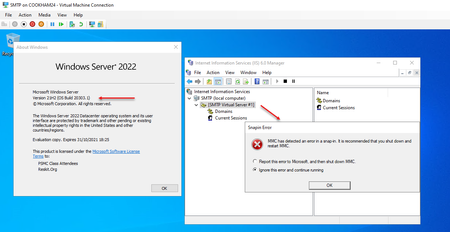
 Nov 10, 2022We found that doing the following worked, and can now edit the settings in the II6 Manager without errors (and without crashing when applying settings) every time:
Stop SMTPSVC service [Display Name: Simple Mail Transfer Protocol (SMTP)]
Stop IISADMIN service [Display name: IIS Admin Service]
Edit "C:\Windows\System32\inetsrv\MetaBase.xml"
Find: <IIsSmtpServer Location ="/LM/SmtpSvc/1"
Add (Settings are alphabetical): RelayIpList=""
Save file
Start IISAdmin Service
Start SMTPSVC service
You can now open the Internet Information Services (IIS) 6.0 Manager (InetMgr6.exe) and work like normal. The setting above relates to the Access Tab > Relay Restrictions section, but doesn't set anything in it (i.e. "all except the below list" with a blank list).
After setting this value you can change it to what you need it to be. (i.e. the value doesn't need to be 'null' for the fix to work, just so long as the variable is present in the file).
The above has been tested on a few new installs of Windows Server 2022, and has worked for us every time. If you have done an upgrade there are some other things to consider (seems like the SMTP service is not installed after upgrade so will require a backup of the settings that can be applied post reinstalling the service. But that is discussed in other topics).
PS: Remember to set the SMTPSVC service to start "automatically". By default its set to "manual".
Source: https://serverfault.com/questions/1088555/server-2022-smtp-server-issue

KevinShaughnessy Microsoft
Mar 17, 2021MicrosoftHmm. That link was good but posting it somehow made it invalid, apparently by stripping the last parenthesis off it. Try copy/pasting this into your address bar then add the "https://" prefix to it: docs.microsoft.com/en-us/previous-versions/windows/it-pro/windows-server-2012-R2-and-2012/hh831568(v=ws.11)

buckeyeguy318
Dec 17, 2021Copper Contributor
KevinShaughnessy Pause the service, then edit what you need, then start it. In addition to crashing when editing, my smtp server crashes any time I connect to it too.
 sphillips_datahoneyJan 12, 2022Copper Contributor
buckeyeguy318 thank you! That worked!