Forum Discussion

Unable to Uninstall Security Update (KB5094128) on Azure Hosted Windows Server 2022 VM
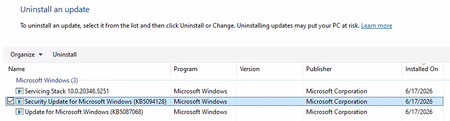

Thanks for the detailed response!
So running the Get-PackageInfo cmdlet on the package that I suspect is the KB5094128 package yields in the following error:
Looking at the dism.log file, I've identified the following as the error relating to the cmdlet:
Error DISM DISM Package Manager: PID=7404 TID=5220 Failed to load identity from package name: Package_for_ServicingStack_5251~31bf385. - CDISMPackageManager::Internal_CreatePackageByName(hr:0x80070057)
Error DISM DISM Package Manager: PID=7404 TID=5220 Failed to get the underlying cbs package. - CDISMPackageManager::OpenPackageByName(hr:0x80070057)
Error DISM DISM Package Manager: PID=7404 TID=5220 Failed opening package with the name "Package_for_ServicingStack_5251~31bf385" - CPackageManagerCLIHandler::Private_GetPackageNameFromCommandLine(hr:0x80070057)
Error DISM DISM Package Manager: PID=7404 TID=5220 Failed to get the list of packages from the command line. - CPackageManagerCLIHandler::ProcessCmdLine_GetPackageInfo(hr:0x80070057)
Error DISM DISM Package Manager: PID=7404 TID=5220 Failed while processing command get-packageinfo. - CPackageManagerCLIHandler::ExecuteCmdLine(hr:0x80070057)
Info DISM DISM Package Manager: PID=7404 TID=5220 Further logs for online package and feature related operations can be found at %WINDIR%\logs\CBS\cbs.log - CPackageManagerCLIHandler::ExecuteCmdLine
Error DISM DISM.EXE: DISM Package Manager processed the command line but failed. HRESULT=80070057
This is making me think that there is a corruption somewhere - have you got any ideas?
On the note this not being safe - I agree. Our system is thankfully airgapped and this was identified as a potential quick fix. We are feeding back to the software developer to patch for this erro