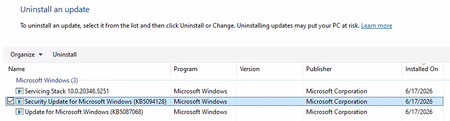
security update
1 Topic
Unable to Uninstall Security Update (KB5094128) on Azure Hosted Windows Server 2022 VM
Hi All, I'm building up a system on Azure of Windows Server 2022 VMs for a PoC. Each Windows Server 2022 VM has been created using a company hardened golden image. After configuring the VM successfully, I am unable to run a software. Through research, the solution to run the software is to uninstall 'Security Update for Microsoft Windows (KB5094128)'. The issue is that I cannot uninstall the update normally. I have looked up various solutions and the following have been unsuccessful: Attempt #1 Powershell (Admin): sfc /scannow wusa /uninstall /kb:5094128 Result: Error 0x800f0905. Attempt #2 Powershell (Admin): Dism /Online /Cleanup-Image /CheckHealth Dism /Online /Cleanup-Image /ScanHealth Dism /Online /Cleanup-Image /RestoreHealth wusa /uninstall /kb:5094128 Result: No corruption detected, error 0x800f0905. Attempt #3 Powershell (Admin): net stop wuauserv net stop cryptSvc net stop bits net stop msiserver ren C:\Windows\SoftwareDistribution SoftwareDistribution.old ren C:\Windows\System32\catroot2 catroot2.old net start wuauserv net start cryptSvc net start bits net start msiserver wusa /uninstall /kb:5094128 Result: All services started and stopped. Error error 0x800f0905. Attempt #4 Windows Update Troubleshooter: Running the windows update troubleshooter gives the following output. The event viewer is suggesting there is a corrupted file error, but as seen above nothing is wanting to remove that file. Does anyone have any other options they could suggest? Or has anyone had success with this issue before? Is it a lost cause as we have to use company hardened golden images? Any suggestions would be appreciated!299Views0likes2Comments