Forum Discussion

juliangzr
Oct 24, 2021Brass Contributor
Windows 11 Explorer: can't order quick access items in the left pane
I can't reorder the quick access items in the right pane of the windows explorer through drag and drop. It's weird, because if i drag and drop one of them to the top, it works, but if i want to place...

SvenC
Nov 30, 2022Brass Contributor
Did not work for me 😞
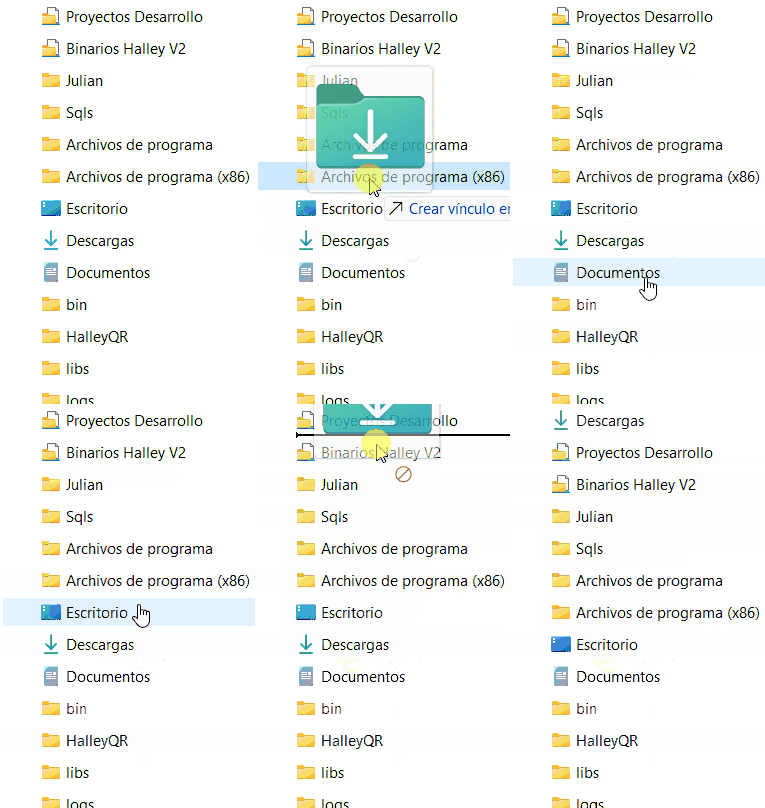
I tried your set of checked boxes from the screenshot, no change, unticked all options, no change.
I am on Windows 11 22H2 22623 (Insider beta channel). Maybe your tweak to sort quick links is gone in that version?
When I move a quick access folder, it will only show me copy or move operations (dependant on pressing ctrl or shift while dragging), not reorder.
Microsoft, come on, let us organize/sort our quick access folders.
I tried your set of checked boxes from the screenshot, no change, unticked all options, no change.
I am on Windows 11 22H2 22623 (Insider beta channel). Maybe your tweak to sort quick links is gone in that version?
When I move a quick access folder, it will only show me copy or move operations (dependant on pressing ctrl or shift while dragging), not reorder.
Microsoft, come on, let us organize/sort our quick access folders.

lettrel2
Jun 05, 2023Iron Contributor
It seemed not to work for me, because I was trying to re-order the main icon levels - we have a Konnekt.io add-in that adds another node at the top, before Home. Wanted to be able to change at this level: Konnekt, Home, This PC, Network; to put Home above Konnekt. Anyway, once I understood that the scope that I could re-order icons was within Home only, then it worked as njerisanyu said.