Forum Discussion

wentto
Sep 02, 2026Tin Contributor
Why is the uninstall button greyed out in Windows 11 for app removal?
Personally, I dislike the Bing search app and edge browser as they pop up from time to time without my permission. I just want to delete both from my Windows 11 computer. When I go to the Settings -...
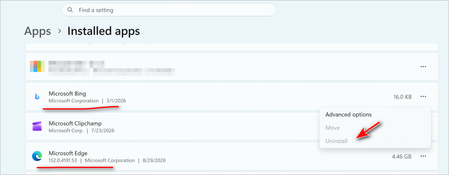

Celesto
Sep 03, 2026Tin Contributor
The "Ultimate Cleanup" method of running sfc /scannow and DISM /Online /Cleanup-Image /RestoreHealth can be a helpful step when the uninstall bing button greyed out in Windows 11.
What This Method Does
- sfc /scannow (System File Checker): This command scans all protected Windows system files and replaces corrupted or missing files with a cached copy . If a damaged system file is preventing the uninstall button from working correctly, this can resolve it.
- DISM /Online /Cleanup-Image /RestoreHealth (Deployment Imaging Service and Management Tool): This command repairs the local Windows image, which is what the sfc tool uses to replace corrupted files . It ensures the "source" of your system files is healthy, making the sfc command more effective.
Key Limitations and Context
- It May Not Work for Bing: A crucial consideration is that an app like Bing can be deeply integrated into Windows 11 24H2 as a system component, meaning it literally cannot be uninstalled through any method . If your goal is specifically to resolve a Uninstall Bing button greyed out in Windows 11 issue, this system-level integration might be the root cause that commands like sfc and DISM cannot override.
Using sfc /scannow and DISM is a worthwhile and free step to take as a diagnostic tool. It can fix underlying system corruption that might be causing a greyed-out uninstall button for many apps. However, if the problem is a system-integrated app like Bing or a corrupted installer registration, this method will not be the final solution.