Forum Discussion

Why is the uninstall button greyed out in Windows 11 for app removal?
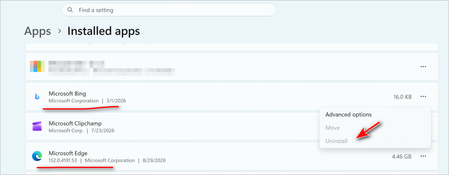

Trying to figure out why the "uninstall" button is greyed out in Windows 11? CTT Windows Tool (Chris Titus Tech's Windows Utility) can help you remove built-in apps and system components that Windows normally won't let you uninstall through the Settings app. It's a PowerShell-based tool that gives you more control over what stays and what goes on your system.
To use it, open PowerShell as administrator and run the command:
irm "https://christitus.com/win" | iex.
Once the menu loads, navigate to the "Tweaks" section and look for options to remove preinstalled apps or bloatware. The tool will bypass the greyed-out uninstall button and let you remove apps like Edge, Cortana, or other system components that are normally locked down. Be careful though—removing certain apps can affect system functionality, so it's worth knowing what you're getting rid of.
So if you've been wondering why the "uninstall" button is greyed out in Windows 11, it's usually because Windows protects built-in apps from accidental removal. CTT Windows Tool gives you a way around that limitation, but with the understanding that you're taking full responsibility for what you remove. It's a useful tool for cleaning up your system, but it's not meant for casual users who aren't sure what they're removing.
Pros:
- Removes apps Windows normally locks.
- simple to use.
Cons:
- Can break system features if used carelessly.
- Not beginner-friendly.