Forum Discussion

Why is the uninstall button greyed out in Windows 11 for app removal?
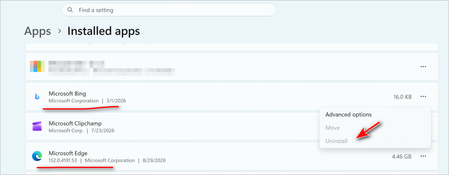

People searching for how to fix the uninstall button greyed out in windows 11 may notice that Microsoft Edge cannot be removed through Settings because the Uninstall button is unavailable. This is different from an ordinary application uninstall, since Edge can be treated as a system-integrated component depending on the Windows build and region. Changing permissions or manually deleting its folders is a common mistake because it can leave WebView and other related components in an inconsistent state.
edge-remover is a community script intended to remove Edge and related components when the normal Windows interface does not provide an uninstall option. Download the project from its repository, extract it, and review the included script before running anything. Close Edge and other applications that may use its processes, then run the appropriate removal script as administrator. Follow the script prompts and let it complete rather than deleting browser folders manually. A separate command is usually unnecessary because the provided script handles the removal procedure itself.
After the script finishes, restart the computer and check Settings > Apps > Installed apps to see whether the browser entry has been removed. Also test applications you normally use, because some Windows features and third-party programs rely on Edge WebView2, which should not be removed just because the browser itself is unwanted. For users dealing with how to fix the uninstall button greyed out in windows 11, remember that later Windows updates can restore or change system components, so removing the browser with a third-party script is not the same as making the greyed-out Windows button permanently available.