Forum Discussion

Why doesnt the Windows 11 Task Manager display the CPU temperature?
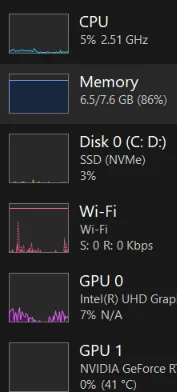

Windows 11 Task Manager does not currently display CPU temperature, and there is no setting or registry option to enable it.
GPU temperature is available through a relatively standardized graphics-driver interface. CPU temperature reporting is less consistent: different processors expose package, core, socket, Tctl or Tdie readings through vendor-specific sensors and motherboard controllers. Windows also has ACPI thermal-zone data, but that value may represent the chassis or motherboard rather than the actual CPU temperature. Microsoft would need a reliable way to choose and label the correct sensor across many hardware combinations.
To monitor it now:
- Install a trusted tool such as HWiNFO, Core Temp, AMD Ryzen Master or Intel’s supported monitoring utility.
- Look for CPU Package on Intel systems or CPU Tctl/Tdie on AMD systems.
- Compare the reading with the processor manufacturer’s specified temperature limit rather than relying on one universal “safe” temperature.
- Use the BIOS/UEFI hardware-monitor page if an independent reading is needed, although it only shows temperature outside normal Windows workloads.
Adding CPU temperature to Task Manager would be useful, but it requires more than simply exposing an existing universal Windows value. Until Microsoft and hardware vendors provide a consistent sensor interface, third-party monitoring tools remain the practical option.