Forum Discussion

HenryRobinson
Aug 14, 2026Iron Contributor
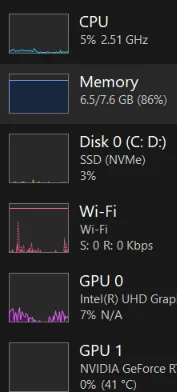
Why doesnt the Windows 11 Task Manager display the CPU temperature?
Ive always wondered why Task Manager shows GPU temperature but not CPU temperature. It's a useful metric, especially when checking if the processor is running hot. I know third-party tools can monit...

Timothy1525
Aug 15, 2026Steel Contributor
Enter your BIOS/UEFI during boot (usually by pressing Del, F2, or Esc).
Look for a "Hardware Monitor", "PC Health", or "H/W Monitor" section – it will show the current CPU temperature (and often fan speeds).
However, this only works when the system is idle at boot, not under load.