Forum Discussion

Weird graphical glitches in preinstalled software
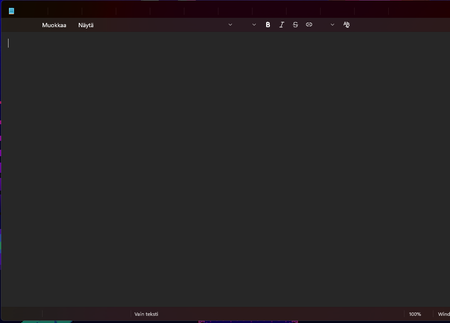

The screenshots show missing or broken interface text and icons, not just a problem with the document contents. That suggests an app-rendering or graphics-driver issue, though the images alone can’t identify the cause.
Save your work, then try Win+Ctrl+Shift+B to reset the graphics driver. The screen may briefly flicker. If that temporarily fixes it, that’s a useful clue.
Next, update Paint and Notepad through Microsoft Store. If they still look wrong, go to Settings > Apps > Installed apps, open each app’s Advanced options, and choose Repair. Avoid Reset initially, especially if Notepad has unsaved tabs.
If both apps remain affected, install the graphics driver recommended by your PC manufacturer. If this started immediately after a graphics-driver update, try Roll Back Driver in Device Manager instead, if available. Task Manager looking normal doesn’t rule out a driver issue—apps can use different rendering paths.