Forum Discussion

User Folders missing
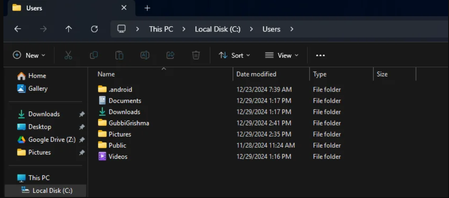

There seems to be something wrong with your Users Folder.
Can you please explain the additional folders inside the Users Folder?
There should not be .android, Documents, Downloads, Pictures, Public Or Videos Folders for the "Users" directory. Those folders would be inside of a Users folder which would be in that directory.
I would suggest rebuilding your index.
This is mine as an example of a bare bottom one, with the Administrator Account being disabled(Which is default)
Solution:
I would deffinately try to use the Local Users and Groups tool to look into this issue, perhaps it will be as simple as unchecking the "Disabled" Box under the account options.
If you own a version of Windows that does not natively have the Local Users and Groups tool, i would suggest looking into downloading it.
The name of the tool is "lusrmgr."