Forum Discussion

Unable to remove old devices from the Phone Link app
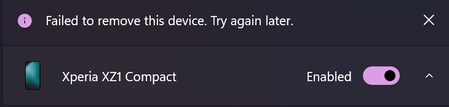

Same problem here! Brand new Samsung GalaxyBook, everything setup & working fine, then i think an update got pushed out and BOOM, you guys ****ed up Phone Link in one hit!
I had all my devices 'singing from the same hymn-sheet' everything was dandy. Now today, i have one of my devices in twice, with slightly different names, one connects and works almost ok, the other just doesn't connect at all.
I can't remove any of my 2(3) devices, the function/option just isn't there. I've ran a repair, nothin. I ran a reset, nothing.
Also i was running a app from my tablet to my PC, worked a treat yesterday, now all of a sudden (if the app loads without crashing out) it will only show in Portrait mode and won't switch (it did yesterday) regardless of the settings i change on both Phone Link or Link to Windows (not that there are many options here mind).
Well done MS, you have managed to completely break a perfectly working app in the space of 1 update.
Bear in mind this is a brand new Win 11 laptop, less than a few weeks old, fully up-to-date, no issues..... Until whatever update was pushed yesterday.
*Note - i don't believe i have ever seen the option to remove a device from within my Phone Link app... this is a long standing issue i'm told, "Microsoft are aware of the problem with no data for resolution"
Just "my two cents".....

I can give them some lessons for free if they want for how to communicate with users and address their issues and how to test apps before publishing them to production. I myself develop apps and I have never acted like that, and my resources are much limited. Even when I do everything myself and in the rare case I break something in production, I start fixing it right away, it takes maybe one hour work, the rest of time is google slow approval process. Still in few days it's fixed. And of course if a user report an issue, I respond immediately. Those companies don't care about their users and will fail as soon as an alternative be a available.